HP Chromebook 14-NA 2020, Celeron N4000, 4GB, 64GB eMMC, Mineral silver cover, natural silver base
The Intel Celeron N4000 dual-core processor with burst up to 2.6 GHz and Intel HD Graphics 600 handle basic web browsing and document editing on the 14-inch 1920x1080 IPS anti-glare display. The 47 Wh battery provides all-day power for light use, and the 1.45 kg build with USB-C charging makes it easy to carry. This Chromebook is best for a student who needs a low-cost, portable laptop for Google Classroom, email, and streaming video.

No current retailer price




Snapshot
The 30-Second Version
The HP Chromebook 14-NA is a USD 199 browser machine with a surprisingly decent 14-inch Full HD IPS anti-glare screen and a 47Wh battery. Everything under the hood is bottom-tier: the Celeron N4000 is the worst for CPU, 4GB of RAM is near the bottom, and 64GB eMMC is in the bottom 4%. Amazon is USD 41 cheaper than Newegg for the identical config, so shop accordingly. Great as a cheap second screen or a kid's first laptop, a bad idea as your only computer.
Pros & Cons
Pros
- Affordability in the top 2%, USD 199 at Amazon 98th
- 14-inch 1920x1080 IPS with anti-glare coating, unusual at this price 78th
- 47Wh battery paired with a low-power dual-core chip
- Two USB-C ports with Power Delivery and DisplayPort 1.2, plus USB-A
- 1.45kg and a compact score in the top 22%, easy to carry
Cons
- Celeron N4000 is the worst for CPU performance
- 4GB LPDDR4 is near the bottom, tight for heavy tab use
- 64GB eMMC in the bottom 4%, slow and small
- HD Graphics 600 in the bottom 7%, no real gaming headroom
- Reliability score of 34 and port score of 26 both fall behind the field
The proof
Performance
Let's talk about what those numbers actually mean day to day. The N4000 is a dual-core chip with a 1.1GHz base clock and a 2.6GHz burst. Burst clocks are lovely on a spec sheet, but with two cores and no hyperthreading, you feel the ceiling the moment you stack tabs. Our model ranks it dead last against everything else in this category, and the 4GB of LPDDR4 is near the bottom of the pack. ChromeOS is memory-hungry in its own quiet way, since every tab is effectively its own process. Owners of machines in this class typically live somewhere between six and ten tabs before things start reloading in the background. The 64GB eMMC is also a weak spot, ranking in the bottom 4%, and eMMC is meaningfully slower than the SSDs in pricier machines, so anything that touches local disk feels sluggish. There's a microSD reader if you need overflow space, which helps for files but not for apps.
Graphics come from Intel HD Graphics 600, which lands in the bottom 7% in our rankings, one of the worst we've seen in this category. Video playback is fine because that's handled by fixed-function decode hardware, but forget gaming beyond browser curiosities, and forget anything GPU-accelerated. Our AI/LLM suitability score is 1.7 out of 100, which is a polite way of saying don't. The 14-inch 1920x1080 IPS panel scores in the 39th percentile overall, so it's mediocre against the full field but clearly the best component in this specific machine. Battery is a 47Wh 2-cell pack charging over a 45W USB-C adapter, and paired with a low-power chip like this, that's a reasonable capacity for a full day of light browsing. Port selection scores in the 26th percentile: two USB-C ports at 5Gbps with Power Delivery and DisplayPort 1.2, one USB-A at 5Gbps, a combo audio jack, and microSD. Wi-Fi 5 rather than anything newer, which is fine for streaming but won't win any speed contests.
Specifications
Full Specifications
Processor
| CPU | Intel Celeron N4000 |
| Cores | 2 |
| Frequency | 1.1 GHz |
Graphics
| GPU | Intel HD Graphics 600 |
Memory & Storage
| RAM | 4 GB |
| RAM Generation | LPDDR4 |
| Storage | 64 GB |
| Storage Type | eMMC |
Display
| Size | 14" |
| Resolution | 1920x1080 (Full HD) |
| Panel | IPS |
Connectivity
| USB-C Ports | 2 |
| USB Ports | 1 |
| Wi-Fi | Wi-Fi 5 |
| Bluetooth | Bluetooth 5.0 |
Physical
| Weight | 1.5 kg / 3.2 lbs |
| Battery | 47 Wh |
| OS | ChromeOS |
vs Competition
Stack this against the names our system pulls as its closest competitors and the picture gets stark. The Lenovo V14 Gen 4 and the Acer Aspire A14-52M-72FH are the ones worth cross-shopping first, because they're the sensible-budget end of the list. We only have their names in our data, not their specs, so we'll argue from what we know about the HP: its CPU is the worst in the category and its RAM is near the bottom, which means essentially every mainstream Windows laptop in this comparison set has more headroom. If you need to install actual software, run a local development environment, or keep a serious number of tabs alive, look at those two instead and accept paying more.
The Dell Latitude 14" 7430, the Samsung Galaxy Book4 Edge 14", and the Apple MacBook Pro 16" True Tone are playing in a completely different league, and honestly they're only in this list because our system groups by form factor. The HP's business suitability score is 12.6 out of 100, so if work is the reason you're buying, the Latitude is the direction to look. Where the HP genuinely wins is the two things it does well: it's cheaper than all of them by a wide margin, and at 1.45kg with a compact score in the top 22%, it's easier to sling in a bag than most. Its 14-inch Full HD IPS panel also means you're not squinting at a low-res screen, which is more than you can say for plenty of budget machines. Just don't mistake "competitive on price and portability" for "competitive."
| Spec | HP Chromebook 14-NA | Apple MacBook Pro 14.2" M4 Max | ASUS ROG Zephyrus 14" GA403WW-G14.R95080 | Lenovo Legion Pro 7i Gen 10 16" | Samsung Galaxy Book5 Pro 14" NP944XHA-KG3US | Dell Premium 14.5" LDA14250-7667SLV-PUS |
|---|---|---|---|---|---|---|
| CPU | Intel Celeron N4000 | Apple M4 Max | AMD Ryzen AI 9 HX 370 | Intel Core Ultra 9 275HX | Intel Core Ultra 7 258V | Intel Core Ultra 7 255H |
| RAM (GB) | 4 | 64 | 32 | 32 | 32 | 32 |
| Storage (GB) | 64 | 4096 | 2048 | 1024 | 1024 | 1024 |
| Screen | 14" 1920x1080 | 14.2" 3024x1964 | 14" 2880x1800 | 16" 2560x1600 | 14" 2880x1800 | 14.5" 3200x2000 |
| GPU | Intel HD Graphics 600 | Apple (40-Core) | NVIDIA GeForce RTX 5080 | NVIDIA GeForce RTX 5070 Ti | Intel Arc Graphics 140V | Intel Arc Graphics |
| OS | ChromeOS | macOS | Windows 11 Home | Windows 11 Home | Windows 11 Pro | Windows 11 Home |
| Weight (kg) | 1.5 | 1.6 | 1.6 | 2.7 | 1.2 | 1.7 |
| Battery (Wh) | 47 | 72 | - | 99 | 63 | 62 |
| Compare | Compare | Compare | Compare | Compare |
| Product | CPU | GPU | RAM | Ports | Screen | Portability | Storage | Reliability | Affordability |
|---|---|---|---|---|---|---|---|---|---|
| HP Chromebook 14-NA | 0.7 | 6.5 | 2.3 | 25.5 | 38.8 | 77.8 | 3.6 | 33.6 | 97.8 |
| Apple MacBook Pro 14.2" M4 Max Compare | 93.7 | 91.6 | 95.7 | 73.2 | 99.3 | 68.9 | 98.5 | 98.3 | 1.7 |
| ASUS ROG Zephyrus 14" GA403WW-G14.R95080 Compare | 91.2 | 98.3 | 90.9 | 89.2 | 96.5 | 73.6 | 89.7 | 60.6 | 5.7 |
| Lenovo Legion Pro 7i Gen 10 16" Compare | 97.2 | 96.6 | 89 | 97.2 | 95.6 | 9.5 | 79.2 | 82 | 5.5 |
| Samsung Galaxy Book5 Pro 14" NP944XHA-KG3US Compare | 65.7 | 69.6 | 79.4 | 83.1 | 91.5 | 89.5 | 79.2 | 82 | 20.1 |
| Dell Premium 14.5" LDA14250-7667SLV-PUS Compare | 87.1 | 69.6 | 89 | 65.9 | 97.2 | 61.1 | 65.1 | 33.6 | 14 |
Price
Value & Pricing
Here's where the HP earns its keep. We track prices across stores, and right now there's a USD 41 spread on this exact config: Amazon has it at USD 199 and Newegg at USD 240. Same machine, same specs. That's a 20% premium for nothing, so buy from Amazon unless something changes. In Japan we're seeing JPY 42,014 from a single listing, which is a different market entirely and not comparable to the US pricing. Our affordability ranking of 98 means that at USD 199, almost nothing in this category costs less.
But cheap and good value aren't the same thing, and it's worth being honest about the trade. You're paying USD 199 for a screen and a battery attached to internals that rank near the bottom of our database. If your workload genuinely fits inside ChromeOS, that's a smart trade, because you're not paying for horsepower you'd never use. If you were hoping to stretch this into photo editing, coding, or anything with a dozen tabs and a video call open at once, the USD 41 you'd save shopping around is irrelevant next to the performance you're missing. Our student suitability score is 26.2 out of 100, which tells you even the friendliest use case is a stretch.
We started tracking prices for this product on Aug 15, 2026. The chart appears once we have more data.
Read more
Overview
The HP Chromebook 14-NA is about as stripped-down as a laptop gets while still being a real laptop. You're looking at an Intel Celeron N4000 with two cores running at 1.1GHz (bursting to 2.6GHz), 4GB of LPDDR4, 64GB of eMMC storage, and ChromeOS doing the heavy lifting on the software side. The one genuinely nice thing here is the screen: a 14-inch 1920x1080 IPS panel with anti-glare coating and micro-edge bezels. That's a lot more display than you usually get at this end of the market.
This is a machine for someone whose computing life happens inside a browser tab. Docs, email, YouTube, a school portal, maybe some light spreadsheet work. If that describes you, the low-end CPU matters a lot less than it would on a Windows box, because ChromeOS isn't trying to run a background antivirus suite and three updaters at once. Our scoring model puts its affordability in the top 2% of all laptops, which is basically the top of the charts. Everything else about it is a compromise, and we'll be straight about which ones bite.
What makes it interesting is the gap between the price and the panel. At USD 199 on Amazon right now, you're getting Full HD IPS rather than the washed-out low-res screens that usually live down here. But our category rankings are brutal on the internals: the CPU is the worst we've seen, RAM is near the bottom, storage is in the bottom 4%, and graphics are in the bottom 7%. Those aren't rounding errors. This thing is slow, and no amount of ChromeOS efficiency turns two Gemini Lake cores into a workstation.
Common Questions
Q: Can I actually get schoolwork or office work done on 4GB of RAM?
Light work, yes. Google Docs, email, a research tab or two, and a school portal will run fine because ChromeOS is lean compared to Windows. But 4GB is near the bottom in our rankings, so once you're past a handful of tabs plus a video call, expect background tabs to reload when you switch back. If your coursework involves installed software or heavy multitasking, our student suitability score of 26.2 out of 100 says look elsewhere.
Q: Is 64GB of storage enough, and can I expand it?
For a ChromeOS machine, 64GB goes further than it would on Windows since the OS is small and most of your work lives in the cloud. There's a microSD card reader for extra file storage, which is handy for downloads and media. Just know that eMMC is slower than a proper SSD, and our storage ranking puts it in the bottom 4%, so local file operations won't feel snappy.
Q: Can it handle gaming or any kind of video editing?
No, and we'd rather say it plainly. Intel HD Graphics 600 ranks in the bottom 7% in our GPU scoring, one of the weakest results in this category, and the dual-core N4000 is the worst for CPU. Streaming video is fine because that uses dedicated decode hardware, but browser games are about the ceiling. Our AI/LLM score of 1.7 out of 100 should tell you everything about heavier compute work.
Q: Why is there a USD 41 difference between Amazon and Newegg?
Same product, different pricing, and we see this constantly across stores. Our system currently tracks Amazon at USD 199 and Newegg at USD 240 for the identical N4000, 4GB, 64GB configuration. There's no spec difference justifying the gap, so unless Newegg drops its price or you have store credit to burn, Amazon is the obvious pick.
Who Should Skip This
Skip this if it's going to be your primary machine. Two cores at 1.1GHz base, 4GB of RAM, and 64GB of eMMC add up to a computer that's constantly negotiating with you about what it can do next. Anyone doing development work, photo or video editing, heavy spreadsheet modeling, or keeping twenty tabs and a meeting open simultaneously will be miserable within a week. Our business score of 12.6 out of 100 isn't subtle. The Lenovo V14 Gen 4 and Acer Aspire A14-52M-72FH are the sensible step up, and the Dell Latitude 14" 7430 if work is the priority.
Also skip it if you want to game, run local AI models, or keep a machine for five-plus years of increasingly heavy web apps. The GPU is in the bottom 7% and our AI/LLM score is 1.7 out of 100, so those doors are closed from day one. And with 4GB soldered LPDDR4, there's no upgrade path waiting for you later. If longevity matters, buy more machine now rather than replacing this one sooner.
Verdict
If you need a second machine for the couch, a kitchen recipe screen, a kid's first laptop, or a travel beater you wouldn't cry over losing, this makes sense at USD 199. ChromeOS boots fast, updates itself, and doesn't need babysitting, and the 14-inch Full HD IPS panel means the experience of actually looking at it is pleasant. The 47Wh battery and low-power chip are a good pairing for long unplugged stretches of light use. Buy it knowing exactly what it is: a browser terminal with a nice screen.
If this is going to be your only computer, we'd push back hard. A CPU that's the worst in its class and 4GB of RAM near the bottom means you'll hit the wall constantly, and the 64GB eMMC gives you nowhere to grow. Our student score of 26.2 and business score of 12.6 reflect that. Spend more on the Lenovo V14 Gen 4 or Acer Aspire A14-52M-72FH and get a machine that can still be useful in three years. And whatever you do, pay USD 199 at Amazon, not USD 240 at Newegg. Same laptop, worse deal.
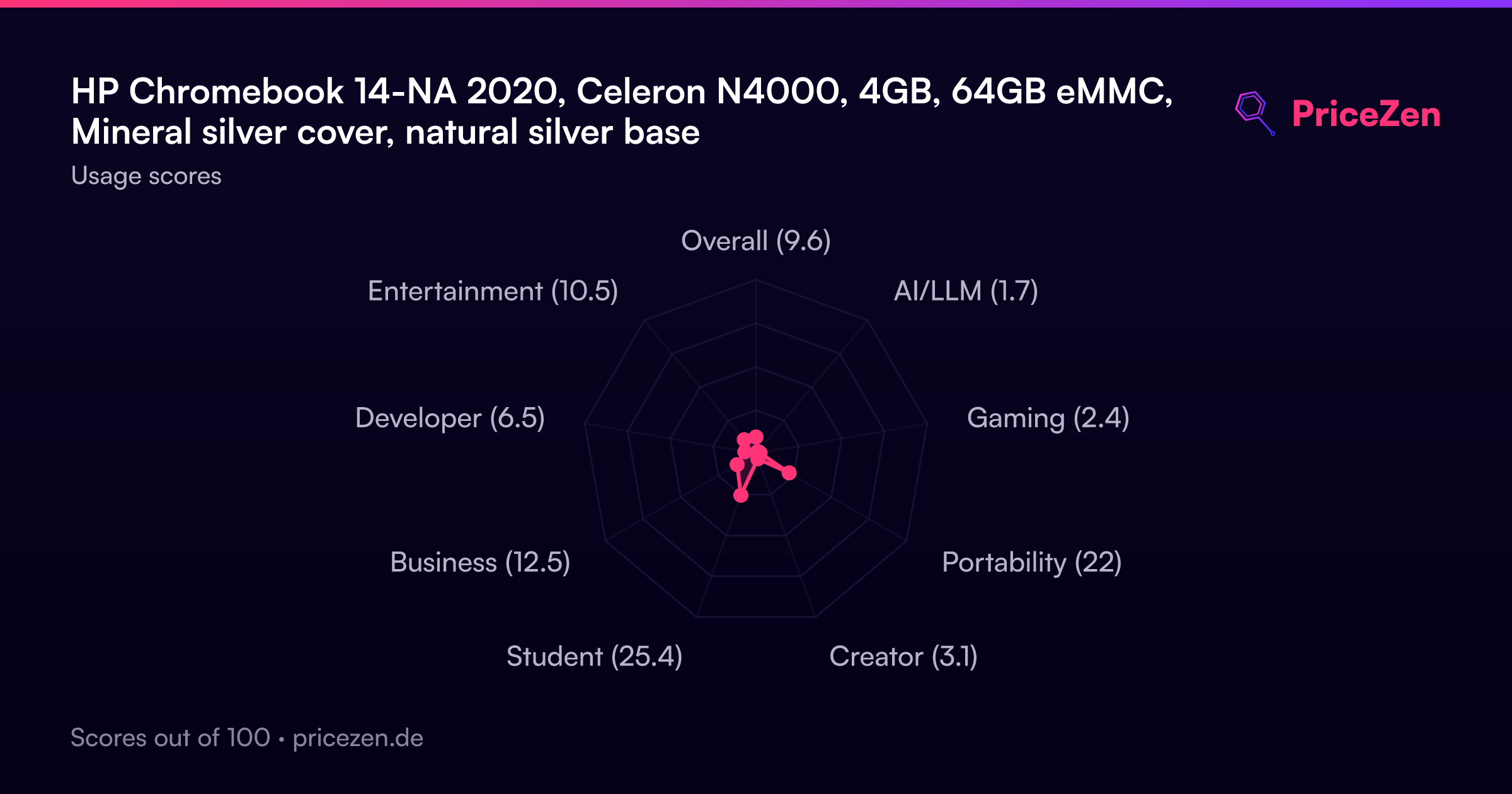
Usage Scores
- Overall9.6
- AI/LLM1.7
- Gaming2.4
- Portability22.1
- Creator3.2
- Student26.2
- Business12.6
- Developer6.5
- Entertainment10.7