Dell Inspiron 15 3530 2023, Core i7-1355U, 32GB, 2TB SSD + 2TB HDD, Black

2 TB of SSD space for big libraries verified Nov 28
48/100 overall score 4.0 average from 16 owner ratings
- CPU
- Intel Core i7 1355U
- RAM
- 32 GB
- Storage
- 2 TB
- Screen
- 15.6" 1920x1080
- GPU
- Intel Iris Xe Graphics
- OS
- Windows 11 Pro
- Weight
- 1.7 kg
- Battery
- 41 Wh
Compare prices at 1 store
Cheapest first. New, refurbished and bundled offers are kept apart, so you compare like with like.
| Store | Sold by | Colour and condition | Price | vs lowest | Last checked | Link |
|---|---|---|---|---|---|---|
| New1 offerSingle unit | ||||||
| Out of stock when last checked | ||||||
| Amazon | Not known | Not listed | No price | Out of stock | Oct 30 | Go to store |
 Source: PriceZen, checked Oct 30, 2026
A price counts as current when we checked it in the last 7 days. “Marketplace seller” means a third-party seller on that store, not the store itself.











Snapshot
The 30-Second Version
A storage-obsessed office workhorse with a dim screen and sad battery. Great for data hoarders, terrible for anyone who likes seeing their screen outdoors.
Pros & Cons
Pros
- 4TB of total storage is absurdly generous 97th
- 32GB RAM handles heavy multitasking with ease 72nd
- Touchscreen plus Windows 11 Pro is a nice business combo
- Wi-Fi 6 and plenty of USB-A ports for legacy gear
Cons
- 250-nit display is dim and washed out
- 41Wh battery will struggle to last a full workday
- Integrated graphics mean gaming is basically off the table
- HDMI 1.4 limits you to 4K at 30Hz on external displays
The proof
Performance
The Core i7-1355U is a solid mid-pack performer, landing around the 43rd percentile in our database. Nothing earth-shattering, but it'll chew through browser tabs and Office apps without breaking a sweat. The real surprise is the storage setup. A 2TB NVMe SSD plus a 2TB HDD puts this thing in the 97th percentile for storage. That's more space than most gaming rigs. The Iris Xe graphics are fine for video playback and light photo editing, but don't expect to game on this. Our gaming score for this config is a brutal 16 out of 100.
Specifications
Full Specifications
Processor
| CPU | Intel Core i7 1355U |
| Cores | 10 |
| Frequency | 1.7 GHz |
| L3 Cache | 12 MB |
Graphics
| GPU | Intel Iris Xe Graphics |
| Type | Integrated |
| VRAM Type | Shared |
Memory & Storage
| RAM | 32 GB |
| RAM Generation | DDR4 |
| Storage 1 | 2 TB |
| Storage 1 Type | NVMe SSD |
| Storage 2 | 2 TB |
| Storage 2 Type | HDD |
Display
| Size | 15.6" |
| Resolution | 1920x1080 (Full HD) |
| Panel | IPS |
| Refresh Rate | 60 Hz |
| Brightness | 250 nits |
Connectivity
| USB-C Ports | 1 |
| USB Ports | 3 |
| HDMI | HDMI 1.4 |
| Wi-Fi | Wi-Fi 6 |
| Bluetooth | ✓ |
Physical
| Weight | 1.7 kg / 3.6 lbs |
| Battery | 41 Wh |
| OS | Windows 11 Pro |
vs Competition
Against the MacBook Pro M4 Pro, this Dell gets destroyed on display quality, battery life, and raw performance. But the MacBook costs three times as much. The more realistic comparison is something like the MSI Prestige 13 Evo, which offers a better screen and lighter build but less storage. The ASUS ROG Zephyrus G14 and Lenovo Legion 5i are gaming machines that will run circles around this Dell graphically, but they're also heavier and pricier. If you need 4TB of storage and 32GB of RAM for under $1,100, the Inspiron is basically alone in its lane.
| Spec | Dell Inspiron 15 3530 | Apple MacBook Pro 14.2" M4 Pro | ASUS ROG Zephyrus 14" GA403WW-G14.R95080 | Lenovo Legion Pro 7i Gen 10 16" | HP OMEN Transcend | Samsung Galaxy Book5 Pro 14" NP944XHA-KG3US |
|---|---|---|---|---|---|---|
| CPU | Intel Core i7 1355U | Apple M4 Pro | AMD Ryzen AI 9 HX 370 | Intel Core Ultra 9 275HX | Intel Core Ultra 9 285H | Intel Core Ultra 7 258V |
| RAM (GB) | 32 | 48 | 32 | 32 | 32 | 32 |
| Storage (GB) | 2048 | 4096 | 2048 | 1024 | 1024 | 1024 |
| Screen | 15.6" 1920x1080 | 14.2" 3024x1964 | 14" 2880x1800 | 16" 2560x1600 | 14" 2880x1800 | 14" 2880x1800 |
| GPU | Intel Iris Xe Graphics | Apple (16-Core) | NVIDIA GeForce RTX 5080 | NVIDIA GeForce RTX 5070 Ti | NVIDIA GeForce RTX 5070 | Intel Arc Graphics 140V |
| OS | Windows 11 Pro | macOS | Windows 11 Home | Windows 11 Home | Windows 11 Home | Windows 11 Pro |
| Weight (kg) | 1.7 | 1.6 | 1.6 | 2.7 | 1.6 | 1.2 |
| Battery (Wh) | 41 | 72 | - | 99 | 71 | 63 |
| Compare | Compare | Compare | Compare | Compare |
| Product | CPU | GPU | RAM | Ports | Screen | Portability | Storage | Reliability | Social Proof | Affordability |
|---|---|---|---|---|---|---|---|---|---|---|
| Dell Inspiron 15 3530 | 46.2 | 47.9 | 72.1 | 48.5 | 30 | 50.5 | 97.4 | 33.7 | 27 | 36.5 |
| Apple MacBook Pro 14.2" M4 Pro Compare | 92.4 | 78.9 | 90.6 | 73.8 | 99.1 | 68.9 | 98.4 | 98.2 | 99.7 | 4.7 |
| ASUS ROG Zephyrus 14" GA403WW-G14.R95080 Compare | 91.2 | 98.3 | 90.8 | 89.4 | 96 | 73.6 | 89.7 | 60.6 | 95.6 | 6.2 |
| Lenovo Legion Pro 7i Gen 10 16" Compare | 97.2 | 96.7 | 89 | 97.3 | 95 | 9.5 | 79.3 | 82 | 99.7 | 5.9 |
| HP OMEN Transcend Compare | 90.1 | 93.5 | 89.7 | 89.4 | 96 | 72.2 | 65.4 | 33.7 | 93.2 | 9 |
| Samsung Galaxy Book5 Pro 14" NP944XHA-KG3US Compare | 65.8 | 69.6 | 79.5 | 83.5 | 90.3 | 89.4 | 79.3 | 82 | 95.6 | 21.3 |
Price
Value & Pricing
Pricing is all over the place. US listings range from $960 to $1,189, which is a $229 spread for what appears to be the same config. At the low end, this is a decent deal for the storage and RAM alone. At the high end, you're getting fleeced. Shop around and don't pay more than $1,000 for this thing. The Newegg listings with Windows 11 Home tend to be cheaper than the Pro versions on Amazon.
Read more
Overview
The Dell Inspiron 15 3530 is a weird mix of overkill and compromise. You get a massive 4TB of total storage and 32GB of RAM, which is genuinely rare at this price, but then Dell pairs it with a dim 250-nit screen and a tiny 41Wh battery. The one thing to know: this is a desktop replacement for spreadsheet warriors, not a laptop you'll enjoy carrying around or using outdoors.
Common Questions
Q: Can this laptop run modern games?
No. The Intel Iris Xe integrated graphics score a 16 out of 100 for gaming in our database. You can play older titles or indie games at low settings, but anything from the last few years will be a slideshow. Get a laptop with a dedicated GPU if gaming matters.
Q: Is the 250-nit screen bright enough for outdoor use?
Not really. 250 nits is on the dim side, landing in the 33rd percentile for laptops. It's fine in a dim office or at home, but you'll squint hard in direct sunlight or bright coffee shops. If you work outside a lot, look for something with 400 nits or more.
Q: How long does the battery actually last?
The 41Wh battery is small for a 15.6-inch laptop. Expect 4 to 6 hours of light use, less if you're pushing the CPU. This is not an all-day machine. Keep the charger handy or plan to work near an outlet.
Who Should Skip This
If you want a laptop for gaming, video editing, or anything GPU-heavy, this isn't it. Go grab an ASUS ROG Zephyrus G14 or Lenovo Legion 5i instead. If you need all-day battery life or a bright screen for outdoor work, look at a MacBook Air or a business laptop with a 400-nit panel. The Inspiron 15 3530 is for desk-bound data hoarders, not road warriors.
Verdict
Buy it if you need a cheap workstation with tons of storage and RAM for office work, data hoarding, or running VMs. Skip it if you care about screen quality, battery life, or any kind of gaming. The Inspiron 15 3530 is a niche machine that nails its niche, but it's not a laptop for everyone.
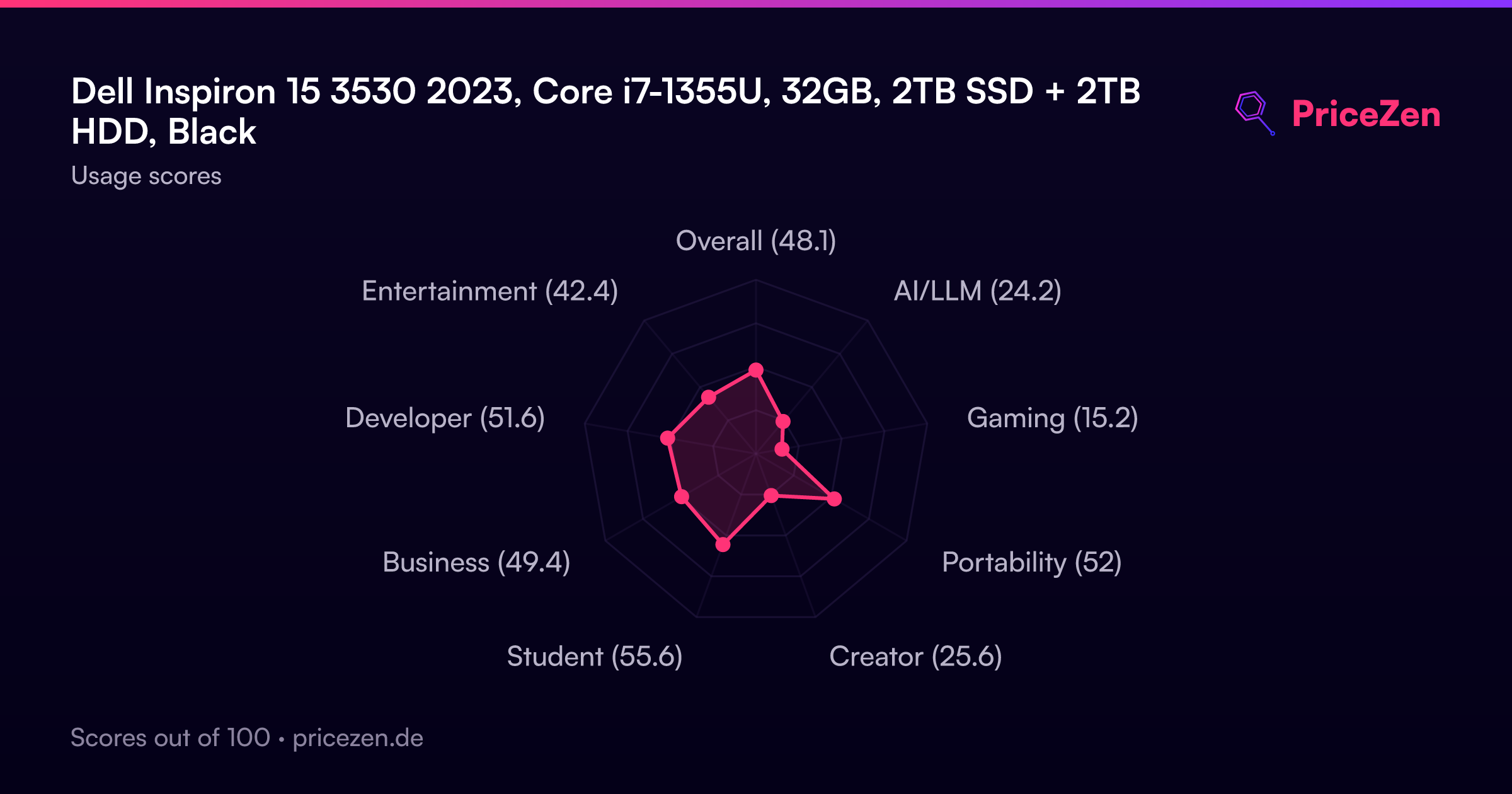
Usage Scores
- Overall48.1
- AI/LLM24.2
- Gaming15.2
- Portability52
- Creator25.6
- Student55.6
- Business49.4
- Developer51.6
- Entertainment42.4