ASUS VivoBook 15.6" F1504VA-BS51T, Core i5-1334U, 40GB, 512GB SSD, Quiet Blue

Wi-Fi 6E for less crowded wireless verified Nov 29
49/100 overall score
- CPU
- Intel Core i5 1334U
- RAM
- 40 GB
- Storage
- 512 GB
- Screen
- 15.6" 1920x1080
- GPU
- Intel Iris Xe Graphics
- OS
- Windows 11 Home
- Weight
- 1.7 kg
- Battery
- 42 Wh
Snapshot
The 30-Second Version
40GB of RAM and a touchscreen for $475 USD is the hook, and memory is where this thing genuinely shines, landing in the top 17% of laptops. The screen and gaming performance are the weak spots. Great student buy, terrible gaming buy.
Pros & Cons
Pros
- 40GB of RAM is well above average and eats browser tabs for breakfast. 83rd
- $475 USD is strong value for this much memory. 77th
- Touchscreen plus a backlit keyboard at a budget price.
- Three USB-A ports, USB-C, HDMI and Wi-Fi 6E cover most desks.
Cons
- Gaming score of 15.9/100 means forget anything beyond solitaire.
- The 1080p 60Hz panel ranks below average for laptops.
- 42Wh battery is small for a 15.6-inch machine.
- It's an open box unit with third-party upgraded RAM, not factory stock.
The proof
Performance
The 40GB of memory is the whole story here, sitting in the top 17% against every laptop we track. Browser tab hoarders, rejoice. The i5-1334U is a 10-core low-power chip that scores 43 out of 100 in our CPU ranking, so it's fine for Office, lectures and light code but not for heavy compiles or exports. Iris Xe lands about average for integrated graphics, and the gaming score of 15.9/100 tells you everything: this is not a gaming machine, don't try. Storage is a middle-of-the-pack 512GB NVMe drive. The 15.6-inch 1920x1080 IPS panel at 60Hz ranks in the bottom 39% of laptops, which is a weak spot, and the 42Wh battery is small for a screen this size. Port selection is decent though: three USB-A, one USB-C, HDMI 1.4 and Wi-Fi 6E.
Specifications
Full Specifications
Processor
| CPU | Intel Core i5 1334U |
| Cores | 10 |
| Frequency | 1.3 GHz |
| L3 Cache | 12 MB |
Graphics
| GPU | Intel Iris Xe Graphics |
| Type | Integrated |
| VRAM Type | Shared |
Memory & Storage
| RAM | 40 GB |
| Storage | 512 GB |
| Storage Type | NVMe SSD |
Display
| Size | 15.6" |
| Resolution | 1920x1080 (Full HD) |
| Panel | IPS |
| Refresh Rate | 60 Hz |
Connectivity
| USB-C Ports | 1 |
| USB Ports | 3 |
| HDMI | 1 x HDMI 1.4 |
| Wi-Fi | Wi-Fi 6E |
| Bluetooth | Bluetooth 5.3 |
Physical
| Weight | 1.7 kg / 3.8 lbs |
| Battery | 42 Wh |
| OS | Windows 11 Home |
vs Competition
Cross-shop the Apple MacBook Air 13.6" M4 if you want a smaller, quieter daily driver and don't need Windows or a touchscreen. The Lenovo ThinkPad X9-14 Gen 1 and Microsoft Surface Laptop 15" 7th Edition are the ones to look at if screen quality matters more than raw memory, since this ASUS ranks in the bottom 39% on display. The HP OmniBook X Flip 14-fk0033dx and Samsung Galaxy Book5 Pro 14" NP944XHA-KG2US are worth a look if you want something more portable than a 1.70kg 15.6-incher. None of that changes the core argument: this VivoBook wins on memory-per-dollar and loses on polish.
| Spec | ASUS VivoBook 15.6" F1504VA-BS51T | Apple MacBook Pro 14.2" M4 Pro | Lenovo Legion Pro 7i Gen 10 16" | HP OMEN Transcend | Samsung Galaxy Book5 Pro 14" NP944XHA-KG3US | Dell Premium 14.5" LDA14250-7667SLV-PUS |
|---|---|---|---|---|---|---|
| CPU | Intel Core i5 1334U | Apple M4 Pro | Intel Core Ultra 9 275HX | Intel Core Ultra 9 285H | Intel Core Ultra 7 258V | Intel Core Ultra 7 255H |
| RAM (GB) | 40 | 48 | 32 | 32 | 32 | 32 |
| Storage (GB) | 512 | 4096 | 1024 | 1024 | 1024 | 1024 |
| Screen | 15.6" 1920x1080 | 14.2" 3024x1964 | 16" 2560x1600 | 14" 2880x1800 | 14" 2880x1800 | 14.5" 3200x2000 |
| GPU | Intel Iris Xe Graphics | Apple (16-Core) | NVIDIA GeForce RTX 5070 Ti | NVIDIA GeForce RTX 5070 | Intel Arc Graphics 140V | Intel Arc Graphics |
| OS | Windows 11 Home | macOS | Windows 11 Home | Windows 11 Home | Windows 11 Pro | Windows 11 Home |
| Weight (kg) | 1.7 | 1.6 | 2.7 | 1.6 | 1.2 | 1.7 |
| Battery (Wh) | 42 | 72 | 99 | 71 | 63 | 62 |
| Compare | Compare | Compare | Compare | Compare |
| Product | CPU | GPU | RAM | Ports | Screen | Portability | Storage | Reliability | Affordability |
|---|---|---|---|---|---|---|---|---|---|
| ASUS VivoBook 15.6" F1504VA-BS51T | 42.5 | 47.8 | 82.6 | 55.2 | 37.5 | 48.2 | 51.1 | 60.6 | 77.2 |
| Apple MacBook Pro 14.2" M4 Pro Compare | 92.4 | 78.9 | 90.6 | 73.8 | 99.1 | 68.9 | 98.4 | 98.2 | 4.7 |
| Lenovo Legion Pro 7i Gen 10 16" Compare | 97.2 | 96.7 | 89 | 97.3 | 95 | 9.5 | 79.3 | 82 | 5.9 |
| HP OMEN Transcend Compare | 90.1 | 93.5 | 89.6 | 89.4 | 96 | 72.2 | 65.4 | 33.7 | 9.1 |
| Samsung Galaxy Book5 Pro 14" NP944XHA-KG3US Compare | 65.8 | 69.6 | 79.5 | 83.5 | 90.3 | 89.4 | 79.3 | 82 | 21.4 |
| Dell Premium 14.5" LDA14250-7667SLV-PUS Compare | 87 | 69.6 | 89 | 66.7 | 96.8 | 61.3 | 65.4 | 33.7 | 14.8 |
Price
Value & Pricing
At $475 USD, affordability is among the best we've seen (top 23% in our rankings), and we track prices over time so we can say this is a genuinely cheap way into 40GB of memory. You're paying for RAM and a touchscreen, not for build polish or a great display. For a student who lives in Chrome and Word, that's a smart trade. Just go in knowing it's open box, so condition and warranty terms are worth reading before you click buy.
Read more
Overview
This is a budget 15.6-inch VivoBook with one very loud spec: 40GB of RAM. That's a third-party upgrade on an open box unit, paired with a Core i5-1334U (10 cores, 1.3GHz base), a 512GB NVMe SSD and Iris Xe graphics. It runs $475 USD at Newegg.
The pitch is simple. Tons of memory for tabs, docs and school work, plus a touchscreen and a backlit keyboard, at a price that sits well above average for affordability in our data. The catch is everything around that RAM: the CPU lands mid-pack, the screen ranks below average, and gaming is a write-off.
Common Questions
Q: Is the 40GB of RAM factory installed?
No, it's a professional third-party upgrade on an open box unit, so the memory config isn't stock from ASUS. Worth checking the seller's warranty terms before buying.
Q: Can it handle games at all?
Not really. Iris Xe integrated graphics plus a gaming score of 15.9/100 means casual titles at best, and the 60Hz 1080p panel isn't built for fast play either.
Q: Is the screen good enough for long study sessions?
It's a 15.6-inch 1920x1080 IPS touchscreen, so text is sharp and touch input is handy, but the display ranks below average in our data. Fine for coursework, not for color work.
Who Should Skip This
If you game, skip it, because a 15.9/100 gaming score and integrated Iris Xe won't get you there. If you edit photos or video, the below-average 1080p panel will annoy you daily. And if you need all-day battery away from a plug, the 42Wh pack in a 15.6-inch body is the wrong bet.
Verdict
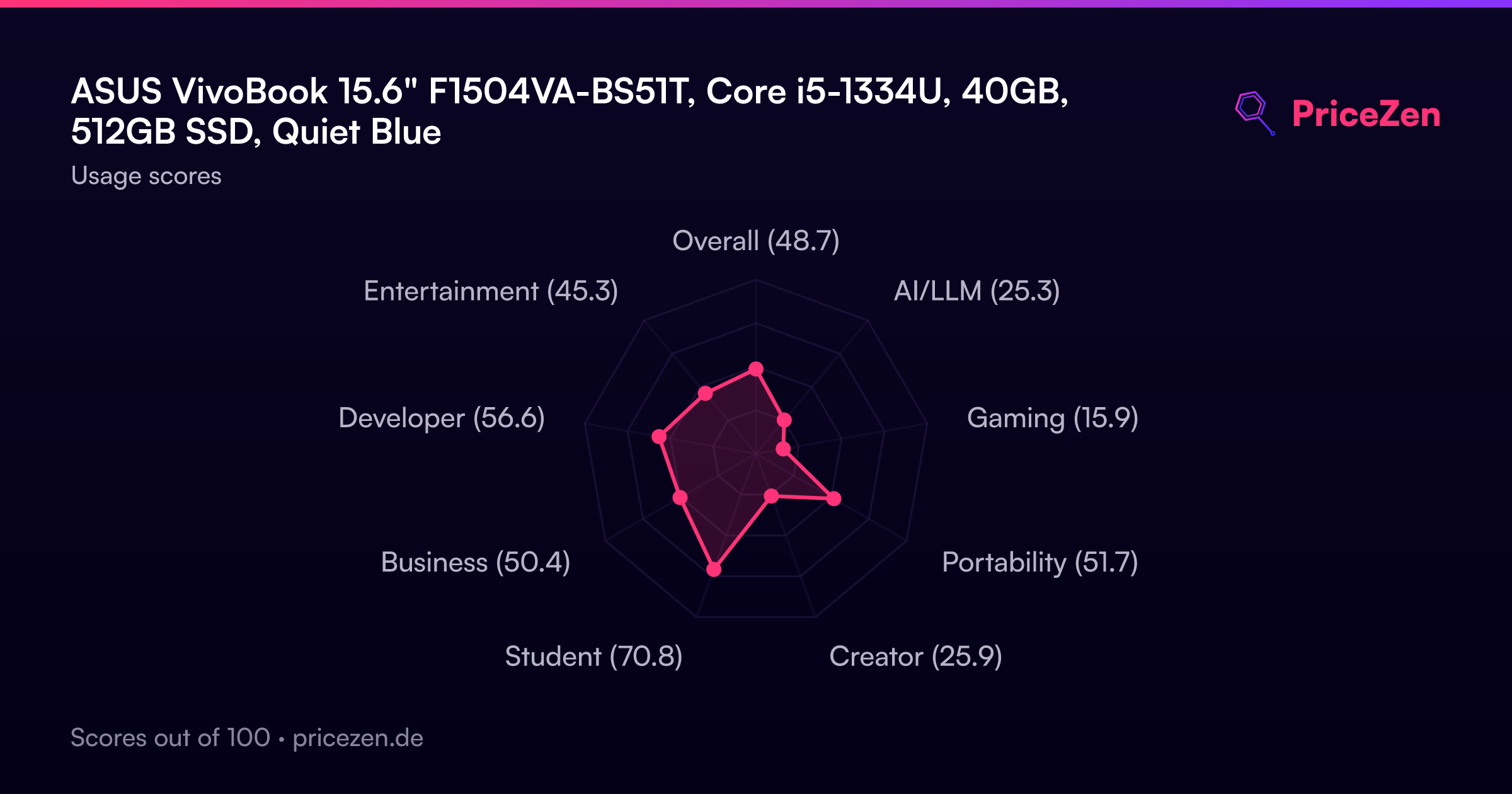
Buy it if you're a student or a light multitasker who wants Windows, a big touchscreen and enough RAM to never close a tab again, all for $475 USD. Our scoring puts it at 71.3/100 for students, which is its best fit by a mile. Developers get a middling 56.6, so it works for learning and light scripting but not as a main workhorse. Anyone chasing frame rates should keep walking.
Usage Scores
- Overall48.7
- AI/LLM25.3
- Gaming15.9
- Portability51.7
- Creator25.9
- Student70.8
- Business50.4
- Developer56.6
- Entertainment45.3