Lenovo IdeaPad Slim 3i 15.3" 83RR00LSUS 2026, Intel 300, 8GB, 256GB SSD, Cosmic Blue

Silky 120 Hz scrolling and motion verified Nov 29
40/100 overall score 4.8 average from 9 owner ratings
- CPU
- Intel Processor 300
- RAM
- 8 GB
- Storage
- 256 GB
- Screen
- 15.3" 1920x1200
- GPU
- Intel Graphics
- OS
- Windows 11 Home
- Weight
- 1.6 kg
- Battery
- 60 Wh
Snapshot
The 30-Second Version
The IdeaPad Slim 3i pairs a genuinely impressive 15.3-inch 120Hz touchscreen with an entry-level Intel Processor 300 and just 8GB of RAM. It's fine for basic student work and browsing, but the weak internals will frustrate power users. Pricing ranges from USD 366 to USD 430, so shop around if you're set on this model. The display is the star here, but the performance ceiling is low.
Pros & Cons
Pros
- Gorgeous 15.3-inch 120Hz IPS display with 400 nits brightness 82nd
- Touchscreen included at a budget price 80th
- Lightweight at 1.59kg with a solid 60Wh battery 70th
- 16:10 aspect ratio gives extra vertical space for productivity
- Rapid Charge Boost adds 2 hours of battery in 15 minutes
Cons
- Intel Processor 300 is one of the weakest CPUs we've tested
- 8GB RAM is barely enough for Windows 11 multitasking
- 256GB storage fills up fast
- Only one USB-C port and HDMI 1.4 limits external display options
- Integrated graphics can't handle anything beyond basic tasks
The proof
Performance
Let's talk about that Intel Processor 300. It's a 6-core chip with a 1.5GHz base clock, and it sits at the 15th percentile for CPUs in our database. That's not a typo. This is a processor designed for basic tasks, and it shows. Web browsing with a handful of tabs, writing in Google Docs, watching YouTube, maybe some light photo editing. That's the comfort zone. Push it harder and you'll feel the lag.
The 8GB of DDR5 RAM lands at the 24th percentile, which is another way of saying it's the bare minimum for Windows 11 in 2025. Windows 11 itself will happily eat 4-5GB just sitting there. Open a dozen Chrome tabs and a Zoom call, and you're bumping against the ceiling. The 256GB SSD is also on the small side at the 16th percentile. You'll be leaning on cloud storage or an external drive before long. Integrated Intel Graphics puts gaming performance at the 9th percentile, so don't even think about anything beyond Solitaire or maybe some very light indie titles.
Specifications
Full Specifications
Processor
| CPU | Intel Processor 300 |
| Cores | 2 |
| Frequency | 3.9 GHz |
| L3 Cache | 6 MB |
Graphics
| GPU | Intel Graphics |
| Type | Integrated |
Memory & Storage
| RAM | 8 GB |
| RAM Generation | DDR5 |
| Storage | 256 GB |
| Storage Type | SSD |
Display
| Size | 15.3" |
| Resolution | 1920x1200 (Full HD) |
| Panel | IPS |
| Refresh Rate | 120 Hz |
| Brightness | 400 nits |
Connectivity
| USB-C Ports | 1 |
| USB Ports | 2 |
| HDMI | HDMI 1.4 |
| Wi-Fi | Wi-Fi 6 |
Physical
| Weight | 1.6 kg / 3.5 lbs |
| Battery | 60 Wh |
| OS | Windows 11 Home |
vs Competition
The HP OmniBook X Flip 14 is the most direct competitor here, and it's a different beast entirely. It runs on a Snapdragon X chip with much better efficiency and performance, though you'll pay more for it. The Apple MacBook Air M2 is in another league for performance and battery life, but it's also a different price bracket and a different OS. If you're not tied to Windows, the M2 Air makes this IdeaPad look like a toy in terms of raw speed.
The Samsung Galaxy Book6 Pro and ASUS ExpertBook P5405 both offer significantly better internals, with more RAM and faster processors. The MSI Stealth 14 is a gaming machine that's not really in the same conversation, but it does highlight just how far behind the IdeaPad's GPU is. The trade-off is clear: you're giving up performance to get that 120Hz touchscreen at a budget price. For some people, that's the right call. For most, a slightly more expensive machine with 16GB of RAM and a better CPU will age far more gracefully.
| Spec | Lenovo IdeaPad Slim 3i 15.3" 83RR00LSUS | Apple MacBook Pro 14.2" M4 Pro | ASUS ROG Zephyrus 14" GA403WW-G14.R95080 | HP OMEN Transcend | Samsung Galaxy Book5 Pro 14" NP944XHA-KG3US | MSI Raider 16 Max HX |
|---|---|---|---|---|---|---|
| CPU | Intel Processor 300 | Apple M4 Pro | AMD Ryzen AI 9 HX 370 | Intel Core Ultra 9 285H | Intel Core Ultra 7 258V | Intel Core Ultra 9 290HX |
| RAM (GB) | 8 | 48 | 32 | 32 | 32 | 32 |
| Storage (GB) | 256 | 4096 | 2048 | 1024 | 1024 | 1024 |
| Screen | 15.3" 1920x1200 | 14.2" 3024x1964 | 14" 2880x1800 | 14" 2880x1800 | 14" 2880x1800 | 16" 2560x1600 |
| GPU | Intel Graphics | Apple (16-Core) | NVIDIA GeForce RTX 5080 | NVIDIA GeForce RTX 5070 | Intel Arc Graphics 140V | NVIDIA GeForce RTX 5080 |
| OS | Windows 11 Home | macOS | Windows 11 Home | Windows 11 Home | Windows 11 Pro | Windows 11 Home |
| Weight (kg) | 1.6 | 1.6 | 1.6 | 1.6 | 1.2 | 2.6 |
| Battery (Wh) | 60 | 72 | - | 71 | 63 | 100 |
| Compare | Compare | Compare | Compare | Compare |
| Product | CPU | GPU | RAM | Ports | Screen | Portability | Storage | Reliability | Social Proof | Affordability |
|---|---|---|---|---|---|---|---|---|---|---|
| Lenovo IdeaPad Slim 3i 15.3" 83RR00LSUS | 11.8 | 28.3 | 23.8 | 37 | 69.6 | 58.3 | 15.8 | 82 | 57.7 | 80.3 |
| Apple MacBook Pro 14.2" M4 Pro Compare | 92.4 | 78.9 | 90.6 | 73.8 | 99.1 | 68.9 | 98.4 | 98.2 | 99.7 | 4.7 |
| ASUS ROG Zephyrus 14" GA403WW-G14.R95080 Compare | 91.2 | 98.3 | 90.8 | 89.4 | 96 | 73.6 | 89.7 | 60.6 | 95.7 | 6.1 |
| HP OMEN Transcend Compare | 90.1 | 93.5 | 89.6 | 89.4 | 96 | 72.2 | 65.4 | 33.7 | 93.3 | 9.1 |
| Samsung Galaxy Book5 Pro 14" NP944XHA-KG3US Compare | 65.8 | 69.6 | 79.5 | 83.5 | 90.3 | 89.4 | 79.3 | 82 | 95.7 | 21.4 |
| MSI Raider 16 Max HX Compare | 99.6 | 98.3 | 86.3 | 98.6 | 91.4 | 10.9 | 79.3 | 60.6 | 78 | 7.9 |
Price
Value & Pricing
Pricing on this thing is all over the place. We're seeing USD 366 to USD 430 across four US listings, which is a USD 64 spread. That's a meaningful chunk of change at this price point. If you can snag it at the lower end, the value proposition gets a lot more interesting. At USD 430, you're creeping into territory where better-equipped machines start to appear.
The affordability percentile sits at 59th, which means it's slightly better than average on price, but not a screaming deal. The screen quality is the wildcard here. You're getting a display that would be impressive on a USD 700 laptop, and that's worth something. But the weak CPU and limited RAM mean you're paying for a nice screen attached to entry-level guts. For a student who mostly lives in a browser and values a good display, the lower end of that price range makes sense. At the top end, you should look elsewhere.
Read more
Overview
The Lenovo IdeaPad Slim 3i is one of those laptops that makes you do a double take at the spec sheet. A 15.3-inch touchscreen with a 120Hz refresh rate and 400 nits of brightness, a 60Wh battery, and a chassis that weighs just 1.59kg. That's a genuinely nice display and solid portability for a machine that sits in the budget aisle. But then you look at the processor and RAM situation, and things get complicated fast.
This is a laptop aimed squarely at students and casual users who need something for web browsing, document editing, video calls, and streaming. The 16:10 aspect ratio screen is a real win for productivity, giving you more vertical space for reading and writing. And the touchscreen is a nice bonus at this price point. But the Intel Processor 300 chip and 8GB of DDR5 RAM mean this thing has a ceiling, and it's not a high one.
What's interesting here is the mismatch between the display and the internals. You're getting a screen that would feel at home on a much more expensive laptop, paired with a processor that's essentially entry-level. It's like putting nice tires on a go-kart. For the right person, that's actually a smart trade-off. For everyone else, it's a warning sign.
Common Questions
Q: Can this laptop handle multitasking with multiple browser tabs and apps open?
It can handle light multitasking, but 8GB of RAM is the limiting factor. Windows 11 uses a significant chunk of that just to run. You'll be fine with a handful of browser tabs and one or two lightweight apps, but pushing beyond that will cause slowdowns. If you're a heavy tab user, look for a model with 16GB of RAM.
Q: Is the 120Hz display actually noticeable for everyday use?
Yes, especially when scrolling through documents, web pages, and social feeds. The 120Hz refresh rate makes everything feel smoother and more responsive compared to standard 60Hz panels. The 400 nits of brightness also means it's usable in brighter rooms. It's genuinely one of the best displays you'll find at this price point.
Q: How is the battery life for a full day of classes or work?
The 60Wh battery is decent for a laptop this size and weight. For light tasks like note-taking, web browsing, and document editing, you should get through most of a school or work day. The Rapid Charge Boost feature is handy too, adding about 2 hours of battery from a 15-minute charge when you're in a pinch.
Q: Can I upgrade the RAM or storage later?
The 8GB of DDR5 RAM is likely soldered to the motherboard, which is common in thin and light budget laptops. That means no RAM upgrades down the line. The 256GB SSD may be replaceable, but you'd need to check Lenovo's service manual for this specific model. Given the small storage capacity, you'll probably want to plan around cloud storage or an external drive from day one.
Who Should Skip This
Anyone who needs real performance should look elsewhere. If you're editing video, running virtual machines, doing software development, or working with large datasets, the Intel Processor 300 and 8GB of RAM will slow you down constantly. The integrated graphics also rule out any meaningful gaming or GPU-accelerated work.
If you're a power user on a budget, look at machines with at least 16GB of RAM and a proper Core i5 or Ryzen 5 processor. You'll spend a bit more, but the difference in daily usability is night and day. The HP OmniBook X Flip or a mid-range ASUS ExpertBook would be much better fits. This IdeaPad is for light users only, and that's okay, but know what you're getting into.
Verdict
If you're a student or casual user who lives in a web browser, writes papers, watches lectures, and occasionally streams Netflix, this laptop will get the job done. The display is genuinely lovely, the battery is solid, and the touchscreen is a nice perk. Just keep your expectations in check. This is a single-task machine, not a multitasking workhorse.
For anyone who needs to run demanding software, keep dozens of tabs open, edit photos or video, or do any kind of gaming, this is not your laptop. The 8GB of RAM and weak CPU will frustrate you within months. Spend a bit more and get something with 16GB of RAM and a proper processor. Your future self will thank you.
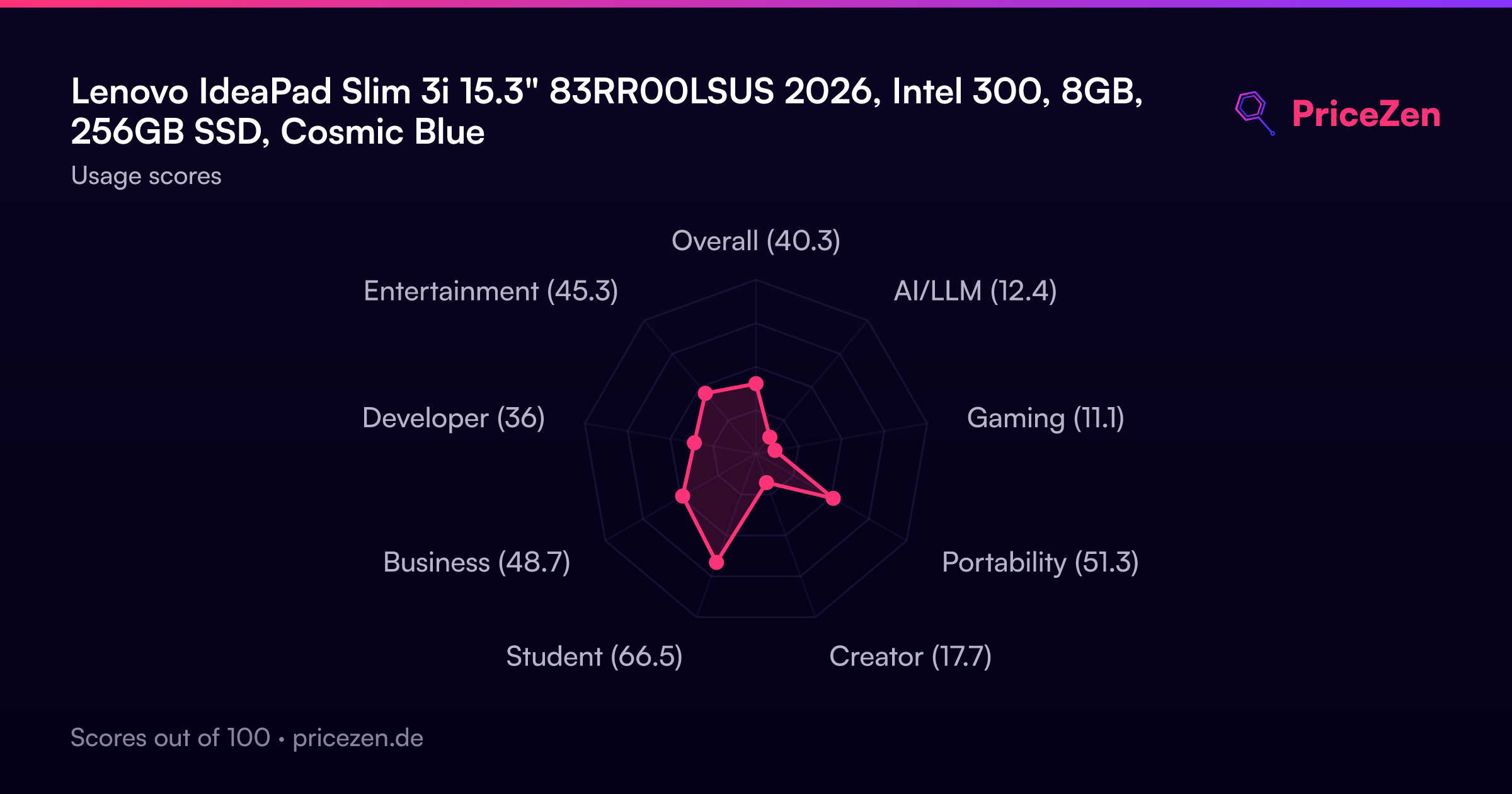
Usage Scores
- Overall40.3
- AI/LLM12.4
- Gaming11.1
- Portability51.3
- Creator17.7
- Student66.5
- Business48.7
- Developer36
- Entertainment45.3