KOORUI G2721E 27" Black 2025
The 320Hz refresh rate on this 27-inch QHD Fast IPS panel delivers ultra-smooth motion with 1ms response, ideal for competitive FPS and racing games. Its 98% DCI-P3 color coverage and HDR400 support make it a strong choice for both gaming and content creation, while the fully adjustable stand with VESA mounting adds flexibility. Best for esports gamers and hobbyist editors who want a high-refresh, color-accurate monitor without paying a premium.

No current retailer price





Snapshot
The 30-Second Version
The KOORUI G2721E is a 27-inch QHD gaming monitor with a 320Hz refresh rate, 1ms response time, and 95% DCI-P3 color. It's one of the best value high-refresh monitors we've tested, with strong ergonomics and solid color for an IPS panel. HDR is weak and connectivity is basic, but for competitive gaming on a budget, this thing delivers.
Pros & Cons
Pros
- 320Hz refresh rate is blazing fast for competitive gaming 91st
- QHD resolution hits the sweet spot between sharpness and performance 91st
- Fully adjustable stand with height, tilt, swivel, and pivot 85th
- 95% DCI-P3 color coverage looks great for an IPS panel 81st
- Aggressive price for the specs you get
Cons
- HDR400 is barely HDR, don't expect real dynamic range
- Only 2x HDMI and 1x DisplayPort, connectivity is average
- 350 nits brightness is just okay, not great for bright rooms
- KOORUI brand recognition and support trail bigger names
- No USB hub or KVM switch for multi-device setups
What owners think
The Word on the Street
How owner sentiment changed over time
ExclusiveBased on when customers actually wrote their reviews - so you can see whether early praise held up.
10 written reviews, Sep 2022 – Jan 2026: 9 happy, 1 unhappy
Across all 4,518 store ratings: 4.4★. Most owners rate without writing a review. The chart counts the 10 written reviews.
Each dot is one written review, in the month it was written. Happy = 4-5★, mixed = 3★, unhappy = 1-2★.
The proof
Performance
The 320Hz refresh rate is the star here, and it lands in the 92nd percentile for performance in our database. That's one of the best on the market right now, especially at this price. Combined with the 1ms response time, motion clarity is excellent for competitive FPS games like Valorant, CS2, or Overwatch. You won't see ghosting or smearing the way you might on a slower IPS panel.
The QHD 2560x1440 resolution is a sweet spot for gaming. It's sharper than 1080p but doesn't demand as much GPU horsepower as 4K, so you can actually hit high frame rates with a mid-range card. The Fast IPS panel handles color well too, with 95% DCI-P3 coverage putting it in the 87th percentile for color. That's strong, and it makes the G2721E viable for light content creation or photo editing, not just gaming. Brightness tops out at 350 nits, which is fine for most rooms but won't blow you away in a sunlit space.
Specifications
Full Specifications
Display
| Size | 27" |
| Resolution | 2560x1440 (QHD) |
| Panel Type | IPS |
| Aspect Ratio | 16:9 |
| Curved | No |
| Screen Finish | matte |
Performance
| Refresh Rate | 320 Hz |
| Response Time | 1 |
| Adaptive Sync | FreeSync Premium |
Color & HDR
| Brightness | 350 nits |
| Color Gamut | 95% DCI-P3 |
| Color Depth | 8-bit |
| HDR | HDR400 |
| HDR Support | HDR400 |
Connectivity
| HDMI Ports | 2 |
| DisplayPort | 1 |
| USB-C | 0 |
Ergonomics
| Height Adjustable | Yes |
| Tilt | Yes |
| Swivel | Yes |
| Pivot | Yes |
| VESA Mount | 75x75 |
Features
| PIP/PBP | Yes |
| Power | 65 |
| Weight | 5.2 kg / 11.5 lbs |
vs Competition
Against the ASUS ROG Strix XG27UCDMG, the KOORUI loses on pure image quality and HDR performance, but wins on price by a landslide. The ASUS is a premium 4K OLED, and it costs like one. The MSI MAG 271QPX QD-OLED E2 and Samsung Odyssey G60SD are both QD-OLED panels with better contrast and true HDR, but they're significantly more expensive and capped at lower refresh rates in some cases. The LG UltraGear 27GX790A-B is closer in spirit, a high-refresh QHD panel, but LG's brand tax pushes it higher.
The Gigabyte M Series OLED MO27U2 SA is another OLED option that will look better in dark scenes, but if you're mostly playing competitive shooters at high frame rates, the KOORUI's 320Hz IPS panel holds its own. The real question is whether you want OLED contrast or raw refresh rate per dollar. For pure speed on a budget, the G2721E is hard to beat.
| Spec | KOORUI G2721E 27" | LG UltraGear 45GX950A-B 45" | ASUS ROG Strix XG27UCDMG 27" | Dell UltraSharp U4025QW 39.7" | Alienware AW-Series AW3425DW 34" | MSI MAG 271QPX QD-OLED E2 27" |
|---|---|---|---|---|---|---|
| Screen Size | 27 | 45 | 27 | 39.70000076293945 | 34 | 27 |
| Resolution | 2560 x 1440 | 5120 x 2160 | 3840 x 2160 | 5120 x 2160 | 3440 x 1440 | 2560 x 1440 |
| Panel Type | IPS | OLED | OLED | IPS | QD-OLED | QD-OLED |
| Refresh Rate | 320 | 330 | 240 | 120 | 240 | 240 |
| Response Time Ms | 1 | 0.029999999329447746 | 0.029999999329447746 | 5 | 0.029999999329447746 | 0.029999999329447746 |
| Adaptive Sync | FreeSync Premium | FreeSync Premium Pro | FreeSync Premium Pro | Adaptive-Sync | FreeSync Premium Pro | FreeSync Premium Pro |
| Hdr | HDR400 | DisplayHDR True Black 400 | DisplayHDR True Black 400 | HDR600 | HDR400 | DisplayHDR True Black 400 |
| Compare | Compare | Compare | Compare | Compare |
| Product | Color | Portability | Display | Feature | Performance | Connectivity | Social Proof |
|---|---|---|---|---|---|---|---|
| KOORUI G2721E 27" | 80.6 | 12.7 | 67.1 | 85.1 | 90.8 | 53.2 | 74.8 |
| LG UltraGear 45GX950A-B 45" Compare | 99.4 | 76.6 | 99.7 | 96.3 | 99.4 | 96.9 | 92 |
| ASUS ROG Strix XG27UCDMG 27" Compare | 96.5 | 57.5 | 97.7 | 85.1 | 97.9 | 81.2 | 98.9 |
| Dell UltraSharp U4025QW 39.7" Compare | 97.9 | 76.6 | 98.6 | 96.3 | 56.1 | 99.3 | 96.8 |
| Alienware AW-Series AW3425DW 34" Compare | 98.9 | 74 | 84.1 | 96.3 | 97.9 | 95.4 | 96.8 |
| MSI MAG 271QPX QD-OLED E2 27" Compare | 99.2 | 57.5 | 73.5 | 85.1 | 97.9 | 81.2 | 98.9 |
Price
Value & Pricing
At around CAD 360-361, the KOORUI G2721E undercuts most 320Hz QHD monitors by a meaningful margin. You're getting a display that performs in the 92nd percentile for performance and 92nd for ergonomics, which is wild for this price. The main trade-off is brand trust and some missing extras like USB ports or better HDR. If you want a high-refresh QHD panel without spending OLED money, this is one of the better value plays we've seen. Just know that HDR400 is more marketing than magic.
Read more
Overview
The KOORUI G2721E is a 27-inch QHD gaming monitor that pushes 320Hz, which puts it in a pretty aggressive spot for competitive players who want speed without jumping to 4K. It's an IPS panel, so you get better viewing angles and color than a typical TN esports screen, while still hitting that 1ms response time. Pricing sits around CAD 360-361 in Canada and MXN 5,277 in Mexico, which is aggressive for what you're getting on paper.
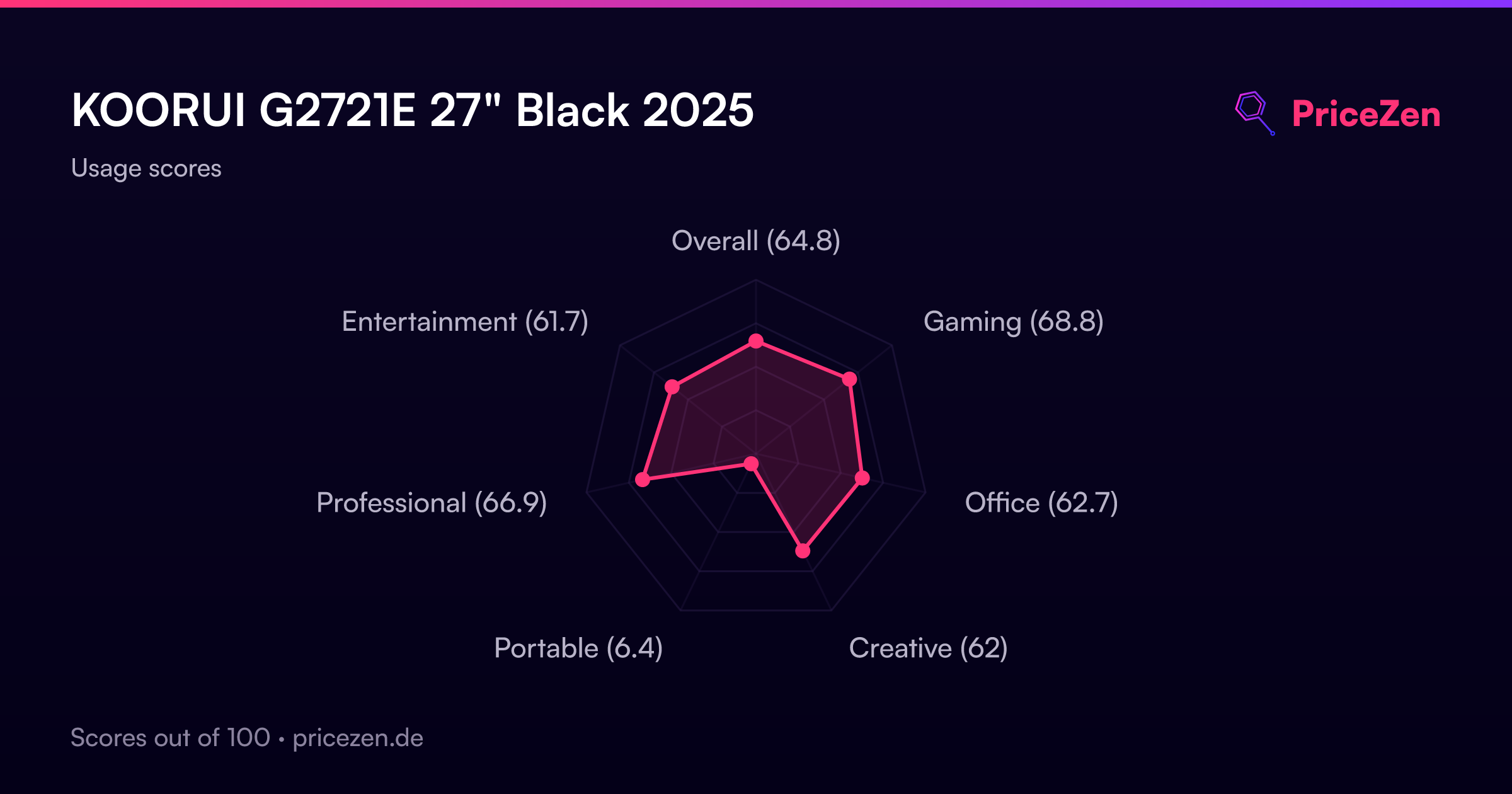
Is the KOORUI G2721E good for gaming? For fast-paced shooters and esports titles, yes. The 320Hz refresh rate is the headline feature, and FreeSync Premium keeps things smooth on AMD GPUs. It's also fine for office work and content consumption, with a 73.3 office score in our database. The 95% DCI-P3 coverage and DisplayHDR 400 certification mean colors pop more than on a budget panel, though HDR400 is more of a checkbox than a true HDR experience.
KOORUI isn't a household name like ASUS or LG, but this monitor has solid social proof, 4.4 stars across 4,522 reviews. That's a lot of buyers for a brand some people still haven't heard of. The stand is fully adjustable with height, tilt, swivel, and pivot, plus VESA 75x75 mounting if you'd rather use an arm.
Common Questions
Q: Is the KOORUI G2721E good for gaming?
Yes, the KOORUI G2721E is excellent for gaming, especially competitive FPS and esports titles. The 320Hz refresh rate and 1ms response time deliver ultra-smooth motion with minimal blur, and FreeSync Premium helps eliminate screen tearing on AMD GPUs.
Q: Does the KOORUI G2721E support G-Sync?
The G2721E officially supports FreeSync Premium, not native G-Sync. Some users report it works with G-Sync Compatible mode on NVIDIA GPUs, but your mileage may vary, and KOORUI doesn't advertise official NVIDIA certification.
Q: Is the KOORUI G2721E good for office work?
It's solid for office use. The QHD resolution gives you plenty of screen real estate for documents and spreadsheets, and the IPS panel offers good viewing angles. The fully adjustable stand also helps with ergonomics during long work sessions.
Q: Does the KOORUI G2721E come with a DisplayPort cable?
Several buyers report that the G2721E does not include a DisplayPort cable in the box. If you want to hit the full 320Hz refresh rate, you'll likely need to buy a DisplayPort 1.4 cable separately, since HDMI 2.0 may not support the maximum refresh rate.
Who Should Skip This
Skip the KOORUI G2721E if you care about HDR performance or deep blacks. The DisplayHDR 400 certification is entry-level, and an OLED panel like the MSI MAG 271QPX QD-OLED E2 or Samsung Odyssey G60SD will look dramatically better in dark scenes and HDR content. Content creators who need true color accuracy for professional work should also look at higher-end IPS or OLED options with factory calibration. And if you need a monitor with USB ports, a KVM switch, or built-in speakers, this isn't it. Console players on PS5 or Xbox Series X won't benefit from 320Hz either, since those systems cap at 120Hz, so you'd be paying for headroom you can't use.
Verdict
Should you buy the KOORUI G2721E? If you're a competitive gamer who wants 320Hz at QHD resolution without spending a fortune, yes. This monitor delivers top-tier refresh rates and solid color performance at a price that makes bigger brands look greedy. The stand is genuinely good, with full ergonomic adjustments, and the panel quality is better than you'd expect from a lesser-known brand.
But if you care about HDR, deep blacks, or want a monitor that doubles as a content creation powerhouse, look elsewhere. The HDR400 certification is weak, and OLED alternatives will look dramatically better in dark scenes. For pure esports performance per dollar, though, the G2721E is a standout.
Usage Scores
- Overall64.8
- Gaming68.8
- Office62.7
- Creative62
- Portable6.4
- Professional66.9
- Entertainment61.7