ASUS ROG Strix XG32WCS 32" Black 2025

85/100 overall score 4.4 average from 126 owner ratings
- Screen
- 32"
- Resolution
- 2560 x 1440
- Panel
- VA
- Refresh
- 180 Hz
- Response time
- 1 ms
- Adaptive sync
- FreeSync
- HDR
- HDR400
Compare prices at 1 store
Cheapest first. New, refurbished and bundled offers are kept apart, so you compare like with like.
| Store | Sold by | Colour and condition | Price | vs lowest | Last checked | Link |
|---|---|---|---|---|---|---|
| New1 offerSingle unit | ||||||
| Out of stock when last checked | ||||||
| Amazon | Not known | Not listed | No price | Out of stock | Nov 20 | Go to store |
 Source: PriceZen, checked Nov 20, 2026
A price counts as current when we checked it in the last 7 days. “Marketplace seller” means a third-party seller on that store, not the store itself.
Price history
Checked that dayNot checked that day, still on offer
Source: PriceZen, checked Sep 23, 2026









Snapshot
The 30-Second Version
The ASUS ROG Strix XG32WCS is a 32-inch curved 1440p gaming monitor with a 180Hz refresh rate, 1ms response time, and FreeSync support. It delivers strong color performance and useful features like ELMB SYNC and USB-C connectivity, and its price has dropped sharply, with US listings starting at USD 180. It's an excellent value for immersive gaming, though OLED panels still win on contrast and HDR if you can spend more.
Pros & Cons
Pros
- 180Hz refresh rate with ELMB SYNC for blur-free gaming 96th
- Strong color coverage at 90% DCI-P3 and 125% sRGB 90th
- USB-C with DP Alt mode for single-cable laptop setups 89th
- Height, tilt, and swivel adjustments on the stand 82nd
- VESA 100x100 mount support for arm setups
Cons
- No pivot or portrait mode rotation
- DisplayHDR 400 is barely HDR, don't expect much
- VA panel can't match OLED contrast or response
- Heavy at over 20 pounds, awkward to move
- Only one HDMI and one DisplayPort input
What owners think
The Word on the Street
- Buyers consistently praise the display quality, with several noting the color richness and overall picture clarity exceeded their expectations for a VA panel.
- The ELMB SYNC feature gets specific callouts from owners who appreciate being able to reduce motion blur without giving up variable refresh rate.
- A recurring complaint is the lack of pivot adjustment, which frustrates users who want to rotate the monitor into portrait mode for work or secondary display use.
How owner sentiment changed over time
ExclusiveBased on when customers actually wrote their reviews - so you can see whether early praise held up.
23 written reviews, Mar 2019 – Oct 2026: 19 happy, 2 mixed, 1 unhappy, 1 without stars
Across all 126 store ratings: 4.4★. Most owners rate without writing a review. The chart counts the 23 written reviews.
Each dot is one written review, in the month it was written. Happy = 4-5★, mixed = 3★, unhappy = 1-2★.
The proof
Performance
The XG32WCS hits 180Hz natively, which lands it in the 84th percentile for performance in our database. That's not the absolute fastest panel out there, but it's a meaningful step up from 144Hz and more than enough for all but the most hardcore esports players. The 1ms GTG response time is a spec sheet number, so take it with a grain of salt, but the Fast VA panel does a solid job keeping motion blur in check. ELMB SYNC is the real star here, letting you combine backlight strobing with FreeSync to cut ghosting and tearing at the same time.
Color performance is a genuine strength. The panel covers 90% DCI-P3 and 125% sRGB, which puts it in the 93rd percentile for color in our database. That's impressive for a VA gaming panel at this price. The 350 nits brightness is fine for most rooms, though the DisplayHDR 400 certification is more of a checkbox than a real HDR experience. Don't buy this expecting OLED-level contrast or HDR pop, it's not that kind of panel. But for SDR gaming and content, colors look rich and the 10-bit depth helps with smooth gradients.
Specifications
Full Specifications
Display
| Size | 32" |
| Resolution | 2560x1440 (QHD) |
| Panel Type | VA |
| Aspect Ratio | 16:9 |
| Curved | Yes |
| Curvature | 1500 |
| Screen Finish | matte |
Performance
| Refresh Rate | 180 Hz |
| Response Time | 1 |
| Adaptive Sync | FreeSync |
Color & HDR
| Brightness | 350 nits |
| Color Gamut | 125% sRGB, DCI-P3 90% |
| Color Depth | 10-bit |
| HDR | HDR400 |
| HDR Support | HDR10 |
Connectivity
| HDMI Ports | 1 |
| DisplayPort | 1 |
| USB-C | 1 |
| Speakers | No |
| Headphone Jack | Yes |
Ergonomics
| Height Adjustable | Yes |
| Tilt | Yes |
| Swivel | Yes |
| Pivot | No |
| VESA Mount | 100x100 |
Features
| Webcam | No |
| Touchscreen | No |
| PIP/PBP | Yes |
| Power | 130 |
| Weight | 9.4 kg / 20.7 lbs |
vs Competition
Our ranking compares every monitor against the others in its category, and the XG32WCS currently sits alongside the LG UltraGear 27G810A-B 27", BenQ MA Series MA270U 27", Dell Alienware AW2523HF 24.5", and Samsung ViewFinity LS34C650UANXGO 34". That's a mixed group rather than a wall of OLED rivals, which changes the math in the ASUS's favor.
Size is the first thing to weigh. The LG and BenQ are 27-inch panels and the Alienware is 24.5 inches, so the ASUS gives you noticeably more screen at 32 inches, plus a 1500R curve those flat panels don't have. If you want a big picture for single-player games and a wide desktop for work, that's the clearest reason to pick it. The Samsung ViewFinity goes the other way at 34 inches, so if you want even more horizontal space for spreadsheets and timelines, that's the one to look at instead.
On performance, our scoring model puts the XG32WCS in the 84th percentile, driven by its 180Hz refresh rate and 1ms rated response, and in the 93rd percentile for color thanks to 90% DCI-P3 and 125% sRGB coverage. So how does the XG32WCS compare to the LG UltraGear 27G810A-B? The ASUS answers with a bigger curved screen and strong color numbers at a price that has fallen a long way, which is a compelling combination if immersion matters more to you than shaving inches off your desk setup. Against the BenQ MA Series MA270U, the ASUS is the gaming-first choice, with the high refresh rate and ELMB SYNC doing the heavy lifting. The Alienware is the smaller, more focused option for players who want a compact screen for competitive play. If you want a large curved 1440p panel and you can catch it near USD 180, the XG32WCS is one of the better deals in this group.
| Spec | ASUS ROG Strix XG32WCS 32" | LG UltraGear 45GX950A-B 45" | Dell UltraSharp U4025QW 39.7" | Alienware AW-Series AW3425DW 34" | MSI MAG 271QPX QD-OLED E2 27" | Samsung Odyssey G60SD 27" |
|---|---|---|---|---|---|---|
| Screen Size | 32 | 45 | 39.7 | 34 | 27 | 27 |
| Resolution | 2560 x 1440 | 5120 x 2160 | 5120 x 2160 | 3440 x 1440 | 2560 x 1440 | 2560 x 1440 |
| Panel Type | VA | OLED | IPS | QD-OLED | QD-OLED | OLED |
| Refresh Rate | 180 | 330 | 120 | 240 | 240 | 360 |
| Response Time Ms | 1 | 0.03 | 5 | 0.03 | 0.03 | 0.03 |
| Adaptive Sync | FreeSync | FreeSync Premium Pro | Adaptive-Sync | FreeSync Premium Pro | FreeSync Premium Pro | FreeSync Premium Pro |
| Hdr | HDR400 | DisplayHDR True Black 400 | HDR600 | HDR400 | DisplayHDR True Black 400 | HDR10+ |
| Compare | Compare | Compare | Compare | Compare |
| Product | Color | Portability | Display | Feature | User Sentiment | Ergonomic | Performance | Connectivity | Social Proof |
|---|---|---|---|---|---|---|---|---|---|
| ASUS ROG Strix XG32WCS 32" | 89.9 | 49.3 | 71 | 96.3 | 89.2 | 73.4 | 81.7 | 62.1 | 75.1 |
| LG UltraGear 45GX950A-B 45" Compare | 99.4 | 76.5 | 99.7 | 96.3 | 62 | 90.7 | 99.4 | 96.9 | 92.2 |
| Dell UltraSharp U4025QW 39.7" Compare | 97.9 | 76.5 | 98.6 | 96.3 | 85.4 | 90.7 | 56 | 99.3 | 92.2 |
| Alienware AW-Series AW3425DW 34" Compare | 98.9 | 73.9 | 84 | 96.3 | 95.8 | 90.7 | 97.9 | 95.3 | 96.9 |
| MSI MAG 271QPX QD-OLED E2 27" Compare | 99.2 | 57.3 | 73.3 | 85 | 95.8 | 90.7 | 97.9 | 81 | 98.9 |
| Samsung Odyssey G60SD 27" Compare | 90.6 | 39.3 | 73.3 | 70.1 | 95.8 | 90.7 | 99.5 | 87.4 | 92.2 |
Price
Value & Pricing
This is where the XG32WCS has gotten interesting. We track its price over time, partly through our community browser extension, and the US range now runs from USD 180 to USD 329. That low end is a serious drop from where this monitor was sitting, and at USD 180 a 32-inch 180Hz QHD curved panel with USB-C is a genuinely strong buy. The spread between listings is wide, so check more than one store before you pull the trigger, because paying USD 329 for the same panel that's listed at USD 180 elsewhere stings. In Canada, the spread is wild, CAD 418 to CAD 1,023, so you really need to shop around. The CAD 418 listing is a steal if you can find it in stock, while anything near CAD 1,023 is a hard pass. For the money, you're getting ELMB SYNC, solid color coverage, and a connectivity set that most budget 1440p panels skip. OLED options still give you better contrast and true HDR if you can stretch your budget, but at the bottom of this price range the gap in cost is a lot harder to justify.
Read more
Overview
The ASUS ROG Strix XG32WCS is a 32-inch curved VA gaming monitor that has gotten a lot cheaper lately. We track its price across stores, and US listings currently run from USD 180 to USD 329, which puts the low end firmly in budget territory rather than mid-range. It's aimed at PC gamers who want a big, immersive 1440p display without dropping OLED money. The headline specs are a 180Hz refresh rate, 1ms response time, and FreeSync support, all wrapped in a 1500R curve that ASUS says is designed for immersive gameplay.
So is the XG32WCS good for gaming? For most people, yeah. The 180Hz refresh rate puts it well above the 144Hz baseline most gamers are used to, and the Fast VA panel keeps ghosting under control better than older VA tech. You also get ELMB SYNC, which lets you run motion blur reduction and variable refresh rate at the same time, something a lot of monitors force you to choose between. That's a genuinely useful feature for competitive shooters.
For everyday use, the 32-inch QHD panel gives you plenty of screen real estate for work and browsing. The USB-C port with DP Alt mode means you can plug in a laptop with a single cable, which is nice if you split time between gaming and productivity. Just don't expect it to be portable, this thing weighs over 20 pounds and the stand has a big footprint.
Common Questions
Q: Is the ASUS ROG Strix XG32WCS good for gaming?
Yes, the XG32WCS is a strong gaming monitor with a 180Hz refresh rate, 1ms response time, and FreeSync support. The ELMB SYNC feature helps reduce motion blur and tearing, making it a good fit for fast-paced games.
Q: Does the ASUS ROG Strix XG32WCS support VESA mounting?
Yes, the XG32WCS has a VESA 100x100 mount pattern, so you can attach it to a monitor arm or wall mount. The included stand also offers height, tilt, and swivel adjustments.
Q: Can the ASUS ROG Strix XG32WCS rotate to portrait mode?
No, the XG32WCS does not support pivot or portrait mode rotation. The stand allows height, tilt, and swivel adjustments, but you cannot rotate the panel 90 degrees.
Q: Does the ASUS ROG Strix XG32WCS have USB-C?
Yes, the XG32WCS includes a USB-C port with DP Alt mode, which lets you connect a laptop and charge it while using the monitor with a single cable.
Who Should Skip This
Skip the XG32WCS if you need true HDR performance or deep blacks, the DisplayHDR 400 certification and VA panel won't satisfy you. Competitive esports players who want the absolute fastest response times should look at an OLED panel instead, and anyone who prefers a compact screen for twitch shooters may be happier with something like the Dell Alienware AW2523HF 24.5". And if you need a monitor that rotates to portrait mode for coding, streaming, or a secondary display setup, this one won't work since it lacks pivot adjustment. Anyone who already owns a good 144Hz 1440p monitor probably won't see enough of an upgrade to justify the cost either.
Verdict
Should you buy the ASUS ROG Strix XG32WCS? If you want a big, curved 1440p gaming monitor with a high refresh rate and you're not ready to pay OLED prices, this is a solid pick, and the recent price drop makes it a much easier one. The 180Hz panel, ELMB SYNC, and strong color coverage make it a great all-rounder for gaming and everyday use. The USB-C port is a nice bonus if you use a laptop.
But it's not perfect. The lack of pivot adjustment will annoy anyone who wants a portrait secondary display, and the HDR 400 certification is mostly marketing. The VA panel is good for a VA panel, but it can't touch OLED for contrast or motion clarity. If you're a competitive gamer who needs the absolute fastest response times, or if you watch a lot of dark content and want true blacks, an OLED panel is still the better display. For everyone else, especially at the USD 180 end of the current range, the XG32WCS is a lot of monitor for very little money.
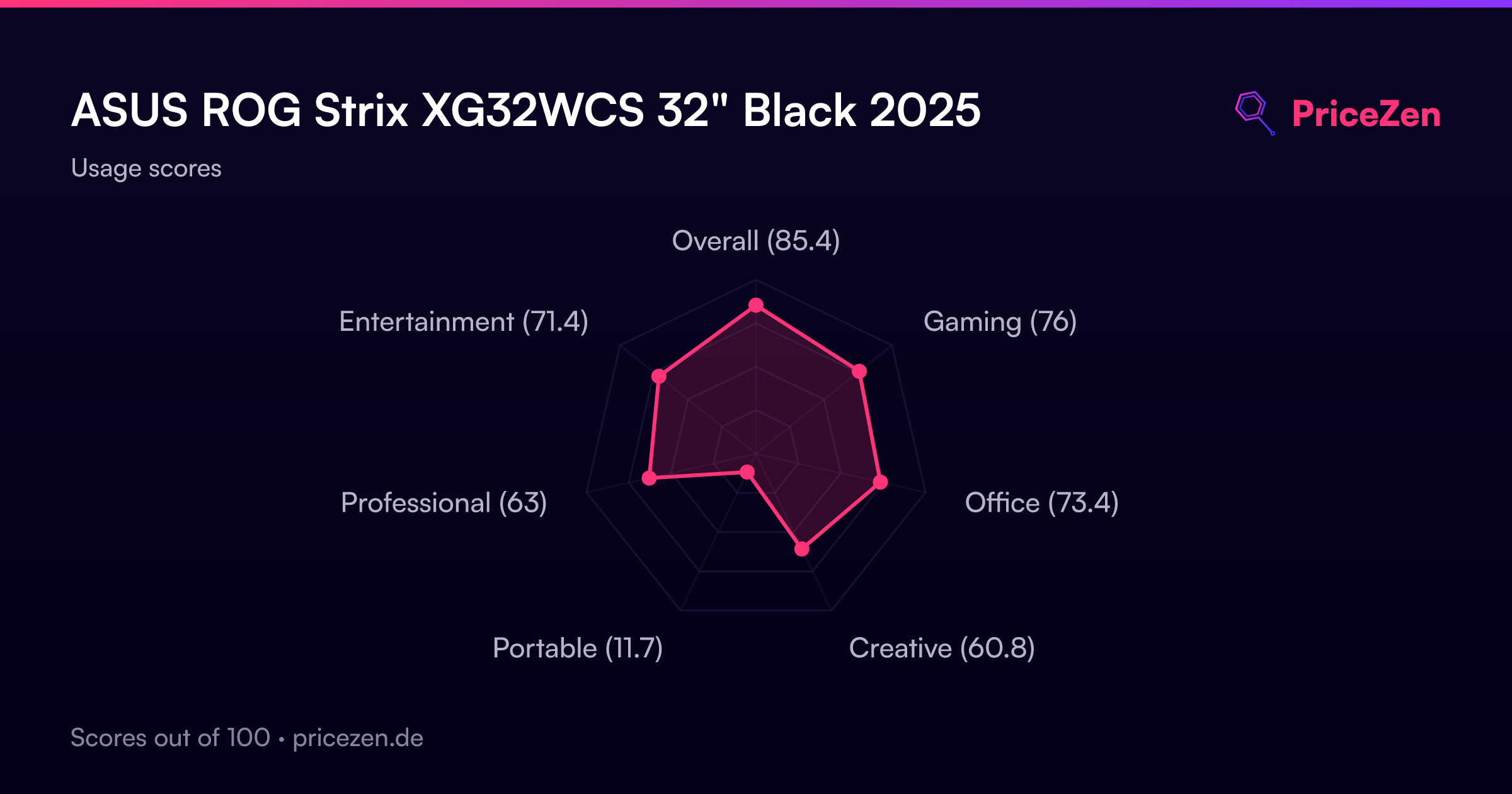
Usage Scores
- Overall85.4
- Gaming76
- Office73.4
- Creative60.8
- Portable11.7
- Professional63
- Entertainment71.4