BenQ DesignVue PD2705U 27" Black 2022
Factory-calibrated to 99% Rec.709 and sRGB with 10-bit color depth and HDR10, the 27-inch 4K IPS panel provides consistent color accuracy for proofing work. A fully ergonomic stand with height, tilt, swivel, and pivot, along with PIP/PBP mode, streamlines multi-source workflows via USB-C one-cable connectivity. This monitor best suits graphic designers, photo editors, and CAD drafters who need precise desktop color fidelity rather than portability.

No current retailer price


Snapshot
The 30-Second Version
The BenQ DesignVue PD2705U is a 27-inch 4K IPS monitor for designers and editors, with 99% sRGB and Rec.709 coverage, 10-bit color, USB-C and a KVM switch. It ranks near the top of its category for color, display quality and ergonomics, but the 60Hz panel makes it a weak gaming choice. Currently USD 694 in the US and CAD 400 to CAD 640 in Canada.
Pros & Cons
Pros
- 99% sRGB and 99% Rec.709 with 10-bit color 91st
- Sharp 27-inch 4K IPS panel, top-tier display ranking 88th
- Excellent ergonomics: height, tilt, swivel, pivot, VESA 100x100 87th
- USB-C, KVM switch and PIP/PBP for two-machine desks 85th
- Low 28W power draw
Cons
- 60Hz and 5ms make it a poor gaming pick
- Only one HDMI and one DisplayPort
- 350 nits limits what HDR10 can actually do
- Heavy at 9300g, not something you move around
- Wide CAD price spread means you can overpay easily
The proof
Performance
The color and display scores are where this thing earns its keep. Color ranks at the 88th percentile and display at the 87th, which puts it among the better panels in the category. In practice, 99% sRGB plus 99% Rec.709 with 10-bit output means web assets, print prep and standard-definition video timelines land where you expect them to. 350 nits is fine for a normal office or studio, though HDR10 here is more of a checkbox than a reason to buy. There's no local dimming story in the specs, so don't expect HDR highlights to punch.
Performance, on the other hand, sits at the 36th percentile, and that's the 60Hz refresh rate and 5ms response time doing the damage. For spreadsheets, Figma, Lightroom and Premiere, none of that matters. For anything fast-moving, it does. FreeSync helps with tearing but it can't invent frames. Our feature score of 85 is the counterweight: PIP/PBP, a KVM switch, USB-C, HDMI, DisplayPort, built-in speakers and a headphone jack mean this monitor pulls real double duty as a desk hub. Ergonomics rank at the 91st percentile with height, tilt, swivel, pivot and VESA 100x100, so portrait mode for long documents or code is on the table. Power draw is a modest 28W.
Specifications
Full Specifications
Display
| Size | 27" |
| Resolution | 3840x2160 (4K UHD) |
| Panel Type | IPS |
| Aspect Ratio | 16:9 |
| Curved | No |
Performance
| Refresh Rate | 60 Hz |
| Response Time | 5 |
| Adaptive Sync | FreeSync |
Color & HDR
| Brightness | 350 nits |
| Color Gamut | 99% Rec.709, 99% sRGB |
| Color Depth | 10-bit |
| HDR | HDR10 |
| HDR Support | HDR10 |
Connectivity
| HDMI Ports | 1 |
| DisplayPort | 1 |
| USB-C | 1 |
| Speakers | Yes |
| Headphone Jack | Yes |
Ergonomics
| Height Adjustable | Yes |
| Tilt | Yes |
| Swivel | Yes |
| Pivot | Yes |
| VESA Mount | 100x100 |
Features
| PIP/PBP | Yes |
| Power | 28 |
| Weight | 9.3 kg / 20.5 lbs |
vs Competition
Against the other 27-inch options in our data, the split is clean. The ASUS ROG Strix XG27UCDMG 27" and the MSI MAG 271QPX QD-OLED E2 27" are the ones to look at if you game at all, because the PD2705U's performance ranking of 36 out of 100 is a hard ceiling no amount of color accuracy fixes. The BenQ wins on the things those don't prioritize as heavily in our model: an ergonomic score that is one of the best, a feature set with KVM and PIP/PBP, and documented 99% sRGB and Rec.709 coverage that matters if your output goes to clients rather than a scoreboard.
The bigger screens are a different conversation. The LG UltraGear 45GX950A-B 45", Dell UltraSharp U4025QW 39.7" and Alienware AW-Series AW3425DW 34" all give you far more horizontal room than a 27-inch 16:9 panel can. If your workflow is a giant timeline or three windows side by side, cross-shop those first. If you want a compact, sharp, color-trustworthy panel that fits a normal desk and pivots to portrait, the BenQ's compact score, which is above average, and 4K density make a stronger case than any of them.
| Spec | BenQ DesignVue PD2705U 27" | ASUS ROG Strix XG27UCDMG 27" | LG UltraGear 45GX950A-B 45" | Dell UltraSharp U4025QW 39.7" | Alienware AW-Series AW3425DW 34" | MSI MAG 271QPX QD-OLED E2 27" |
|---|---|---|---|---|---|---|
| Screen Size | 27 | 27 | 45 | 39.7 | 34 | 27 |
| Resolution | 3840 x 2160 | 3840 x 2160 | 5120 x 2160 | 5120 x 2160 | 3440 x 1440 | 2560 x 1440 |
| Panel Type | IPS | QD-OLED | OLED | IPS | QD-OLED | QD-OLED |
| Refresh Rate | 60 | 240 | 330 | 120 | 240 | 240 |
| Response Time Ms | 5 | 0.03 | 0.03 | 5 | 0.03 | 0.03 |
| Adaptive Sync | FreeSync | FreeSync Premium Pro | FreeSync Premium Pro | Adaptive-Sync | FreeSync Premium Pro | FreeSync Premium Pro |
| Hdr | HDR10 | DisplayHDR True Black 400 | DisplayHDR True Black 400 | HDR600 | HDR400 | DisplayHDR True Black 400 |
| Compare | Compare | Compare | Compare | Compare |
| Product | Color | Portability | Display | Feature | Performance | Connectivity |
|---|---|---|---|---|---|---|
| BenQ DesignVue PD2705U 27" | 88.3 | 76.5 | 87 | 85 | 35.8 | 70.2 |
| ASUS ROG Strix XG27UCDMG 27" Compare | 96.5 | 57.4 | 97.7 | 85 | 97.9 | 81.1 |
| LG UltraGear 45GX950A-B 45" Compare | 99.4 | 76.5 | 99.7 | 96.3 | 99.4 | 96.9 |
| Dell UltraSharp U4025QW 39.7" Compare | 97.9 | 76.5 | 98.6 | 96.3 | 56.1 | 99.3 |
| Alienware AW-Series AW3425DW 34" Compare | 98.9 | 73.9 | 84.1 | 96.3 | 97.9 | 95.4 |
| MSI MAG 271QPX QD-OLED E2 27" Compare | 99.2 | 57.4 | 73.4 | 85 | 97.9 | 81.1 |
Price
Value & Pricing
At USD 694 there's a single US listing in our data, currently at Amazon, so there's not much shopping around to do stateside. Canada is the interesting one: we track this across three listings ranging from CAD 400 to CAD 640, a CAD 240 spread for the same monitor. Some of that comes down to refurbished versus new stock, so read the listing condition carefully before you click buy. At the bottom of that CAD range this is a genuinely good deal for a color-accurate 4K panel with a KVM switch. At the top, you're paying a premium that the 60Hz panel doesn't really justify. Cross-shop the ASUS ROG Strix XG27UCDMG 27" and MSI MAG 271QPX QD-OLED E2 27" if your budget stretches and your priorities include motion.
Read more
Overview
The BenQ DesignVue PD2705U is a 27-inch 4K IPS monitor built for people who care more about accurate color than frame rates. It sits in the mid-range of our 25 to 29 inch monitor category, currently listed at USD 694 in the US and anywhere from CAD 400 to CAD 640 across Canadian listings. That's designer-monitor money, not gaming-monitor money, and the spec sheet makes the priorities pretty obvious.
You get a 3840 x 2160 panel with 99% sRGB and 99% Rec.709 coverage, 10-bit color, HDR10 support and 350 nits of brightness. The refresh rate is 60Hz with a 5ms response time and FreeSync. So if you're searching for a 4K monitor for photo editing, video work or design, this is aimed squarely at you. If you're searching for a 4K gaming monitor, keep scrolling.
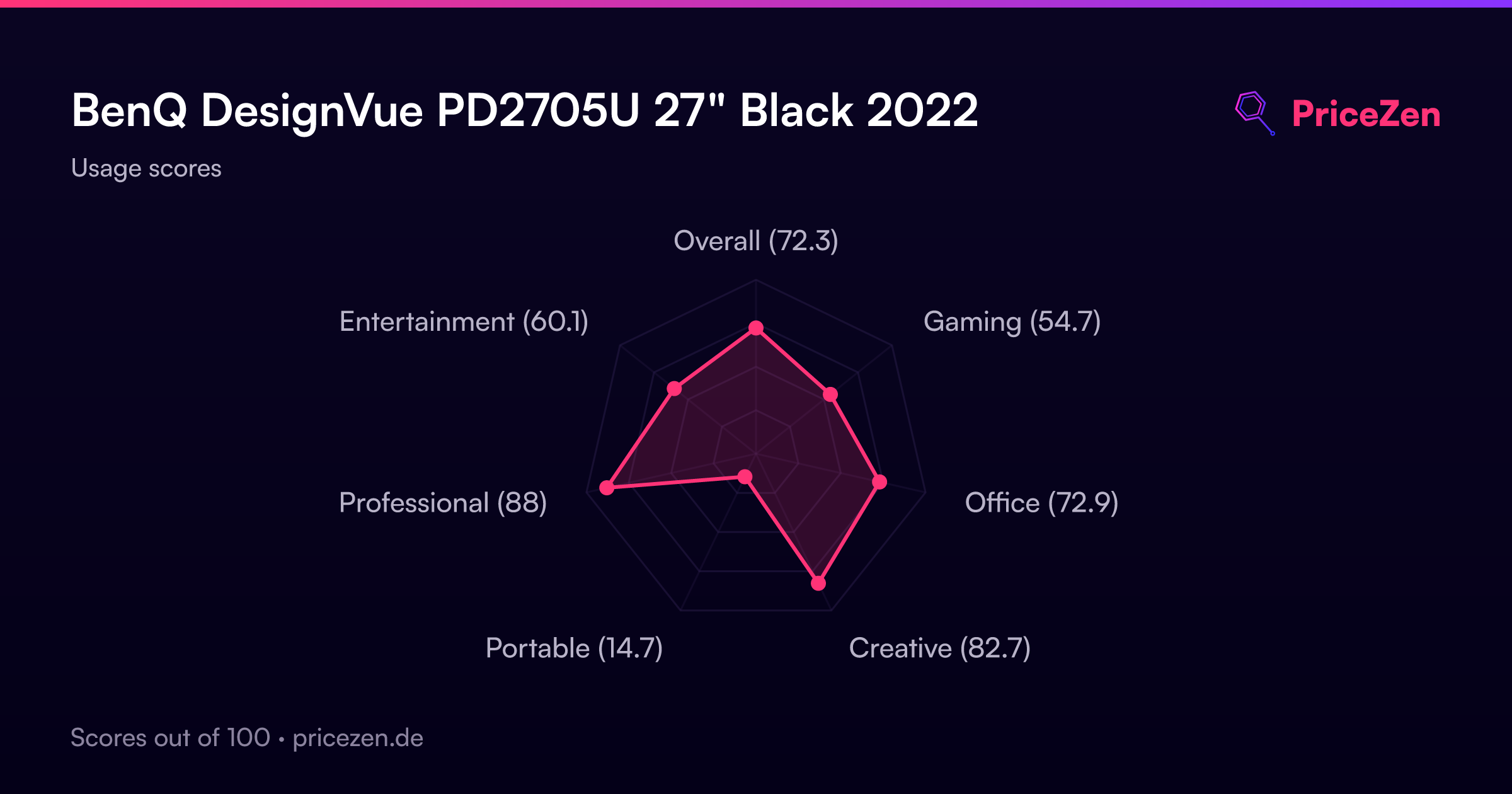
We collect specs, prices and owner feedback from a pile of stores with our own automated system, then compare every product against the rest of its category and rank it with our scoring model built from specs and external benchmarks. Nobody can pay us to say something nice. On that model, the PD2705U lands at 85.3/100 for professional use and 80.4/100 for creative work, with a total score of 69.3/100. Those numbers tell the story better than any marketing copy: strong work display, weak all-rounder.
Common Questions
Q: Is the BenQ PD2705U good for gaming?
Not really. It's a 60Hz 4K monitor with a 5ms response time and FreeSync, which puts its performance ranking well below average in our category data. For gaming at 27 inches, the ASUS ROG Strix XG27UCDMG or MSI MAG 271QPX QD-OLED E2 are better fits.
Q: Is the BenQ DesignVue PD2705U good for photo and video editing?
Yes, that's exactly what it's for. The 27-inch 4K IPS panel covers 99% sRGB and 99% Rec.709 with 10-bit color, and our scoring model gives it 80.4/100 for creative work and 85.3/100 for professional use.
Q: Does the PD2705U work with a MacBook over USB-C?
It has a USB-C port alongside HDMI and DisplayPort, so a single-cable connection to a USB-C laptop is supported. The built-in KVM switch and PIP/PBP also let you run two machines from one keyboard and mouse.
Q: Can the BenQ PD2705U rotate into portrait mode?
Yes. It supports pivot along with height, tilt and swivel adjustment, plus VESA 100x100 mounting, which is why its ergonomic ranking sits at the 91st percentile in our data.
Who Should Skip This
Skip this if you game, edit high-frame-rate footage, or want HDR that actually looks like HDR. The 60Hz refresh, 5ms response and 350-nit ceiling are real limits, and the LG UltraGear 45GX950A-B 45", ASUS ROG Strix XG27UCDMG 27" or MSI MAG 271QPX QD-OLED E2 27" are the direction to look instead. Also skip it if you need serious screen width for sprawling timelines or multi-window layouts, where the Dell UltraSharp U4025QW 39.7" and Alienware AW-Series AW3425DW 34" make more sense. And at 9300g with a portable score of 13.2/100, this is not a monitor you take anywhere. It lives on a desk or on a VESA arm, and that's it.
Verdict
Buy it if you do color-sensitive work on a normal-sized desk and you don't game. The 4K IPS panel, 99% sRGB and Rec.709 coverage, 10-bit color, full ergonomic adjustment and the USB-C plus KVM combo add up to a monitor that quietly makes a working day easier. Our professional score of 85.3/100 backs that up.
Don't buy it if you want one screen for everything. A 69.3/100 total score is the honest summary of a specialist: brilliant at its job, mediocre outside it. And if you're in Canada, hunt for the lower end of that CAD 400 to CAD 640 range rather than paying the top number.
Usage Scores
- Overall69.3
- Gaming54.1
- Office69.1
- Creative80.4
- Portable13.2
- Professional85.3
- Entertainment59.5