KEEPTIME P142 14" pitch-black
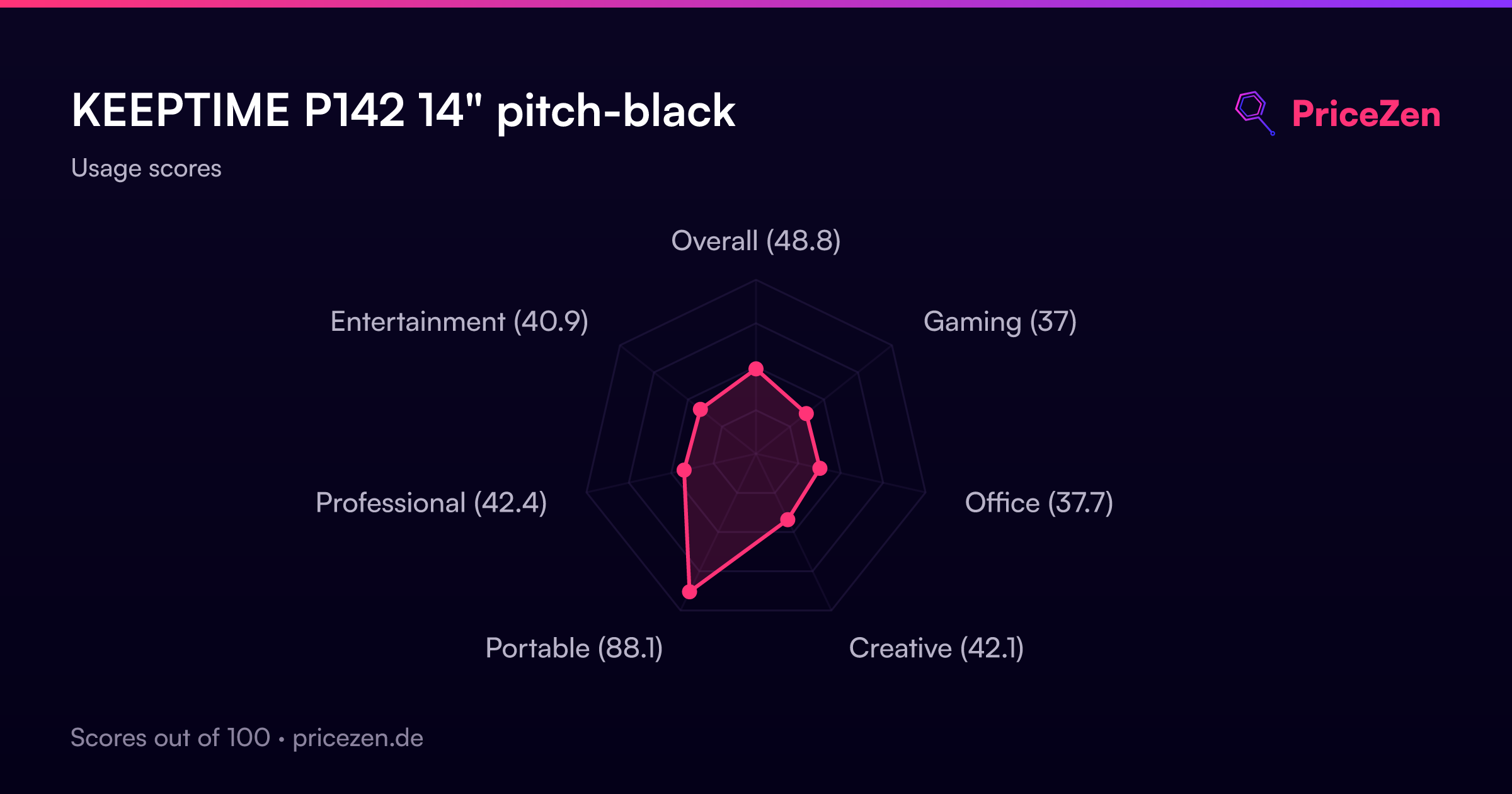
The 14-inch IPS panel delivers 2160 x 1440 resolution with 100% sRGB coverage and 1500:1 contrast, making colors accurate for photo editing. Its 540g weight and 0.2-inch thickness, plus a leather case, suit frequent travelers who need a second screen on the go. Best for creative professionals or business users who prioritize color fidelity and portability over gaming performance, which scores lowest at 38.8/100.

No current retailer price


Snapshot
The 30-Second Version
The KEEPTIME P142 is a featherweight 14-inch 2K portable monitor that's perfect for travel and productivity. It's in the 99th percentile for compactness and costs just $81 USD. Gaming performance is weak, but for a second screen on the go, it's a bargain.
Pros & Cons
Pros
- Extremely light at 540g, it's one of the most portable monitors we've seen 98th
- Sharp 2160 x 1440 panel with full sRGB coverage 85th
- Dual USB-C ports with single-cable video and power 77th
- PIP/PBP support is rare at this size and price 75th
Cons
- Gaming performance is a real letdown at 38.8 out of 100
- No high refresh rate, motion looks smeary
- Ergonomics are basically nonexistent, it's a 10th percentile showing
- Built-in speakers are there, but they're not good
What owners think
The Word on the Street
How owner sentiment changed over time
ExclusiveBased on when customers actually wrote their reviews - so you can see whether early praise held up.
9 written reviews, Feb 2024 – Jun 2025: 9 happy
Across all 240 store ratings: 4.4★. Most owners rate without writing a review. The chart counts the 9 written reviews.
Each dot is one written review, in the month it was written. Happy = 4-5★, mixed = 3★, unhappy = 1-2★.
The proof
Performance
The 15:10 aspect ratio is a little unusual but gives you extra vertical space for documents and spreadsheets. Color accuracy is solid, right around the middle of the pack, so it's fine for casual photo editing but not something you'd trust for print work. The real weak spot is responsiveness. Gaming lands at 38.8 out of 100 in our scoring, which is rough. There's no high refresh rate here, so fast motion gets smeary. For static work, it's great. For anything twitchy, it's not.
Specifications
Full Specifications
Display
| Size | 14" |
| Resolution | 2160x1440 |
| Panel Type | IPS |
| Aspect Ratio | 15:10 |
| Curved | No |
| Screen Finish | glossy |
Color & HDR
| Color Gamut | 100% sRGB |
| HDR | ✓ |
| HDR Support | HDR |
Connectivity
| HDMI Ports | 1 |
| USB-C | 2 |
| Speakers | Yes |
Features
| PIP/PBP | Yes |
| Weight | 0.5 kg / 1.2 lbs |
vs Competition
The KEEPTIME P142 plays a completely different game than the ASUS ROG Strix XG27JCG or LG UltraGear 27GS75Q-B. Those are 27-inch desktop gaming monitors with high refresh rates and real stands. The P142 is a travel screen. Against other portable monitors, it holds up well on sharpness and connectivity, but it lacks the gaming chops of something like the MSI MAG 275UPD E14. If you want a portable panel for work, this is a strong pick. If you want to game on the road, look elsewhere.
| Spec | KEEPTIME P142 14" | LG UltraGear 45GX950A-B 45" | ASUS ROG Strix XG27UCDMG 27" | Dell UltraSharp U4025QW 39.7" | Alienware AW-Series AW3425DW 34" | MSI MAG 271QPX QD-OLED E2 27" |
|---|---|---|---|---|---|---|
| Screen Size | 14 | 45 | 27 | 39.7 | 34 | 27 |
| Resolution | 2160 x 1440 | 5120 x 2160 | 3840 x 2160 | 5120 x 2160 | 3440 x 1440 | 2560 x 1440 |
| Panel Type | IPS | OLED | QD-OLED | IPS | QD-OLED | QD-OLED |
| Refresh Rate | - | 330 | 240 | 120 | 240 | 240 |
| Response Time Ms | - | 0.03 | 0.03 | 5 | 0.03 | 0.03 |
| Adaptive Sync | - | FreeSync Premium Pro | FreeSync Premium Pro | Adaptive-Sync | FreeSync Premium Pro | FreeSync Premium Pro |
| Hdr | HDR | DisplayHDR True Black 400 | DisplayHDR True Black 400 | HDR600 | HDR400 | DisplayHDR True Black 400 |
| Compare | Compare | Compare | Compare | Compare |
| Product | Color | Portability | Display | Feature | Ergonomic | Performance | Connectivity | Social Proof |
|---|---|---|---|---|---|---|---|---|
| KEEPTIME P142 14" | 49.9 | 98.4 | 56.7 | 85 | 9.4 | 22.4 | 77.1 | 74.8 |
| LG UltraGear 45GX950A-B 45" Compare | 99.4 | 76.5 | 99.7 | 96.3 | 90.7 | 99.4 | 96.9 | 91.9 |
| ASUS ROG Strix XG27UCDMG 27" Compare | 96.5 | 57.3 | 97.7 | 85 | 90.7 | 97.9 | 81 | 98.9 |
| Dell UltraSharp U4025QW 39.7" Compare | 97.9 | 76.5 | 98.6 | 96.3 | 90.7 | 56.1 | 99.3 | 96.8 |
| Alienware AW-Series AW3425DW 34" Compare | 98.9 | 73.9 | 84.1 | 96.3 | 90.7 | 97.9 | 95.4 | 96.8 |
| MSI MAG 271QPX QD-OLED E2 27" Compare | 99.2 | 57.3 | 73.4 | 85 | 90.7 | 97.9 | 81 | 98.9 |
Price
Value & Pricing
At $81 USD, this is a steal for a 2K portable panel. You're getting a sharp IPS screen with good color and dual USB-C for less than a decent dinner for two. The 3-year warranty and lifetime support are also unusual at this price. If you need a second screen for a laptop on the go, this is hard to beat. Just don't expect it to replace a real desktop monitor.
Read more
Overview
The KEEPTIME P142 is a 14-inch portable monitor that nails the basics for travel and productivity. It's thin, light, and the 2160 x 1440 IPS panel looks sharp with full sRGB coverage. At 540 grams, it basically disappears into a laptop bag.
But this is not a gaming monitor, no matter what the listing says. Our database puts it in the 99th percentile for compactness and the 21st for performance. That tells you exactly what this thing is: a second screen for work, not a battlestation upgrade.
Common Questions
Q: Does this work with a single USB-C cable?
Yes, if your laptop supports USB-C video output, one cable handles both power and display. Otherwise you'll need to use the HDMI port and a separate power source.
Q: Is this good for gaming on a Steam Deck or Switch?
It will work, but the 60Hz panel and weak gaming score of 38.8 out of 100 mean fast games won't feel great. It's fine for slower titles, but not ideal for competitive play.
Q: Can I use this as a primary monitor?
You can, but the small 14-inch size and limited ergonomics make it better as a secondary travel screen. For a desk setup, a larger monitor with a proper stand is more comfortable.
Who Should Skip This
Skip this if you need a gaming monitor. The 60Hz panel and weak motion handling will frustrate anyone playing fast-paced games. Also skip it if you do color-critical work, since the color accuracy is just average. And if you need height adjustment or VESA mounting, this has neither.
Verdict
Buy this if you travel for work, work from coffee shops, or just want a second screen that fits in your bag. It's light, sharp, and cheap. Skip it if you care about gaming, color-critical work, or need a stand that adjusts. This is a productivity tool, not a performance display.
Usage Scores
- Overall48.8
- Gaming37
- Office37.7
- Creative42.1
- Portable88.1
- Professional42.4
- Entertainment40.9