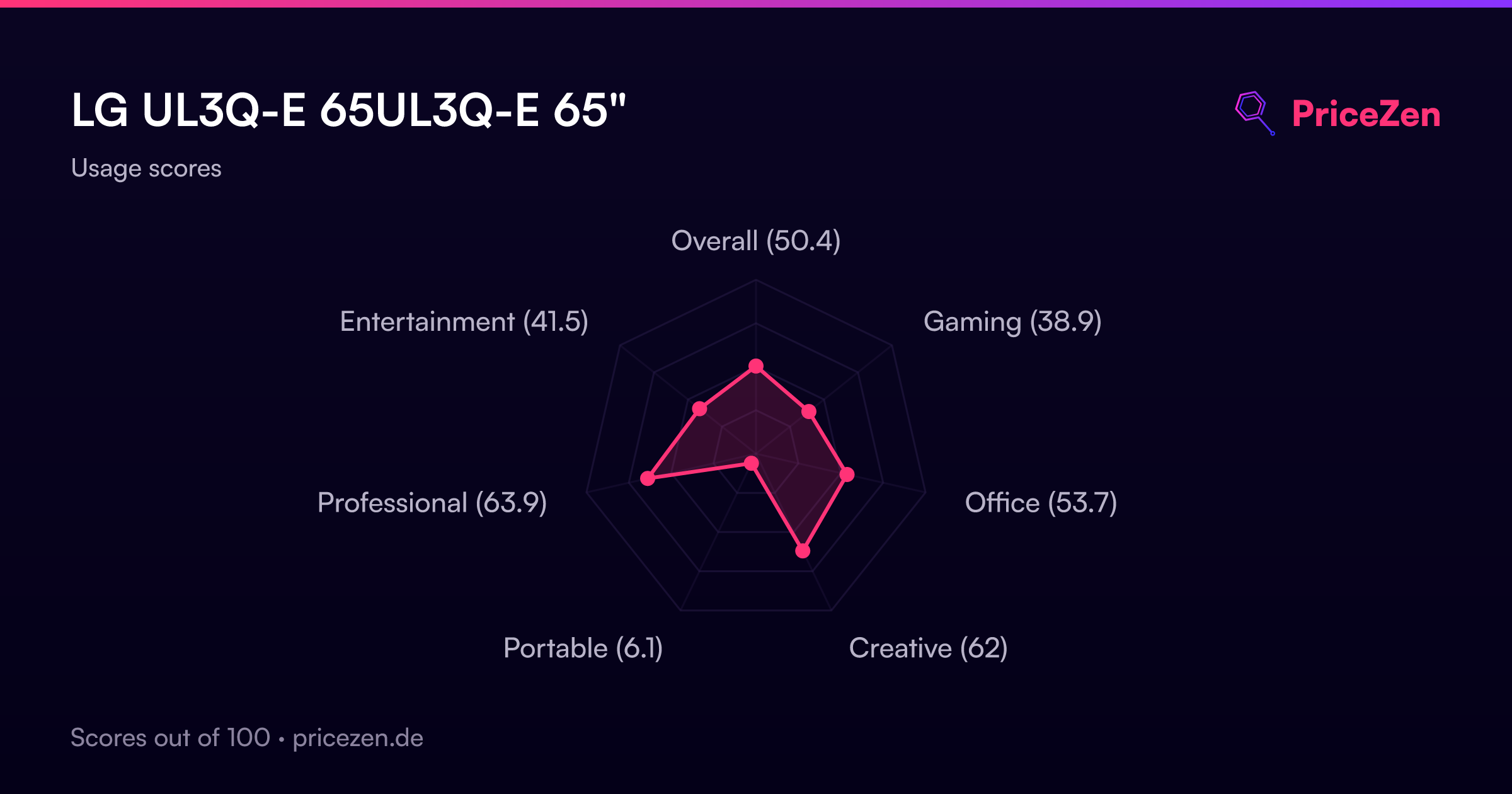
LG UL3Q-E 65UL3Q-E 65"
The 65-inch 4K ADS LCD panel delivers 350 nits brightness within a slim 10.8mm uniform bezel, while IP LAN, RS-232, Wi-Fi, and Bluetooth enable remote control for commercial deployments. Its webOS 6.1 platform and 16/7 duty cycle ensure continuous digital signage operation in both portrait and landscape orientations. This display is best for corporate, retail, and hospitality settings needing centralized, always-on messaging with robust connectivity options.

No current retailer price











Snapshot
The 30-Second Version
A 65-inch 4K signage beast with a thin bezel and webOS brains. Just don't expect it to be fast or bright enough for a sunlit window.
Pros & Cons
Pros
- Huge 65-inch 4K panel with a super thin 10.8mm bezel 96th
- Built for 16/7 operation, so it won't die after a year of lobby duty 80th
- webOS 6.1 makes content management genuinely easy 71st
- IP LAN and RS-232 control means IT can manage a whole fleet remotely
Cons
- 60Hz and 8ms response time is slow for anything interactive
- 350 nits is dim for bright retail windows
- Only 80% DCI-P3, so colors won't pop like a consumer OLED
- Heavy at 16.5kg and not exactly portable
What owners think
The Word on the Street
How owner sentiment changed over time
ExclusiveBased on when customers actually wrote their reviews - so you can see whether early praise held up.
1 written review, Dec 2025: 1 happy
Across all 1 store ratings: 5.0★. The chart counts the 1 written review.
Each dot is one written review, in the month it was written. Happy = 4-5★, mixed = 3★, unhappy = 1-2★.
The proof
Performance
Here's the surprise: the display itself is fantastic, sitting in the 96th percentile for size and resolution. But the performance score is a brutal 6th percentile. 60Hz, 8ms response, 350 nits. That's fine for a menu board or a welcome screen, but it's not going to impress anyone trying to edit video or play fast games. The 80% DCI-P3 coverage is decent for signage, but it's not a color-critical panel.
Specifications
Full Specifications
Display
| Size | 65" |
| Resolution | 3840x2160 (4K UHD) |
| Panel Type | IPS |
| Aspect Ratio | 16:9 |
Performance
| Refresh Rate | 60 Hz |
| Response Time | 8 |
Color & HDR
| Brightness | 350 nits |
| Color Gamut | 80% DCI-P3 |
| Color Depth | 8-bit + FRC |
Connectivity
| HDMI Ports | 3 |
| Speakers | Yes |
| Headphone Jack | Yes |
Ergonomics
| Height Adjustable | No |
| Tilt | Yes |
| Swivel | Yes |
| Pivot | Yes |
| VESA Mount | 300x300 |
Features
| Webcam | No |
| Touchscreen | No |
| PIP/PBP | No |
| Power | 114 |
| Weight | 16.5 kg / 36.4 lbs |
vs Competition
The UL3Q-E isn't competing with the ASUS ROG Strix XG27UCDMG or the Samsung Odyssey G60SD. Those are 27-inch OLED gaming monitors with 240Hz+ refresh rates. The real comparison is against other commercial displays. The Dell UltraSharp U4025QW is a 40-inch ultrawide with better color accuracy for creative work, but it's smaller and pricier. The Gigabyte M Series OLED MO27U2 SA is a 27-inch OLED that destroys this LG in contrast and speed, but it's not a signage panel. For a 65-inch commercial screen, the LG's main edge is its size, thin bezel, and webOS management.
| Spec | LG UL3Q-E 65UL3Q-E 65" | ASUS ROG Strix XG27UCDMG 27" | Dell UltraSharp U4025QW 39.7" | MSI MAG 271QPX QD-OLED E2 27" | Alienware AW-Series AW3425DW 34" | Samsung Odyssey G60SD 27" |
|---|---|---|---|---|---|---|
| Screen Size | 65 | 27 | 39.70000076293945 | 27 | 34 | 27 |
| Resolution | 3840 x 2160 | 3840 x 2160 | 5120 x 2160 | 2560 x 1440 | 3440 x 1440 | 2560 x 1440 |
| Panel Type | IPS | OLED | IPS | QD-OLED | QD-OLED | OLED |
| Refresh Rate | 60 | 240 | 120 | 240 | 240 | 360 |
| Response Time Ms | 8 | 0.029999999329447746 | 5 | 0.029999999329447746 | 0.029999999329447746 | 0.029999999329447746 |
| Adaptive Sync | - | FreeSync Premium Pro | Adaptive-Sync | FreeSync Premium Pro | FreeSync Premium Pro | FreeSync Premium Pro |
| Hdr | - | DisplayHDR True Black 400 | DisplayHDR 600 | DisplayHDR True Black 400 | DisplayHDR 400 True Black | HDR10+ |
| Compare | Compare | Compare | Compare | Compare |
| Product | Color | Portability | Display | Feature | Ergonomic | Performance | Connectivity | Social Proof |
|---|---|---|---|---|---|---|---|---|
| LG UL3Q-E 65UL3Q-E 65" | 80.1 | 20.8 | 95.5 | 19.2 | 70.9 | 6.2 | 58.2 | 27 |
| ASUS ROG Strix XG27UCDMG 27" Compare | 96.1 | 57.5 | 97.9 | 83.7 | 90.8 | 98 | 81.3 | 98.9 |
| Dell UltraSharp U4025QW 39.7" Compare | 98.2 | 76.5 | 98.7 | 95.7 | 90.8 | 56.1 | 99.3 | 96.9 |
| MSI MAG 271QPX QD-OLED E2 27" Compare | 99.1 | 57.5 | 77.3 | 83.7 | 90.8 | 98 | 81.3 | 98.9 |
| Alienware AW-Series AW3425DW 34" Compare | 99 | 73.9 | 85.7 | 89.7 | 90.8 | 98 | 95.5 | 96.9 |
| Samsung Odyssey G60SD 27" Compare | 90.3 | 39.6 | 77.3 | 66.9 | 90.8 | 99.5 | 87.6 | 92.1 |
Price
Value & Pricing
At $918 USD, this is a fair price for a commercial 65-inch 4K panel with webOS and remote management. You're not paying for gaming specs, you're paying for reliability and control. If you need a screen that runs all day without babysitting, this earns its keep.
Read more
Overview
The LG UL3Q-E is a 65-inch 4K commercial display built for lobbies, boardrooms, and retail walls, not your gaming desk. It's got a gorgeous big panel and a bezel thin enough to make video walls look seamless. But don't mistake it for a high-refresh monitor. This thing runs at 60Hz and is all about signage, not speed.
Common Questions
Q: Can I use this as a regular TV?
Yes, it has HDMI and speakers, but it's built for signage. The 60Hz panel and 350 nits are fine for a dim conference room, not a bright living room.
Q: Is the bezel really that thin?
10.8mm uniform bezel. It's designed so multiple panels can sit side by side without a fat gap. For a single screen, it just looks clean.
Q: Does it support portrait mode?
Yes, it does portrait and landscape. The VESA 300x300 mount and built-in orientation sensor make flipping it easy.
Who Should Skip This
If you're looking for a gaming monitor or a color-accurate creative display, this isn't it. Go get an OLED like the Gigabyte MO27U2 or a Dell UltraSharp instead. This LG is for signage, not speed or color grading.
Verdict
Buy the LG UL3Q-E if you need a reliable, big, 4K signage display that your IT team can control remotely. Skip it if you want a fast, color-accurate monitor for gaming or creative work. It's a workhorse, not a racehorse.
Usage Scores
- Overall50.3
- Gaming38.9
- Office53.7
- Creative64.7
- Portable6
- Professional62.9
- Entertainment41.6