MSI MP273AW 27" Matte White 2024
The 100Hz refresh rate and 1ms MPRT response on a 27-inch IPS panel provide noticeably smoother scrolling and motion than standard 60Hz office displays. Its tool-free assembly, built-in speakers, and TUV-certified eye protection add practical convenience for all-day use without extra clutter. This monitor is best for office workers and students who want a fluid, easy-to-set-up display for productivity and light media, not color-critical creative work.

No current retailer price


Snapshot
The 30-Second Version
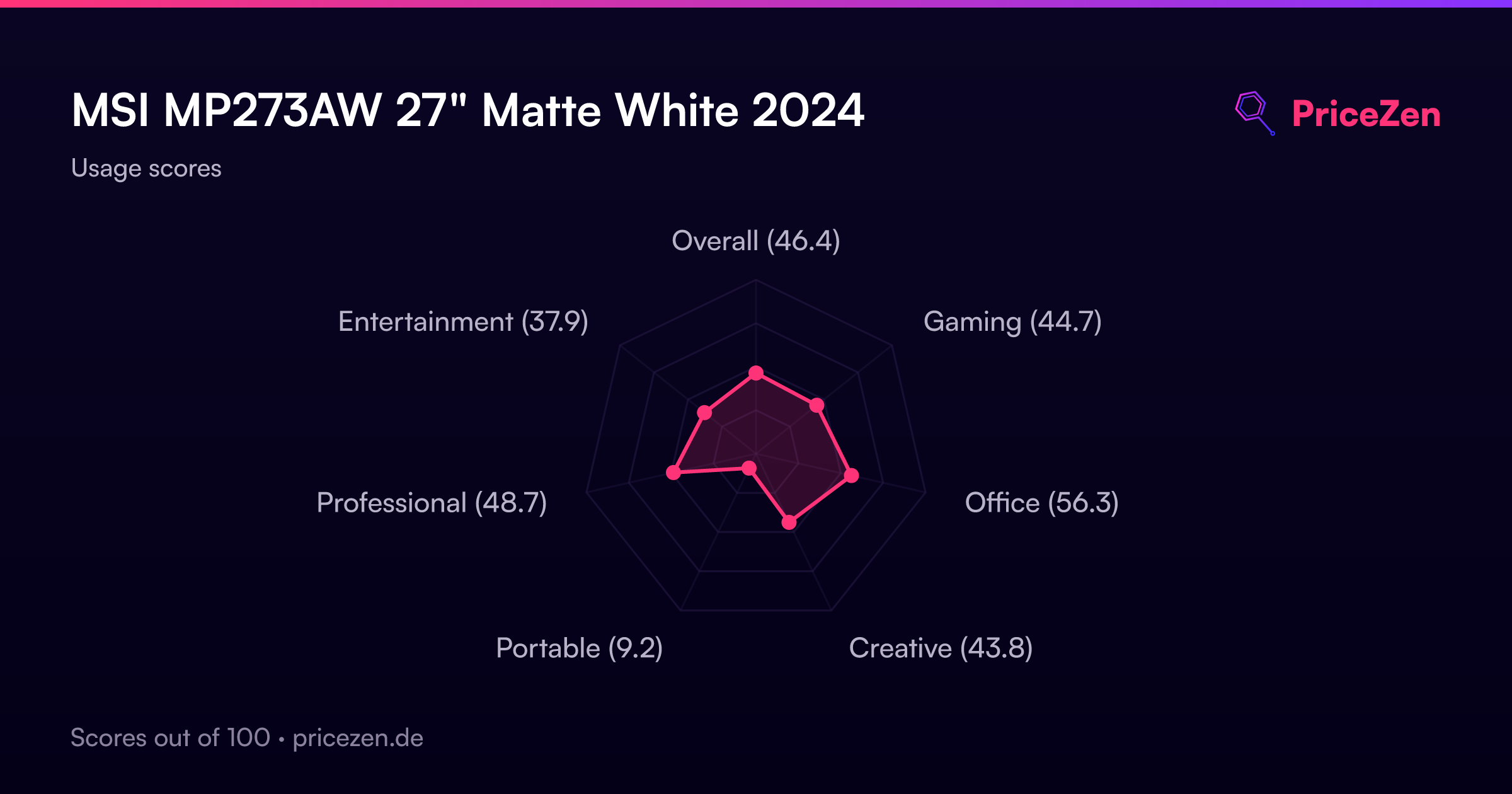
A 91st-percentile ergonomic stand attached to a thoroughly average 27-inch 1080p panel. The 100Hz refresh and full height/swivel/pivot adjustment make it a decent office pick at 56.3/100, but the low resolution and thin review history keep the overall score at 46.3/100.
Pros & Cons
Pros
- Stand is one of the best we track: height, tilt, swivel and pivot, 91st percentile for ergonomics 91st
- 100Hz refresh with FreeSync makes everyday desktop work noticeably smoother than 60Hz 68th
- VESA 75x75 mount plus a 4200g panel means arms and dual-monitor setups are easy
- Best suited to office work at 56.3/100, its highest category score
- IPS panel with TUV-certified eye protection, and owners say their eyes feel less tired
Cons
- 1920 x 1080 on 27 inches is low pixel density, display ranks only mid-pack
- Feature set is a weak spot at the 21st percentile: one HDMI, one DisplayPort, no extras
- Only 4 owner reviews behind the 4.3/5 rating, social proof lags behind most monitors
- One buyer reports the stand wobbles badly despite the full adjustment range
- Built-in speakers exist, but owners call them cheap sounding
What owners think
The Word on the Street
How owner sentiment changed over time
ExclusiveBased on when customers actually wrote their reviews - so you can see whether early praise held up.
2 written reviews, Jan – Apr 2025: 1 happy, 1 unhappy
Across all 4 store ratings: 4.3★. Most owners rate without writing a review. The chart counts the 2 written reviews.
Each dot is one written review, in the month it was written. Happy = 4-5★, mixed = 3★, unhappy = 1-2★.
The proof
Performance
100Hz with 1ms MPRT and 4ms gray-to-gray is the spec sheet doing the heavy lifting here, and it lands the MP273AW at the 68th percentile for performance, solidly above the midpoint without troubling the leaders. In plain terms: scrolling spreadsheets and dragging windows around feels smoother than a basic 60Hz office screen, and FreeSync keeps casual gaming from tearing. But 4ms GtG is not esports territory, and 1080p stretched across 27 inches means text edges are visibly softer than they'd be on a smaller or sharper panel.
Color is where expectations need adjusting. 106% sRGB in CIE 1976 sounds generous, but that measurement standard inflates the number compared to the older sRGB scale most people quote, and our color ranking puts this thing dead average at the 50th percentile. 300 nits is enough for a normal office, not for a sunlit room. The feature score is disappointing at the 21st percentile: you get built-in speakers, a headphone jack, one HDMI and one DisplayPort, and that's the list. No extras, no hub, nothing fancy.
Specifications
Full Specifications
Display
| Size | 27" |
| Resolution | 1920x1080 (Full HD) |
| Panel Type | IPS |
| Aspect Ratio | 16:9 |
| Curved | No |
| Screen Finish | matte |
Performance
| Refresh Rate | 100 Hz |
| Response Time | 1 |
| Adaptive Sync | FreeSync |
Color & HDR
| Brightness | 300 nits |
| Color Gamut | 106% sRGB (CIE 1976) |
| Color Depth | 8-bit |
Connectivity
| HDMI Ports | 1 |
| DisplayPort | 1 |
| Speakers | Yes |
| Headphone Jack | Yes |
Ergonomics
| Height Adjustable | Yes |
| Tilt | Yes |
| Swivel | Yes |
| Pivot | Yes |
| VESA Mount | 75x75 |
Features
| PIP/PBP | No |
| Weight | 4.2 kg / 9.3 lbs |
vs Competition
Here's the awkward part: the competitors our system surfaces alongside it are the ASUS ROG Strix XG27UCDMG 27", Alienware AW3425DW 34", Samsung Odyssey G60SD 27", LG UltraGear 32GX850A-B 32" and Gigabyte AORUS FO32U2 32", and none of them are shopping in this monitor's weight class. If you're cross-shopping any of those, you're looking for gaming performance, and the MP273AW's 100Hz, 4ms GtG and 68th-percentile performance score aren't going to win that argument. Where it does win is the boring stuff those panels often skip: a 91st-percentile ergonomic stand with pivot, and a 56.3/100 office score. Buy this for a desk job, not for a frag fest.
| Spec | MSI MP273AW 27" | LG UltraGear 45GX950A-B 45" | ASUS ROG Strix XG27UCDMG 27" | Dell UltraSharp U4025QW 39.7" | Alienware AW-Series AW3425DW 34" | Samsung Odyssey G60SD 27" |
|---|---|---|---|---|---|---|
| Screen Size | 27 | 45 | 27 | 39.70000076293945 | 34 | 27 |
| Resolution | 1920 x 1080 | 5120 x 2160 | 3840 x 2160 | 5120 x 2160 | 3440 x 1440 | 2560 x 1440 |
| Panel Type | IPS | OLED | OLED | IPS | QD-OLED | OLED |
| Refresh Rate | 100 | 330 | 240 | 120 | 240 | 360 |
| Response Time Ms | 1 | 0.029999999329447746 | 0.029999999329447746 | 5 | 0.029999999329447746 | 0.029999999329447746 |
| Adaptive Sync | FreeSync | FreeSync Premium Pro | FreeSync Premium Pro | Adaptive-Sync | FreeSync Premium Pro | FreeSync Premium Pro |
| Hdr | - | DisplayHDR True Black 400 | DisplayHDR True Black 400 | HDR600 | HDR400 | HDR10+ |
| Compare | Compare | Compare | Compare | Compare |
| Product | Color | Portability | Display | Feature | Performance | Connectivity | Social Proof |
|---|---|---|---|---|---|---|---|
| MSI MP273AW 27" | 50.2 | 35.3 | 50.7 | 21.3 | 67.8 | 43.3 | 12.1 |
| LG UltraGear 45GX950A-B 45" Compare | 99.4 | 76.6 | 99.7 | 96.3 | 99.4 | 96.9 | 92 |
| ASUS ROG Strix XG27UCDMG 27" Compare | 96.5 | 57.5 | 97.7 | 85.1 | 97.9 | 81.2 | 98.9 |
| Dell UltraSharp U4025QW 39.7" Compare | 97.9 | 76.6 | 98.6 | 96.3 | 56.1 | 99.3 | 96.8 |
| Alienware AW-Series AW3425DW 34" Compare | 98.9 | 74 | 84.1 | 96.3 | 97.9 | 95.4 | 96.8 |
| Samsung Odyssey G60SD 27" Compare | 90.8 | 39.5 | 73.6 | 70.2 | 99.5 | 87.6 | 92 |
Price
Value & Pricing
We track this one between USD 379 and USD 409 across two US listings, with a Canadian listing at CAD 383. Keep those currencies separate, they're not comparable numbers. Several of the listings we collect are 2-pack bundles that throw in a dual desk mount, which changes the math quite a bit if you're building a two-screen office setup, so check what you're actually buying before comparing prices. For a single unit at the top of that USD range, you're paying mostly for the stand and the white finish, because the panel itself is average by our rankings. At the lower end, or bundled, it starts making more sense.
Read more
Overview
91st percentile for ergonomics. That's the headline number on the MSI MP273AW, and it's a genuinely surprising one for a white office panel: height adjust, tilt, swivel and pivot all in one stand, plus VESA 75x75 if you'd rather bolt it to an arm. Our scoring model puts it at 56.3/100 for office use, its strongest category, against 48.7/100 for professional work and 46.3/100 overall.
The rest of the story is more ordinary. It's a 27-inch IPS panel running 1920 x 1080 at 100Hz with FreeSync, 300 nits and 106% sRGB coverage (CIE 1976) on an 8-bit panel. Display sits right at the middle of our rankings, color exactly average, connectivity slightly below. And the social proof score is a weak spot: 4.3/5 sounds fine until you see it comes from just 4 reviews.
Common Questions
Q: Is 1080p really okay on a 27-inch screen?
It's usable, but it's the main compromise. Our display ranking puts this panel at the 51st percentile, right in the middle of the pack, and stretching 1920 x 1080 across 27 inches means softer text than sharper panels. For spreadsheets and video it's fine. If you stare at small text all day, a higher-resolution screen will look cleaner.
Q: Can I actually game on this?
Casually, yes. You get 100Hz, FreeSync and 1ms MPRT with 4ms gray-to-gray, which lands it at the 68th percentile for performance, above average but well short of gaming-focused monitors. One owner games on it happily. For competitive shooters, the 4ms GtG and 100Hz ceiling will hold you back.
Q: Does the stand really adjust that much?
On paper, it's one of the best-equipped stands we track: height, tilt, swivel and pivot, plus VESA 75x75, good for the 91st percentile in ergonomics. One caveat from the owner side: a buyer reports significant wobble, so the range of motion doesn't guarantee rock-solid stability.
Who Should Skip This
Gamers chasing frames should walk away: 100Hz and 4ms GtG won't keep up with the Samsung Odyssey G60SD or ASUS ROG Strix XG27UCDMG crowd. Designers and photo editors should skip too, the color score sits at exactly the 50th percentile and 8-bit 1080p isn't a pro canvas, which explains the 48.7/100 professional rating. And if you need a screen to travel with, the portable score of 9.2/100 is one of the worst we've seen, which, fair enough, it's a 4200g desktop monitor. Anyone wanting USB hubs or extra features will also be disappointed by that 21st-percentile feature score.
Verdict
Our numbers tell a clear story: 56.3/100 for office work, 91st percentile ergonomics, and middling marks everywhere else. If your day is email, spreadsheets and the occasional lunchtime game, the MP273AW's fully adjustable stand and 100Hz panel are a real quality-of-life upgrade, and the eye-care certification has at least one owner swearing by it. Just go in knowing the 1080p resolution on 27 inches is the compromise you're accepting, and the 4-review sample size means we're all still learning how this thing holds up. Near USD 379, or in a bundle with the mount, we'd call it a reasonable office buy. At USD 409 solo, shop around.
Usage Scores
- Overall46.4
- Gaming44.7
- Office56.3
- Creative43.8
- Portable9.2
- Professional48.7
- Entertainment37.9