Acer EK220Q E3bi 21.5" Black
The 100Hz refresh rate and 1ms response time with AMD FreeSync deliver smooth, tear-free motion that stands out in this budget segment. Its near-bezel-less ZeroFrame design and VESA mountability offer clean, space-efficient multi-monitor setups. This monitor is best for home office users and casual gamers who want fluid visuals and eye-care features without a premium price.

No current retailer price
Snapshot
The 30-Second Version
The Acer EK220Q E3bi delivers a 100Hz refresh rate and 1ms response time for just $70, landing in the 68th percentile for performance. With a 4.7-star rating from 1,022 reviews, it's one of the best-reviewed budget monitors we've seen. The single HDMI port and 250-nit brightness are the main compromises.
Pros & Cons
Pros
- 100Hz refresh rate at a $70 price point is a steal 97th
- 1ms response time keeps motion blur minimal 68th
- 4.7-star rating from 1,022 reviews, 98th percentile social proof 68th
- IPS panel with 99% sRGB coverage for decent color
- VESA mount support and tilt from -5 to 20 degrees
Cons
- Single HDMI port, 22nd percentile for connectivity
- 250-nit brightness is weak for bright rooms
- Color performance in the 38th percentile, not for creators
- 21.5-inch screen feels cramped for multitasking
- No height adjustment, just tilt
What owners think
The Word on the Street
How owner sentiment changed over time
ExclusiveBased on when customers actually wrote their reviews - so you can see whether early praise held up.
Owners are as happy as early on: 90% lately, 97% in Apr – Jun 2025
Across all 1,042 store ratings: 4.7★. Most owners rate without writing a review. The chart counts the 249 written reviews with stars and their own date.
Show the numbers
| Period | Reviews | Happy | Mixed | Unhappy | Happy share |
|---|---|---|---|---|---|
| Apr – Jun 2025 | 30 | 29 | 1 | 0 | 97% |
| Jul – Sep 2025 | 44 | 40 | 2 | 2 | 91% |
| Oct – Dec 2025 | 50 | 46 | 3 | 1 | 92% |
| Jan – Mar 2026 | 51 | 46 | 2 | 3 | 90% |
| Apr – Jun 2026 | 43 | 42 | 1 | 0 | 98% |
| Jul – Sep 2026 | 31 | 28 | 3 | 0 | 90% |
Each column joins calendar quarters until it holds at least 10 reviews with stars and their own date. Happy = 4-5★, mixed = 3★, unhappy = 1-2★.
The proof
Performance
The headline here is the 100Hz refresh rate paired with a 1ms response time. That's a combo that lands this monitor in the 68th percentile for performance, which is solid for a sub-$100 display. FreeSync support means AMD GPU owners get tear-free gaming without much fuss. The 100Hz refresh rate makes everyday scrolling and fast-paced games feel noticeably smoother than the 60Hz panels most people are still using.
The IPS panel does the heavy lifting for viewing angles and color consistency, but the 250-nit brightness ceiling means this thing struggles in bright rooms. It's not a dealbreaker for a desk setup, but don't expect it to fight off sunlight. The 1920x1080 resolution on a 21.5-inch screen gives you a decent pixel density, so text stays crisp even if the overall display quality sits in the 22nd percentile.
Specifications
Full Specifications
Display
| Size | 21.5" |
| Resolution | 1920x1080 (Full HD) |
| Panel Type | IPS |
| Aspect Ratio | 16:9 |
| Curved | No |
Performance
| Refresh Rate | 100 Hz |
| Response Time | 1 |
| Adaptive Sync | FreeSync |
Color & HDR
| Brightness | 250 nits |
| Color Gamut | 99% sRGB |
Connectivity
| HDMI Ports | 1 |
| DisplayPort | 0 |
| USB-C | 0 |
| Speakers | No |
| Headphone Jack | No |
Ergonomics
| Height Adjustable | No |
| Tilt | Yes |
| VESA Mount | 100x100 |
Features
| Webcam | No |
| Touchscreen | No |
| Weight | 2.5 kg / 5.5 lbs |
vs Competition
Stacked against the ASUS TUF Gaming VG27AQL5A or the LG UltraGear 27GS75Q-B, the Acer EK220Q looks tiny and underpowered. Those competitors offer 27-inch panels, higher refresh rates, and far better connectivity. But they also cost three to four times as much. The Samsung Odyssey LS27BG402ENXGO brings better color and brightness, but again, you're paying a premium. The MSI MAG 274CF X24 is closer in spirit, but still a step up in price. For pure budget gaming, the Acer holds its own. For anything else, the bigger panels win.
| Spec | Acer EK220Q E3bi 21.5" | ASUS ROG Strix XG27UCDMG 27" | LG UltraGear 45GX950A-B 45" | Dell UltraSharp U4025QW 39.7" | Alienware AW-Series AW3425DW 34" | MSI MAG 271QPX QD-OLED E2 27" |
|---|---|---|---|---|---|---|
| Screen Size | 21.5 | 27 | 45 | 39.7 | 34 | 27 |
| Resolution | 1920 x 1080 | 3840 x 2160 | 5120 x 2160 | 5120 x 2160 | 3440 x 1440 | 2560 x 1440 |
| Panel Type | IPS | QD-OLED | OLED | IPS | QD-OLED | QD-OLED |
| Refresh Rate | 100 | 240 | 330 | 120 | 240 | 240 |
| Response Time Ms | 1 | 0.03 | 0.03 | 5 | 0.03 | 0.03 |
| Adaptive Sync | FreeSync | FreeSync Premium Pro | FreeSync Premium Pro | Adaptive-Sync | FreeSync Premium Pro | FreeSync Premium Pro |
| Hdr | - | DisplayHDR True Black 400 | DisplayHDR True Black 400 | HDR600 | HDR400 | DisplayHDR True Black 400 |
| Compare | Compare | Compare | Compare | Compare |
| Product | Color | Portability | Display | Feature | Ergonomic | Performance | Connectivity | Social Proof |
|---|---|---|---|---|---|---|---|---|
| Acer EK220Q E3bi 21.5" | 35.8 | 67.9 | 21.4 | 21.2 | 47.2 | 67.8 | 20.6 | 96.8 |
| ASUS ROG Strix XG27UCDMG 27" Compare | 96.5 | 57.4 | 97.7 | 85 | 90.8 | 97.9 | 81.1 | 98.9 |
| LG UltraGear 45GX950A-B 45" Compare | 99.4 | 76.5 | 99.7 | 96.3 | 90.8 | 99.4 | 96.9 | 92 |
| Dell UltraSharp U4025QW 39.7" Compare | 97.9 | 76.5 | 98.6 | 96.3 | 90.8 | 56.1 | 99.3 | 96.8 |
| Alienware AW-Series AW3425DW 34" Compare | 98.9 | 73.9 | 84.1 | 96.3 | 90.8 | 97.9 | 95.4 | 96.8 |
| MSI MAG 271QPX QD-OLED E2 27" Compare | 99.2 | 57.4 | 73.4 | 85 | 90.8 | 97.9 | 81.1 | 98.9 |
Price
Value & Pricing
At $70, this monitor is almost impossible to argue with. You're getting a 100Hz IPS panel with FreeSync and a 1ms response time for less than the cost of a decent dinner for two. The value proposition is so strong that the 4.7-star rating from over 1,000 buyers starts to make perfect sense. People aren't expecting a premium display, they're expecting a cheap one that doesn't feel cheap, and this delivers. The single HDMI port and modest brightness are the trade-offs, but at this price, they're easy to forgive.
Read more
Overview
The Acer EK220Q E3bi is a budget 21.5-inch monitor that punches above its weight in a couple of key areas. Its 100Hz refresh rate and 1ms response time sit at the 68th percentile in our database, which is genuinely impressive for a display that's been spotted at $70. That's the kind of spec combo you'd normally expect to pay double for. The social proof is also wild, 4.7 stars from over 1,000 reviews puts it in the 98th percentile, meaning buyers are overwhelmingly happy with what they got.
But this is a budget panel, and the corners cut are obvious. The 250-nit brightness and 99% sRGB coverage land in the 38th percentile for color, which is fine for everyday use but won't wow anyone doing photo work. Connectivity is the real sore spot, a single HDMI port puts it in the 22nd percentile. You'll need to pick your one device carefully.
Common Questions
Q: Is the Acer EK220Q good for gaming?
For budget gaming, yes. The 100Hz refresh rate and 1ms response time put it in the 68th percentile for performance, and FreeSync support eliminates screen tearing with AMD GPUs. Just don't expect high-end color accuracy or brightness, it's built for speed, not beauty.
Q: Can I mount this monitor on a wall or monitor arm?
Yes, it has VESA 100x100 mounting holes. The stand also tilts from -5 to 20 degrees, but there's no height adjustment. If you want more ergonomic flexibility, a monitor arm is a solid upgrade.
Q: How many devices can I connect to this monitor?
Just one via HDMI. There's a single HDMI 1.4 port and a VGA port, but no DisplayPort or USB hub. If you need to switch between a PC and a console, you'll need an HDMI switcher or a different monitor.
Who Should Skip This
Skip this if you need more than one input or work in a bright room. The single HDMI port is a real limitation, and the 250-nit brightness means it'll wash out near windows. Color-sensitive work is also out, the 38th percentile color performance won't cut it for photo or video editing. And if you're used to a 27-inch or larger display, the 21.5-inch screen will feel like a downgrade.
Verdict
If you need a cheap, fast monitor for a secondary setup, a kid's first gaming rig, or just a solid everyday display, the Acer EK220Q E3bi is a no-brainer at $70. The 100Hz refresh rate and 1ms response time are the stars here, and the 4.7-star rating from over 1,000 buyers confirms it's not a fluke. Just know what you're signing up for: one HDMI port, modest brightness, and a small screen. If those limitations don't bother you, this is one of the best budget picks in our database.
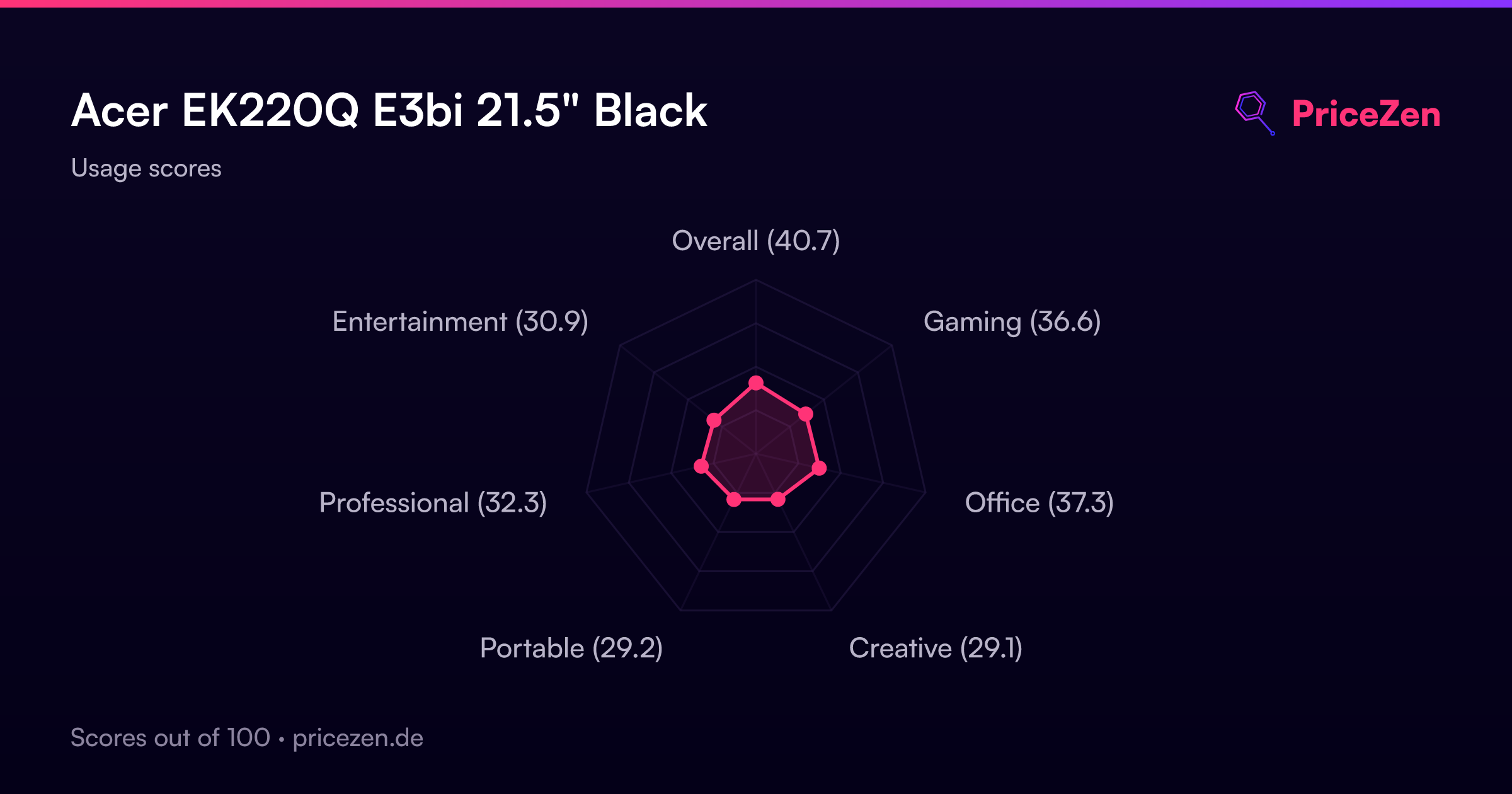
Usage Scores
- Overall40.7
- Gaming36.6
- Office37.3
- Creative29.1
- Portable29.2
- Professional32.3
- Entertainment30.9