Acer CB Series CB322QK 31.5" Silver 2024

A roomy 31.5-inch screen for daily work verified Nov 29
73/100 overall score
- Screen
- 31.5"
- Resolution
- 3840 x 2160
- Panel
- IPS
- Refresh
- 60 Hz
- Response time
- 4 ms
- Adaptive sync
- FreeSync
- HDR
- HDR10
Compare prices at 1 store
Cheapest first. New, refurbished and bundled offers are kept apart, so you compare like with like.
| Store | Sold by | Colour and condition | Price | vs lowest | Last checked | Link |
|---|---|---|---|---|---|---|
| New1 offerSingle unit | ||||||
| Out of stock when last checked | ||||||
| Amazon | Not known | Not listed | No price | Out of stock | Nov 7 | Go to store |
 Source: PriceZen, checked Nov 7, 2026
A price counts as current when we checked it in the last 7 days. “Marketplace seller” means a third-party seller on that store, not the store itself.
Price history
Checked that dayNot checked that day, still on offer
Source: PriceZen, checked Oct 24, 2026










Snapshot
The 30-Second Version
A big, beautiful 4K workhorse with a stand that actually adjusts. Just don't expect it to keep up with your gaming rig.
Pros & Cons
Pros
- 31.5 inches of 4K real estate is a productivity dream 91st
- IPS panel with 99% sRGB and 1.07 billion colors, great for color-sensitive work 87th
- Ergonomic stand with height, tilt, swivel, and pivot, rare at this price 83rd
- USB-C connectivity for single-cable laptop setups 77th
Cons
- 60Hz refresh rate is a hard pass for serious gamers
- HDR10 is marketing fluff, not real HDR performance
- 300W power draw is chunky for a monitor
- Nearly 9.5kg, this thing is a desk anchor
What owners think
The Word on the Street
- Owners consistently praise the wide viewing angles and color accuracy, especially for multi-monitor setups.
- The silver cabinet design gets more love than you'd expect for a budget monitor.
- The review pool is small, so while nobody's complaining loudly, there's not a ton of long-term data to lean on.
How owner sentiment changed over time
ExclusiveBased on when customers actually wrote their reviews - so you can see whether early praise held up.
The proof
Performance
The 4ms response time and 60Hz refresh rate put this firmly in the 'fine for everything, great for nothing fast' category. But the color story is where it shines. 99% sRGB coverage, 8-bit+FRC for 1.07 billion colors, and 350 nits of brightness mean this thing handles spreadsheets and photo edits with equal ease. The HDR10 support is more of a checkbox than a feature, edge-lit global dimming won't blow you away, but for SDR work it's a genuinely pleasant panel.
Specifications
Full Specifications
Display
| Size | 31.5" |
| Resolution | 3840x2160 (4K UHD) |
| Panel Type | IPS |
| Aspect Ratio | 16:9 |
| Curved | No |
Performance
| Refresh Rate | 60 Hz |
| Response Time | 4 |
| Adaptive Sync | FreeSync |
Color & HDR
| Brightness | 350 nits |
| Color Gamut | 99% sRGB |
| Color Depth | 8-bit+FRC |
| HDR | HDR10 |
| HDR Support | HDR |
Connectivity
| HDMI Ports | 1 |
| DisplayPort | 1 |
| USB-C | 1 |
| Speakers | Yes |
| Headphone Jack | Yes |
Ergonomics
| Height Adjustable | Yes |
| Tilt | Yes |
| Swivel | Yes |
| Pivot | Yes |
| VESA Mount | 100x100 |
Features
| Touchscreen | No |
| PIP/PBP | No |
| Power | 300 |
| Weight | 7.0 kg / 15.4 lbs |
vs Competition
Against the OLED gaming crowd like the ASUS ROG Strix XG27UCDMG or the MSI MAG 271QPX, this Acer loses on refresh rate and contrast, badly. Those are 240Hz+ panels built for speed. But they're also smaller, 27 inches, and cost significantly more. The Acer's pitch is different: bigger screen, better ergonomics, and color accuracy for work. If you're choosing between this and a 27-inch OLED for office use, the Acer's extra real estate and lower price make it the smarter buy. For gaming, don't even think about it.
| Spec | Acer CB Series CB322QK 31.5" | LG UltraGear 45GX950A-B 45" | ASUS ROG Strix XG27UCDMG 27" | Dell UltraSharp U4025QW 39.7" | Alienware AW-Series AW3425DW 34" | MSI MAG 271QPX QD-OLED E2 27" |
|---|---|---|---|---|---|---|
| Screen Size | 31.5 | 45 | 27 | 39.7 | 34 | 27 |
| Resolution | 3840 x 2160 | 5120 x 2160 | 3840 x 2160 | 5120 x 2160 | 3440 x 1440 | 2560 x 1440 |
| Panel Type | IPS | OLED | QD-OLED | IPS | QD-OLED | QD-OLED |
| Refresh Rate | 60 | 330 | 240 | 120 | 240 | 240 |
| Response Time Ms | 4 | 0.03 | 0.03 | 5 | 0.03 | 0.03 |
| Adaptive Sync | FreeSync | FreeSync Premium Pro | FreeSync Premium Pro | Adaptive-Sync | FreeSync Premium Pro | FreeSync Premium Pro |
| Hdr | HDR10 | DisplayHDR True Black 400 | DisplayHDR True Black 400 | HDR600 | HDR400 | DisplayHDR True Black 400 |
| Compare | Compare | Compare | Compare | Compare |
| Product | Color | Portability | Display | Feature | User Sentiment | Performance | Connectivity |
|---|---|---|---|---|---|---|---|
| Acer CB Series CB322QK 31.5" | 83.3 | 62.8 | 87 | 70 | 76.7 | 44.1 | 70.1 |
| LG UltraGear 45GX950A-B 45" Compare | 99.4 | 76.5 | 99.7 | 96.3 | 76.7 | 99.4 | 96.9 |
| ASUS ROG Strix XG27UCDMG 27" Compare | 96.5 | 57.3 | 97.7 | 85 | 99.3 | 97.9 | 81 |
| Dell UltraSharp U4025QW 39.7" Compare | 97.9 | 76.5 | 98.6 | 96.3 | 85.4 | 56 | 99.3 |
| Alienware AW-Series AW3425DW 34" Compare | 98.9 | 73.9 | 84 | 96.3 | 95.7 | 97.9 | 95.3 |
| MSI MAG 271QPX QD-OLED E2 27" Compare | 99.1 | 57.3 | 73.4 | 85 | 95.7 | 97.9 | 81 |
Price
Value & Pricing
Pricing is all over the map. In the US you'll find it between $395 and $450, and at the low end that's a solid deal for a 31.5-inch 4K IPS panel with a full ergonomic stand. In Europe the spread is wild, EUR 509 to EUR 947, so shop carefully. If you're paying the high end of that range, you're getting fleeced. At the low end, it's a genuinely good value for a color-accurate workhorse.
Read more
Overview
The Acer CB322QK is a big, color-accurate 4K panel that nails the basics for work and media. It's not a gaming monitor, no matter what the FreeSync sticker says. The one thing to know: you're buying a 31.5-inch IPS screen with excellent ergonomics and genuinely good color, at a price that undercuts a lot of flashier options.
Common Questions
Q: Can I use this for photo editing?
Yes. The IPS panel, 99% sRGB coverage, and 1.07 billion colors make it a solid choice for color-sensitive work. Just don't expect it to replace a hardware-calibrated pro display.
Q: Is this monitor good for gaming?
Not really. 60Hz and 4ms response time are fine for casual games, but if you play anything fast-paced, you'll feel the lag. Get a 144Hz+ panel instead.
Q: Does the stand let me rotate the screen?
Yep. Height adjust, tilt, swivel, and pivot are all there. It's one of the best ergonomic setups you'll find at this price.
Who Should Skip This
If you're looking for a gaming monitor, this isn't it. Go get a 144Hz+ panel like the Gigabyte M Series OLED MO27U2 SA or the LG UltraGear 27GX790A-B instead. And if you need something portable or compact, this 31.5-inch, 9.5kg beast is the opposite of that.
Verdict
Buy it if you want a big, color-accurate 4K monitor for work, photo editing, or general use, and you don't care about high refresh rates. The ergonomic stand and USB-C are genuinely useful, and the panel quality is solid. Skip it if you're a gamer or if you find it priced at the top of that European range. At $395 to $450 US, it's an easy recommendation for the right person.
Usage Scores
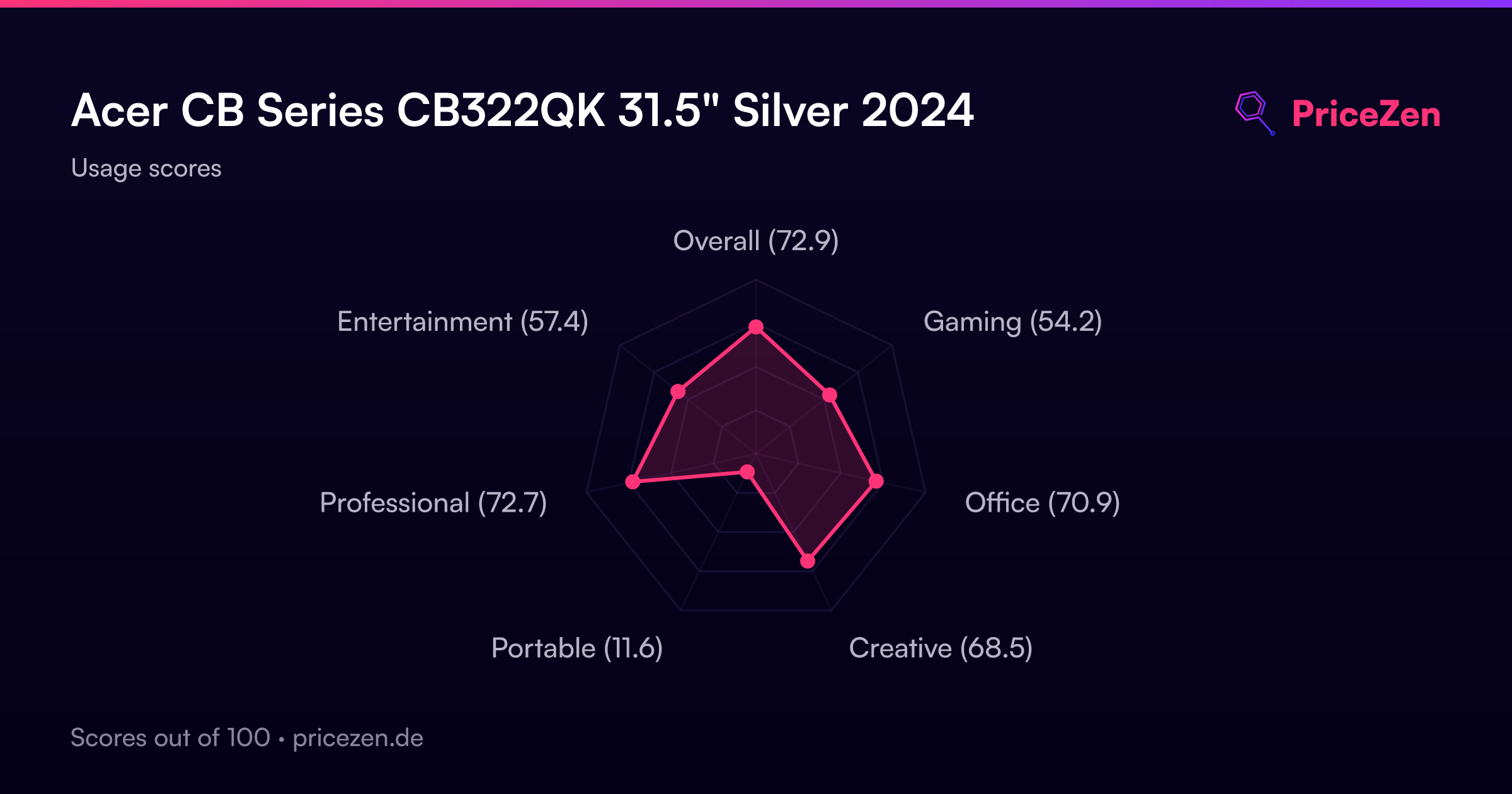
- Overall72.9
- Gaming54.2
- Office70.4
- Creative68.5
- Portable11.6
- Professional72.7
- Entertainment57.4