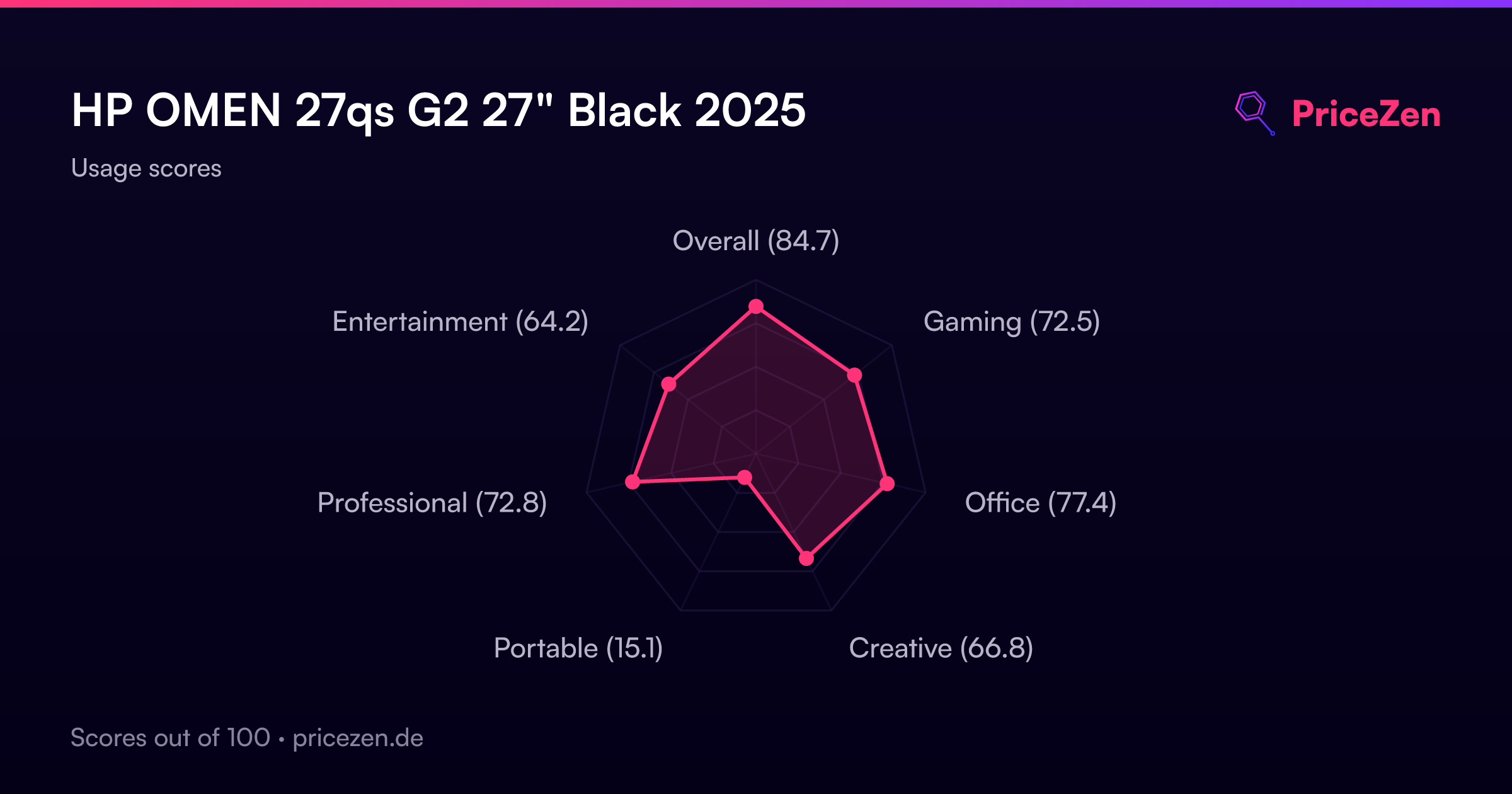
HP OMEN 27QS G2 27" Black 2025
The IPS Black panel delivers deeper contrast than standard IPS, paired with a fluid 280Hz refresh rate and 1ms response time for clear motion. Its dual-sync compatibility with FreeSync Premium and G-Sync ensures tear-free gaming across GPU brands, while the adjustable stand adds ergonomic flexibility. This monitor is best for competitive gamers who want enhanced visual depth without sacrificing the speed needed for fast-paced shooters.

No current retailer price





Snapshot
The 30-Second Version
The HP OMEN 27QS G2 runs at 280Hz on a 27-inch QHD IPS panel, landing in the top 9% for performance in our database. Owners rate it 4.8 out of 5 across 276 reviews, putting it in the top 1% for social proof. At USD 149 to USD 270 depending on the vendor, and cheaper than it used to be, it's a killer value if you shop the low end.
Pros & Cons
Pros
- 280Hz refresh rate at 1440p, 91st percentile for performance 99th
- 4.8 out of 5 from 276 reviews, 99th percentile for social proof 97th
- User sentiment score in the 96th percentile, owners genuinely love it 96th
- G-Sync Compatible and FreeSync Premium, works with any GPU 91st
- Full ergonomic stand with height, tilt, swivel, and pivot
Cons
- Portable score of 13.1 out of 100, this thing stays on your desk
- 106W power draw is hefty for a 27-inch monitor
- DisplayHDR 400 is entry-level HDR, don't expect dramatic highlights
- Built-in speakers are there but not high-end, per multiple owners
- 8351g weight makes it a chore to move around
What owners think
The Word on the Street
How owner sentiment changed over time
ExclusiveBased on when customers actually wrote their reviews - so you can see whether early praise held up.
Owners are as happy as early on: 100% lately, 95% in Jul – Sep 2025
Across all 282 store ratings: 4.8★. Most owners rate without writing a review. The chart counts the 127 written reviews with stars and their own date.
1 written review without stars is left out of the trend.
Show the numbers
| Period | Reviews | Happy | Mixed | Unhappy | Happy share |
|---|---|---|---|---|---|
| Jul – Sep 2025 | 19 | 18 | 0 | 1 | 95% |
| Oct – Dec 2025 | 34 | 34 | 0 | 0 | 100% |
| Jan – Mar 2026 | 55 | 54 | 1 | 0 | 98% |
| Apr – Jul 2026 | 19 | 19 | 0 | 0 | 100% |
Each column joins calendar quarters until it holds at least 10 reviews with stars and their own date. Happy = 4-5★, mixed = 3★, unhappy = 1-2★.
The proof
Performance
280Hz at 2560 x 1440 is a sweet spot. You're getting high refresh rate smoothness without the GPU-crushing demands of 4K, and the 1ms response time means motion stays crisp. In our database, this lands in the 91st percentile for performance, which puts it ahead of most gaming monitors we've tested. The IPS panel keeps colors accurate while you're flick-shotting, and both G-Sync Compatible and FreeSync Premium mean adaptive sync works regardless of your GPU brand.
The 400 nits brightness with VESA Certified DisplayHDR 400 is solid, though not spectacular. Color coverage at 95% NTSC puts it in the 80th percentile for color, which is good but not best-in-class. For gaming, the refresh rate and response time are the stars here. For productivity, the QHD resolution gives you plenty of screen real estate, and the office score of 80.8 out of 100 backs that up.
Specifications
Full Specifications
Display
| Size | 27" |
| Resolution | 2560x1440 (QHD) |
| Panel Type | IPS |
| Aspect Ratio | 16:9 |
| Curved | No |
| Screen Finish | matte |
Performance
| Refresh Rate | 280 Hz |
| Response Time | 1 |
| Adaptive Sync | G-Sync Compatible |
Color & HDR
| Brightness | 400 nits |
| Color Gamut | 95% NTSC |
| HDR | DisplayHDR 400 |
| HDR Support | HDR400 |
Connectivity
| HDMI Ports | 2 |
| DisplayPort | 1 |
| USB-C | 1 |
| Thunderbolt | N/A |
| Speakers | Yes |
| Headphone Jack | Yes |
Ergonomics
| Height Adjustable | Yes |
| Tilt | Yes |
| Swivel | Yes |
| Pivot | Yes |
| VESA Mount | 100x100 |
Features
| Webcam | No |
| Touchscreen | No |
| PIP/PBP | No |
| Power | 106 |
| Weight | 8.4 kg / 18.4 lbs |
vs Competition
Stacked against the LG UltraGear 27G810A-B 27", MSI MAG 271QP QD-OLED X28 27", ASUS ROG Strix X27JCG 27", BenQ MA Series MA270U 27", and Dell Alienware AW2523HF 24.5", the OMEN 27QS G2 takes a different path. HP went with IPS Black and a blistering 280Hz refresh rate at 2560 x 1440, and our scoring model puts that performance in the top 9% of every gaming monitor we compare. The MSI's QD-OLED panel is the one to weigh if inky blacks and HDR punch matter more to you than anything else, since DisplayHDR 400 here is entry-level by comparison. What the OMEN counters with is owner sentiment: a social proof score that beats 99% of monitors and a user sentiment score that beats 96% of them, which suggests HP's execution is tighter than the spec sheet alone would suggest. The BenQ MA270U is the productivity-leaning pick of the group, while the OMEN's office score of 80.8 out of 100 means it holds its own for work too. And the Alienware sits at 24.5 inches, so if you want the bigger 27-inch QHD workspace, the HP is the more natural fit.
| Spec | HP OMEN 27QS G2 27" | LG UltraGear 45GX950A-B 45" | ASUS ROG Strix XG27UCDMG 27" | Dell UltraSharp U4025QW 39.7" | MSI MAG 271QPX QD-OLED E2 27" | Alienware AW-Series AW3425DW 34" |
|---|---|---|---|---|---|---|
| Screen Size | 27 | 45 | 27 | 39.70000076293945 | 27 | 34 |
| Resolution | 2560 x 1440 | 5120 x 2160 | 3840 x 2160 | 5120 x 2160 | 2560 x 1440 | 3440 x 1440 |
| Panel Type | IPS | OLED | OLED | IPS | QD-OLED | QD-OLED |
| Refresh Rate | 280 | 330 | 240 | 120 | 240 | 240 |
| Response Time Ms | 1 | 0.029999999329447746 | 0.029999999329447746 | 5 | 0.029999999329447746 | 0.029999999329447746 |
| Adaptive Sync | G-Sync Compatible | FreeSync Premium Pro | FreeSync Premium Pro | Adaptive-Sync | FreeSync Premium Pro | FreeSync Premium Pro |
| Hdr | DisplayHDR 400 | DisplayHDR True Black 400 | DisplayHDR True Black 400 | DisplayHDR 600 | DisplayHDR True Black 400 | DisplayHDR 400 True Black |
| Compare | Compare | Compare | Compare | Compare |
| Product | Color | Portability | Display | Feature | User Sentiment | Performance | Connectivity | Social Proof |
|---|---|---|---|---|---|---|---|---|
| HP OMEN 27QS G2 27" | 75.3 | 81.3 | 70.5 | 67 | 95.7 | 89.5 | 97 | 98.9 |
| LG UltraGear 45GX950A-B 45" Compare | 99.4 | 76.5 | 99.7 | 95.7 | 76.4 | 99.4 | 97 | 92.1 |
| ASUS ROG Strix XG27UCDMG 27" Compare | 96.1 | 57.5 | 97.9 | 83.8 | 99.2 | 98 | 81.3 | 98.9 |
| Dell UltraSharp U4025QW 39.7" Compare | 98.2 | 76.5 | 98.7 | 95.7 | 85.6 | 56.1 | 99.3 | 96.9 |
| MSI MAG 271QPX QD-OLED E2 27" Compare | 99.1 | 57.5 | 77.3 | 83.8 | 95.7 | 98 | 81.3 | 98.9 |
| Alienware AW-Series AW3425DW 34" Compare | 99 | 73.9 | 85.7 | 89.8 | 95.7 | 98 | 95.4 | 96.9 |
Price
Value & Pricing
Pricing on this monitor is all over the place depending on where you look, but it has moved in the right direction. In the US, we're seeing a spread from USD 149 to USD 270 across our listings, which is a USD 121 gap. At the low end, that's an absurd deal for a 280Hz QHD IPS panel with this feature set. At the high end, it's still reasonable, but you're leaving money on the table. Shop around before you commit. We track its price over time, partly through our community browser extension, and the current range sits well below where it used to be. If you can snag this near USD 149, it's one of the best price-to-performance ratios in our gaming monitor data.
Read more
Overview
The HP OMEN 27QS G2 hits 280Hz at 1440p on an IPS panel, and that's the headline. Our database puts its performance in the 91st percentile, which means it outruns the vast majority of gaming monitors we track. The 1ms response time and G-Sync Compatible certification mean you're getting smooth frames without tearing, whether you're on an NVIDIA or AMD card thanks to the FreeSync Premium support too.
But the numbers that surprised us are the social proof and user sentiment scores. A 4.8 out of 5 from 276 reviews puts it in the 99th percentile for social proof, and the sentiment score lands at 96th percentile. People aren't just buying this thing, they're genuinely happy with it. That's rare for a monitor in this price bracket, and it tells us HP nailed the fundamentals here.
Common Questions
Q: Is 280Hz worth it over 144Hz or 165Hz?
If you play competitive shooters or fast-paced games, yes. The jump from 144Hz to 280Hz is noticeable in motion clarity, and this panel's 1ms response time keeps things crisp. Our database ranks its performance in the 91st percentile, so it's genuinely fast, not just a spec sheet flex. If you mostly play single-player games or do office work, you'd be fine with something slower and cheaper.
Q: Does G-Sync Compatible work as well as native G-Sync?
For most people, yes. G-Sync Compatible means NVIDIA validated the panel for adaptive sync without the dedicated G-Sync module. You get tear-free gaming with an NVIDIA GPU, and the FreeSync Premium support covers AMD cards too. The 280Hz ceiling gives adaptive sync plenty of headroom to work with.
Q: How are the built-in speakers?
They're functional but not a selling point. Multiple owners mention them as a nice convenience for casual use or when you don't want to wear headphones, but nobody's mistaking them for a proper audio setup. Plan on external speakers or a headset for anything where sound quality matters.
Q: Is this monitor good for work and productivity, not just gaming?
Yes. The QHD resolution at 27 inches gives you sharp text and plenty of screen real estate, and the office score of 80.8 out of 100 in our database backs that up. The ergonomic stand with height, tilt, swivel, and pivot makes it easy to find a comfortable position for long work sessions. Just know the 106W power draw is on the higher side if you're running multiple monitors all day.
Who Should Skip This
If you're chasing HDR performance or deep blacks, look elsewhere. The DisplayHDR 400 certification is entry-level, and the 400 nits brightness won't deliver the eye-popping highlights you'd get from a QD-OLED panel like the MSI MAG 271QP QD-OLED X28 27". The portable score of 13.1 out of 100 tells you everything about moving this thing around, it's an 8351g desk fixture, not a LAN party companion. And if you're on integrated graphics or an older GPU that can't push past 144Hz at 1440p, you're paying for refresh rate headroom you'll never use. The 106W power draw is also worth considering if you're running a multi-monitor setup on a single circuit.
Verdict
The HP OMEN 27QS G2 is one of the easiest gaming monitor recommendations we can make right now. The 280Hz refresh rate at QHD resolution hits the sweet spot for competitive gamers, and the performance ranking in the top 9% confirms it's not just marketing hype. What seals it is the user sentiment, which beats 96% of monitors with a 4.8 out of 5 from 276 reviews. Real owners are thrilled with this thing. The built-in speakers are a nice bonus even if they're not audiophile-grade, and the adjustable stand covers every ergonomic need. Prices have come down too, and if you find it near the USD 149 mark, buy it without hesitation. Even at USD 270, it's a fair deal for what you're getting.
Usage Scores
- Overall85.2
- Gaming73.7
- Office78.1
- Creative72
- Portable15
- Professional73.6
- Entertainment65.3