ASUS TUF Gaming VG24VQER 24" Black 2024
The 180Hz refresh, 1ms MPRT response, and FreeSync on a 23.6-inch VA panel with 3000:1 contrast ensure fluid motion and deep blacks for competitive gaming. A 1500R curve and 90% DCI-P3 gamut add immersive color without a premium cost. Best for budget-conscious esports players who value high refresh rates and contrast over higher resolution or peak brightness.

No current retailer price


Snapshot
The 30-Second Version
Fast 180Hz curved 1080p for USD 117 at Newegg, with a feature set that ranks among the best. The screen itself is the weak spot: dim, soft, tilt-only. Worth it for budget gamers, not for anyone who reads text all day.
Pros & Cons
Pros
- 180Hz with FreeSync and ELMB SYNC at a budget price. 91st
- 3000:1 VA contrast makes dark games look properly moody. 82nd
- 90% DCI-P3 coverage is strong for this price bracket. 75th
- Two HDMI ports plus DisplayPort, and a 3-year warranty.
Cons
- 1080p across 23.6 inches looks soft up close.
- 250 nits is dim, so HDR10 is basically decorative.
- Tilt only, no height or swivel adjustment.
- One owner reported the screen separating from the housing.
What owners think
The Word on the Street
How owner sentiment changed over time
ExclusiveBased on when customers actually wrote their reviews - so you can see whether early praise held up.
15 written reviews, Mar 2025 – Aug 2026: 13 happy, 2 unhappy
Across all 140 store ratings: 4.4★. Most owners rate without writing a review. The chart counts the 15 written reviews.
Each dot is one written review, in the month it was written. Happy = 4-5★, mixed = 3★, unhappy = 1-2★.
The proof
Performance
The speed is real. 180Hz with ELMB SYNC and FreeSync means tearing and ghosting stay out of your way, and performance ranks well above average. The VA panel's 3000:1 contrast gives dark scenes actual depth, and Shadow Boost lifts detail in shadows without blowing out highlights. 90% DCI-P3 on an 8-bit panel is decent color coverage for the money, though our color score lands mid-pack at 63. The lowlights: 4ms GtG behind that 1ms MPRT figure, 250 nits means HDR10 is a checkbox rather than an experience, and tilt-only adjustment with no height or swivel. Connectivity is about average, two HDMI 2.0 ports plus DisplayPort 1.2 and a headphone jack. At 17W it barely sips power.
Specifications
Full Specifications
Display
| Size | 24" |
| Resolution | 1920x1080 (Full HD) |
| Panel Type | VA |
| Aspect Ratio | 16:9 |
| Curved | Yes |
| Curvature | 1500 |
| Screen Finish | matte |
Performance
| Refresh Rate | 180 Hz |
| Response Time | 1 |
| Adaptive Sync | FreeSync |
Color & HDR
| Brightness | 250 nits |
| Color Gamut | 90% DCI-P3 |
| Color Depth | 8-bit |
| HDR | HDR10 |
| HDR Support | HDR10 |
Connectivity
| HDMI Ports | 2 |
| DisplayPort | 1 |
| USB-C | 0 |
| Speakers | No |
| Headphone Jack | Yes |
Ergonomics
| Height Adjustable | No |
| Tilt | Yes |
| Swivel | No |
| Pivot | No |
| VESA Mount | 100x100 |
Features
| Webcam | No |
| Touchscreen | No |
| PIP/PBP | No |
| Power | 17 |
| Weight | 3.2 kg / 7.1 lbs |
vs Competition
The obvious cross-shop list is all 27-inch panels: the LG UltraGear 27G810A-B, HP OMEN 27qs G2, Acer Nitro XV272U W2bmiiprx, Dell S2725QC and Alienware AW2724HF. If you want more screen and sharper text, go look at those, because our display score for this ASUS sits in the bottom third and 1080p is the reason. Where the VG24VQER fights back is features and price: top-tier on features, 180Hz, ELMB SYNC and a curve at USD 117. If your desk is small and your GPU is happiest at 1080p, this is the smarter spend. If you're doing spreadsheets next to shooters, the Dell or the Acer will treat your eyes better.
| Spec | ASUS TUF Gaming VG24VQER 24" | LG UltraGear 45GX950A-B 45" | Dell UltraSharp U4025QW 39.7" | Alienware AW-Series AW3425DW 34" | MSI MAG 271QPX QD-OLED E2 27" | Samsung Odyssey G60SD 27" |
|---|---|---|---|---|---|---|
| Screen Size | 24 | 45 | 39.7 | 34 | 27 | 27 |
| Resolution | 1920 x 1080 | 5120 x 2160 | 5120 x 2160 | 3440 x 1440 | 2560 x 1440 | 2560 x 1440 |
| Panel Type | VA | OLED | IPS | QD-OLED | QD-OLED | OLED |
| Refresh Rate | 180 | 330 | 120 | 240 | 240 | 360 |
| Response Time Ms | 1 | 0.03 | 5 | 0.03 | 0.03 | 0.03 |
| Adaptive Sync | FreeSync | FreeSync Premium Pro | Adaptive-Sync | FreeSync Premium Pro | FreeSync Premium Pro | FreeSync Premium Pro |
| Hdr | HDR10 | DisplayHDR True Black 400 | HDR600 | HDR400 | DisplayHDR True Black 400 | HDR10+ |
| Compare | Compare | Compare | Compare | Compare |
| Product | Color | Portability | Display | Feature | Ergonomic | Performance | Connectivity | Social Proof |
|---|---|---|---|---|---|---|---|---|
| ASUS TUF Gaming VG24VQER 24" | 62.8 | 49.4 | 31.2 | 90.8 | 47.2 | 81.7 | 53.1 | 74.8 |
| LG UltraGear 45GX950A-B 45" Compare | 99.4 | 76.5 | 99.7 | 96.3 | 90.8 | 99.4 | 96.9 | 92 |
| Dell UltraSharp U4025QW 39.7" Compare | 97.9 | 76.5 | 98.6 | 96.3 | 90.8 | 56.1 | 99.3 | 96.8 |
| Alienware AW-Series AW3425DW 34" Compare | 98.9 | 73.9 | 84.1 | 96.3 | 90.8 | 97.9 | 95.4 | 96.8 |
| MSI MAG 271QPX QD-OLED E2 27" Compare | 99.2 | 57.4 | 73.4 | 85 | 90.8 | 97.9 | 81.1 | 98.9 |
| Samsung Odyssey G60SD 27" Compare | 90.7 | 39.4 | 73.4 | 70.1 | 90.8 | 99.5 | 87.5 | 92 |
Price
Value & Pricing
At USD 117 from Newegg this is a genuinely good deal. Amazon wants USD 129, Best Buy USD 146, B&H USD 159, so there's a USD 59 spread across listings and no reason to pay the top end. We track prices over time through our community browser extension, and the low end here is where this monitor makes sense. Canadian buyers are looking at CAD 160 to CAD 228, a CAD 68 gap, so shop around before you click buy. Above roughly USD 140 the 1080p resolution starts feeling like a compromise you're paying extra for.
Read more
Overview
The ASUS TUF Gaming VG24VQER is a 23.6-inch curved VA panel doing one job: cheap, fast 1080p gaming. 180Hz, 1ms MPRT, FreeSync, and a 1500R curve for USD 117 at Newegg right now. That's the pitch, and it mostly lands.
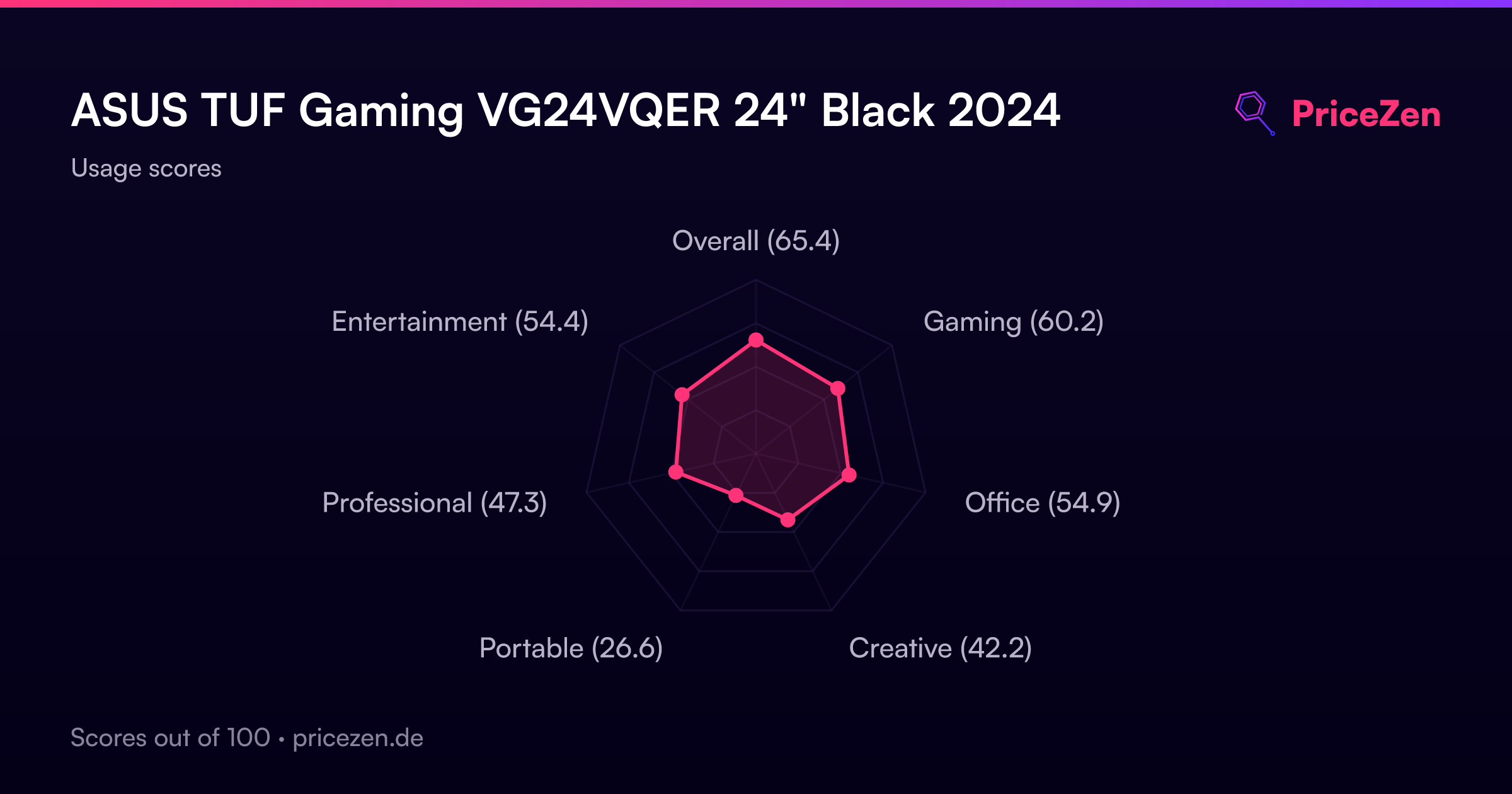
Our scoring model puts it at 65.4 overall, with gaming at 60.2 and office at 54.9. Feature set is the standout, ranking among the best in this category. The display itself is the weak link, sitting in the bottom third, which tracks: 1080p on a nearly 24-inch panel isn't sharp, and 250 nits isn't bright.
Common Questions
Q: Is 1080p sharp enough at 24 inches?
It's usable but soft, especially for text. Our display ranking puts this panel in the bottom third of the category, and 1920 x 1080 across 23.6 inches is why.
Q: Does the HDR actually do anything?
Not much. It accepts HDR10 but tops out at 250 nits on an 8-bit panel, so you won't get meaningful highlight punch.
Q: Can I mount it on an arm?
Yes, it's VESA 100x100 and weighs 3198g, so most arms handle it fine. Worth doing since the built-in stand only tilts.
Who Should Skip This
If you work in documents, code or spreadsheets, look elsewhere. 1080p at this size makes text fuzzy and our office score of 54.9 backs that up. Same story if you need height adjustment or a bright room-friendly screen, because 250 nits and a tilt-only stand will annoy you daily. And if you're picky about build quality, at least one owner had the panel come apart.
Verdict
Buy this if you're building a budget 1080p setup and want high refresh without drama. Competitive shooter players on modest GPUs get the most out of it, and the 4.4/5 from 140 owners suggests most people are happy. Skip it if you want crisp text, real HDR or a stand that moves. It's a fast panel with cheap bones, and it's honest about that at USD 117.
Usage Scores
- Overall65.4
- Gaming60.2
- Office54.9
- Creative42.2
- Portable26.6
- Professional47.3
- Entertainment54.4