Dell UltraSharp U2725QE 27" Black, Silver, Dual Color 2025
The IPS Black panel delivers a 3000:1 contrast ratio for deeper blacks, paired with 600 nits brightness and 99% DCI-P3 coverage for precise color work. Thunderbolt 4 with daisy-chaining and a built-in 2.5GbE port transforms it into a full connectivity hub, reducing desk clutter. This monitor is best for hybrid professionals who need a single 4K 120Hz display for both color-accurate design tasks and smooth, everyday productivity.












Snapshot
The 30-Second Version
The Dell UltraSharp U2725QE scores 81.2 out of 100 overall, with a color score in the top 10% and a connectivity score in the top 10% that make it a standout for productivity. The 2000:1 contrast ratio is double the typical IPS panel, and the built-in Thunderbolt 4 hub with KVM replaces a separate dock. But owner sentiment has slipped to 62 out of 100, and the feature score in the bottom quarter and performance score in the bottom half mean this is a work monitor first, everything else second.
Pros & Cons
Pros
- 99% DCI-P3 color coverage puts it in the top tier for color accuracy 99th
- 2000:1 contrast ratio is double what most IPS panels deliver 98th
- Thunderbolt 4 hub with KVM simplifies multi-device desk setups 91st
- 120Hz refresh rate makes everyday use feel noticeably smoother than 60Hz 87th
- 93rd percentile connectivity score with DP, HDMI, and USB-C options
Cons
- No built-in speakers, which feels cheap at this price point
- Screen glare is a real problem in bright rooms per multiple owners
- Coil whine reported on some units, though it's hit or miss
- Feature score of 24th percentile means it lacks extras competitors include
- 9720 grams makes this one of the heavier 27-inch monitors we've tracked
What owners think
The Word on the Street
How owner sentiment changed over time
ExclusiveBased on when customers actually wrote their reviews - so you can see whether early praise held up.
Happy owners: 64% lately, 79% in Apr 2025 – Mar 2026
Too few reviews to call that a change.
Across all 473 store ratings: 4.3★. Most owners rate without writing a review. The chart counts the 33 written reviews with stars and their own date.
11 written reviews without stars are left out of the trend.
Show the numbers
| Period | Reviews | Happy | Mixed | Unhappy | Happy share |
|---|---|---|---|---|---|
| Apr 2025 – Mar 2026 | 19 | 15 | 1 | 3 | 79% |
| Apr – Sep 2026 | 14 | 9 | 3 | 2 | 64% |
- Jul – Sep 20265 of 8 happy
Buyers praised image quality, setup ease, and Mac compatibility, but several reported issues with macOS drivers, coil whine, missing manuals, and confusing multi-monitor setup documentation.
- Excellent color accuracy and sharpness for photo editing; bright, crisp display praised by multiple buyers.
- Coil whine when brightness below 80%; Dell deems it acceptable up to 31 dB, annoying in quiet rooms.
- macOS issues: Realtek ethernet driver caps speed, 120Hz unsupported at 3360x1890, dongle complaints.
- Setup generally easy, but poor documentation and missing HDMI cable for multi-monitor; one buyer returned due to no manual.
- Apr – Jun 20264 of 6 happy · 1 without stars
Mixed reviews: praised for connectivity, design, and 120Hz, but Mac users report eye strain, scaling issues, and washed-out whites. Some coil whine and vignetting noted.
- Mac compatibility issues: blurry text, washed-out whites, and eye strain for some users.
- Excellent connectivity and design: Thunderbolt hub, KVM, Ethernet, and clean aesthetics.
- Coil whine reported after a week; quality control concerns at this price point.
- Minor vignetting on bottom of screen noted by one user, possibly unit-specific.
- Jan – Mar 20268 of 10 happy · 5 without stars
Buyers praise the monitor's display quality, color accuracy, and built-in docking station, but note a wobbly stand and USB port extension issues with Mac Mini M4 Pro.
- Excellent display quality, color accuracy, and brightness for office work.
- Built-in docking station and Thunderbolt power pass-through simplify cable management.
- Included stand is wobbly, requiring an arm kit or VESA mount.
- Integrated USB port extension has issues with Mac Mini M4 Pro.
Each column joins calendar quarters until it holds at least 10 reviews with stars and their own date. Happy = 4-5★, mixed = 3★, unhappy = 1-2★. Period summaries are in English.
The proof
Performance
Let's talk about that 120Hz refresh rate, because it's the headline spec Dell is pushing. For a productivity-focused UltraSharp, 120Hz is genuinely smooth. Scrolling through documents and moving windows around feels noticeably better than the 60Hz panels most office monitors are stuck with. The 5ms response time is fine for casual gaming and completely irrelevant for spreadsheet work. G-Sync compatibility is a nice bonus if you occasionally fire up a game after hours, but this is not a gaming monitor. The performance percentile of 58th puts it right in the middle of the pack, and that feels accurate. It's competent, not competitive.
The real story is the panel itself. 3840 x 2160 resolution on a 27-inch screen gives you roughly 163 pixels per inch, which means text looks razor sharp. The 99% DCI-P3 color coverage puts this in the top tier for color accuracy, and the 450 nits of brightness is solid for most indoor environments. The 2000:1 contrast ratio is the quiet overachiever here. Most IPS panels hover around 1000:1, so Dell doubling that number explains why owners keep mentioning deep blacks in their reviews. Combined with the 92nd percentile color score, this panel punches well above its price class for image quality.
Specifications
Full Specifications
Display
| Size | 27" |
| Resolution | 3840x2160 (4K UHD) |
| Panel Type | IPS |
| Aspect Ratio | 16:9 |
| Curved | No |
| Screen Finish | matte |
Performance
| Refresh Rate | 120 Hz |
| Response Time | 5 |
| Adaptive Sync | Adaptive-Sync |
Color & HDR
| Brightness | 600 nits |
| Color Gamut | 99% DCI-P3, 100% sRGB |
| Color Depth | 10-bit |
| HDR | ✓ |
| HDR Support | HDR |
Connectivity
| HDMI Ports | 1 |
| DisplayPort | 1 |
| USB-C | 3 |
| Thunderbolt | Thunderbolt 4 |
| Speakers | No |
| Headphone Jack | Yes |
Ergonomics
| Height Adjustable | Yes |
| Tilt | Yes |
| Swivel | Yes |
| Pivot | Yes |
| VESA Mount | 100x100 |
Features
| Webcam | No |
| Touchscreen | No |
| PIP/PBP | No |
| Power | 25 |
| Weight | 7.1 kg / 15.6 lbs |
vs Competition
Stacked against the competition, the U2725QE occupies a weird but defensible position. The ASUS ROG Strix XG27UCDMG and Samsung Odyssey G60SD are gaming-first panels, and our ranking puts the Dell's performance score in the bottom half, well behind what those two are built for. What the Dell counters with is a color score in the top 10% and connectivity in the top 10%, including the Thunderbolt 4 hub with KVM. The LG UltraGear 45GX950A-B is a massive ultrawide that wins on immersion but loses on pixel density and desk footprint, and the Dell's 27-inch 4K panel keeps text far sharper per inch. The MSI MAG 271QPX QD-OLED and Gigabyte M Series OLED MO27U2 SA both use OLED panels, which means better contrast and response times, but burn-in risk is a real concern for people who leave static spreadsheets on screen for eight hours a day. The Dell's IPS panel with 2000:1 contrast is the safe, reliable choice for productivity. You're trading gaming performance for color accuracy and connectivity, and for the target audience, that's the right trade.
| Spec | Dell UltraSharp U2725QE 27" | LG UltraGear 45GX950A-B 45" | ASUS ROG Strix XG27UCDMG 27" | Alienware AW-Series AW3425DW 34" | MSI MAG 271QPX QD-OLED E2 27" | Samsung Odyssey G80SH 32" |
|---|---|---|---|---|---|---|
| Screen Size | 27 | 45 | 27 | 34 | 27 | 32 |
| Resolution | 3840 x 2160 | 5120 x 2160 | 3840 x 2160 | 3440 x 1440 | 2560 x 1440 | 3840 x 2160 |
| Panel Type | IPS | OLED | OLED | QD-OLED | QD-OLED | OLED |
| Refresh Rate | 120 | 330 | 240 | 240 | 240 | 240 |
| Response Time Ms | 5 | 0.029999999329447746 | 0.029999999329447746 | 0.029999999329447746 | 0.029999999329447746 | 0.029999999329447746 |
| Adaptive Sync | Adaptive-Sync | FreeSync Premium Pro | FreeSync Premium Pro | FreeSync Premium Pro | FreeSync Premium Pro | FreeSync Premium Pro |
| Hdr | HDR | DisplayHDR True Black 400 | DisplayHDR True Black 400 | HDR400 | DisplayHDR True Black 400 | HDR10+ |
| Compare | Compare | Compare | Compare | Compare |
| Product | Color | Portability | Display | Feature | User Sentiment | Performance | Connectivity | Social Proof |
|---|---|---|---|---|---|---|---|---|
| Dell UltraSharp U2725QE 27" | 97.9 | 79.5 | 87 | 70.2 | 10.4 | 56.1 | 99.1 | 67.2 |
| LG UltraGear 45GX950A-B 45" Compare | 99.4 | 76.6 | 99.7 | 96.3 | 76.4 | 99.4 | 97 | 92 |
| ASUS ROG Strix XG27UCDMG 27" Compare | 96.5 | 57.4 | 97.7 | 85.1 | 99.3 | 97.9 | 81.1 | 98.9 |
| Alienware AW-Series AW3425DW 34" Compare | 98.9 | 74 | 84.1 | 96.3 | 95.7 | 97.9 | 95.4 | 96.8 |
| MSI MAG 271QPX QD-OLED E2 27" Compare | 99.2 | 57.4 | 73.5 | 85.1 | 95.7 | 97.9 | 81.1 | 98.9 |
| Samsung Odyssey G80SH 32" Compare | 94.4 | 49.4 | 99 | 70.2 | 89.2 | 97.9 | 81.1 | 96.8 |
Price
Value & Pricing
Pricing is all over the map depending on where you shop, and we track it over time. US listings now run from $528 to $1,560, with the low end down roughly 16% from where this monitor sat before. European listings range from 629 to 671 EUR, Canadian buyers are looking at 940 CAD, and Brazilian shoppers face a 6,499 BRL price tag. The bottom of that US range is the sweet spot. You're getting a 4K panel with top-tier color accuracy, a Thunderbolt 4 hub, and 120Hz for under $550, which is a strong value proposition for professionals who need color-critical work done without jumping to a reference monitor. The Thunderbolt hub alone replaces a separate dock, which effectively drops the real cost even further. At the top of that US spread, though, the math falls apart completely, and even the higher end of the European range or the Canadian price gets shaky when competitors are nipping at the same price point. Check where the listing sits before you commit.
Amazon 1 offer From €592
Price history
Read more
Overview
The Dell UltraSharp U2725QE lands in our database with a total score of 81.2 out of 100, and the numbers tell a pretty clear story. This is a monitor built for people who stare at text, spreadsheets, and color-critical work all day, not for someone chasing esports glory. The display quality sits at the 90th percentile, color accuracy at the 92nd, and connectivity at the 93rd. That's a triple threat for productivity. But the performance score of 58th percentile and feature score of 24th percentile mean this thing has some real blind spots if you're expecting a do-everything panel.
What you're getting is a 27-inch 4K IPS display with a 120Hz refresh rate, 5ms response time, and G-Sync compatibility. The 2000:1 contrast ratio is unusually high for IPS, which helps explain why owners keep raving about deep blacks. The built-in Thunderbolt 4 hub with KVM is the sleeper hit here. Multiple buyers mention it simplifies their desk setup in ways they didn't expect. At 9720 grams, this is not a portable monitor, and the 14.6 out of 100 portable score confirms it. This thing is a desk anchor, and that's fine, because it's meant to be.
Common Questions
Q: Is the 120Hz refresh rate worth it for office work?
Yes, even for non-gaming use. The jump from 60Hz to 120Hz makes scrolling, window dragging, and cursor movement feel noticeably smoother. It's not a gaming-grade panel with its 5ms response time and 58th percentile performance score, but the higher refresh rate is a genuine quality-of-life upgrade for daily productivity.
Q: How does the Thunderbolt 4 hub actually work?
The built-in Thunderbolt 4 hub lets you connect your laptop with a single cable and get video, data, and power delivery all at once. The KVM feature means you can connect multiple devices and switch between them using the same keyboard and mouse. Multiple owners mention this replaces a separate dock, which typically costs $100-200 on its own.
Q: Is this monitor good for gaming?
It's fine for casual gaming but not a gaming monitor. The 120Hz refresh rate and G-Sync compatibility are nice, but the 5ms response time and 58th percentile performance score put it well behind dedicated gaming panels like the ASUS ROG Strix XG27UCDMG or Samsung Odyssey G60SD. If gaming is your priority, look at those instead. If you occasionally game after work, this handles it competently.
Who Should Skip This
Skip this if you're primarily a gamer. The performance score in the bottom half and 5ms response time put it well behind the ASUS ROG Strix XG27UCDMG and Samsung Odyssey G60SD in gaming scenarios. Skip it if you work in a bright room with lots of windows, since the screen glare issue is a recurring complaint and the anti-glare coating doesn't seem to hold up against direct sunlight. That complaint, along with coil whine on some units, is a big part of why owner sentiment now sits at 62 out of 100 rather than the glowing numbers this panel's specs suggest. Skip it if you need built-in speakers, because there aren't any. And skip it if you're looking for a feature-rich monitor with extras, since the feature score in the bottom quarter means this panel is stripped down to the essentials. The 9720 gram weight also makes it a poor choice if you plan to move your setup frequently.
Verdict
The Dell UltraSharp U2725QE is a productivity workhorse that accidentally became decent at gaming. The 120Hz refresh rate and G-Sync compatibility are nice bonuses, but the real value is in the 99% DCI-P3 color coverage, the 2000:1 contrast ratio, and the Thunderbolt 4 hub that replaces a separate dock. The 81.2 total score reflects a monitor that excels at what it's designed for and underwhelms at everything else. Owner sentiment has cooled to 62 out of 100, though, and that matters as much as the spec sheet. Glare in bright rooms and coil whine on some units keep coming up, and the feature score in the bottom quarter is the other red flag. No built-in speakers, no fancy extras, just a really good panel with really good connectivity. If you're a professional who needs accurate colors and a clean desk setup, and your room isn't flooded with window light, this is still one of the stronger options in our database, especially at the low end of the current US price range. If you want a gaming monitor that can also do work, look elsewhere.
Usage Scores
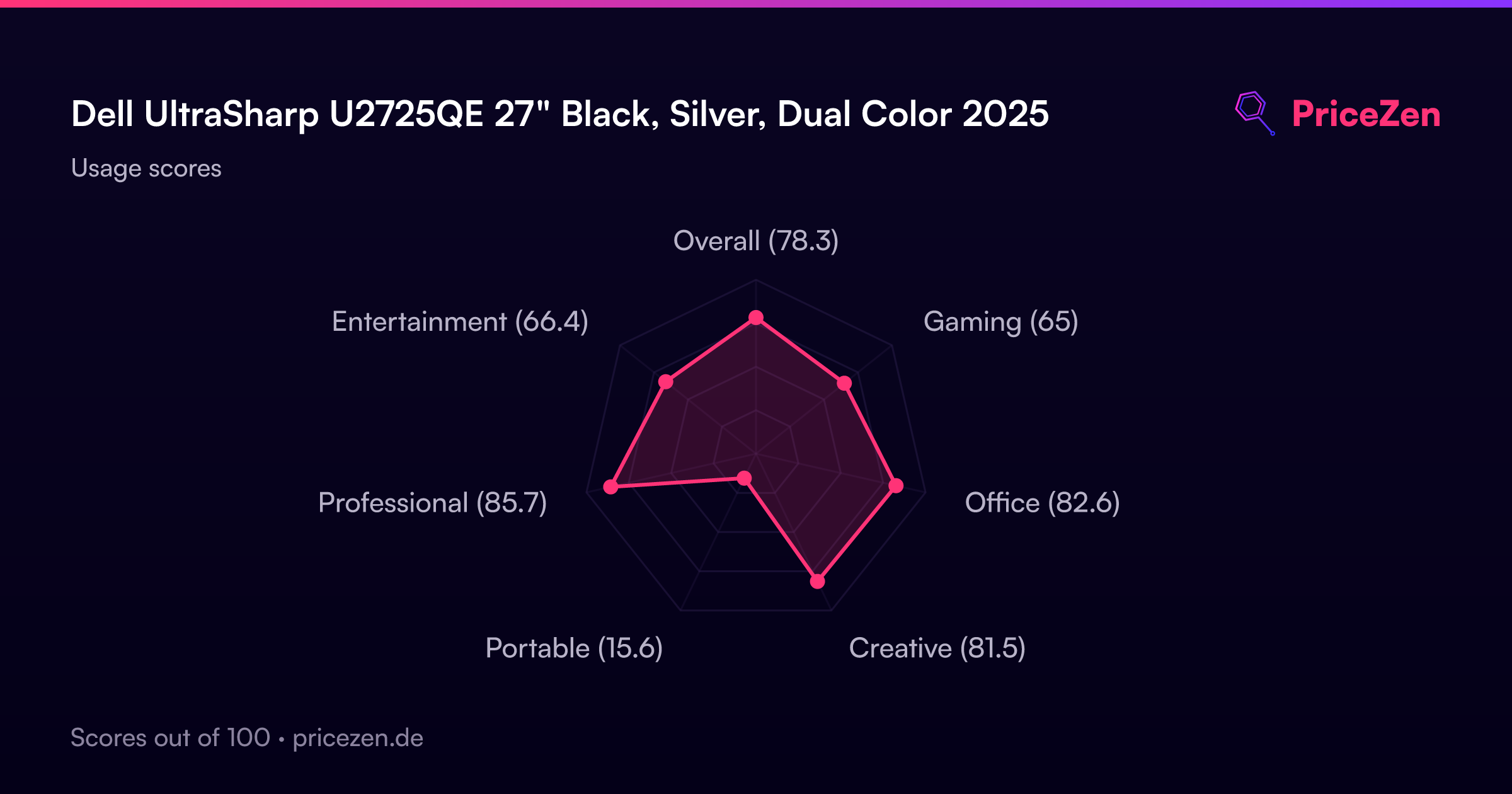
- Overall78.3
- Gaming65
- Office82.6
- Creative81.5
- Portable15.6
- Professional85.7
- Entertainment66.4