MSI MAG 244F 24" Metallic Black 2025
A 200Hz refresh rate and 0.5ms response time on its 23.8-inch IPS panel deliver exceptionally fluid motion clarity for fast-paced gaming. The panel covers 96% DCI-P3 and 126% sRGB, offering wide color gamut accuracy uncommon at this price point. This monitor is best for competitive esports players who prioritize high frame rates and color vibrancy over higher resolutions.

No current retailer price
Where we saw it before. Check the store for today's price.











Snapshot
The 30-Second Version
The MSI MAG 244F delivers a 200Hz refresh rate and 0.5ms response time at a budget price, with color coverage that beats monitors costing twice as much. The stand is flimsy and HDR is mostly marketing, but for competitive gaming on a budget, this is one of the best values we've seen. US pricing currently runs $81 to $121, and near the low end it's a steal. If you want smooth, responsive gameplay without breaking the bank, this monitor delivers.
Pros & Cons
Pros
- 200Hz refresh rate with 0.5ms response time, top-tier smoothness for competitive gaming 93rd
- Excellent color coverage at 96% DCI-P3 and 126% sRGB, rare for this price bracket 84th
- FreeSync Premium support works with both PC and console VRR 84th
- VESA 100x100 mount support means you can ditch the flimsy stand 70th
- Low input lag reported by multiple owners, ideal for fast-paced shooters
Cons
- Stand feels flimsy according to user feedback, tilt-only adjustment with no height or swivel
- HDR support is mostly marketing, no local dimming and only 300 nits brightness
- Limited connectivity with just one HDMI and one DisplayPort
- Quality control issues reported, including dead pixels and light bleed on some units
- No built-in speakers despite some retailer listings suggesting otherwise
What owners think
The Word on the Street
How owner sentiment changed over time
ExclusiveBased on when customers actually wrote their reviews - so you can see whether early praise held up.
13 written reviews, Aug 2025 – Aug 2026: 8 happy, 3 mixed, 1 unhappy, 1 without stars
Across all 115 store ratings: 4.5★. Most owners rate without writing a review. The chart counts the 13 written reviews.
Each dot is one written review, in the month it was written. Happy = 4-5★, mixed = 3★, unhappy = 1-2★.
The proof
Performance
The 200Hz refresh rate is the headline here, and it's legitimately one of the best on the market right now. Our database puts this monitor in the 94th percentile for performance, which means it's beating the vast majority of displays we've tracked. The 0.5ms GtG response time is the minimum spec, so real-world performance will vary depending on the overdrive setting, but even at more conservative settings you're looking at a panel that keeps motion blur to a minimum. For fast-paced shooters, that's the difference between seeing an enemy clearly mid-flick and seeing a smeared mess.
The 300 nits brightness is solid for indoor use, though it's not going to blow you away in a sunlit room. The HDR support is more of a checkbox feature than a real selling point. Without local dimming and with a 1000:1 contrast ratio, HDR content will look slightly better than SDR but nowhere near what a proper HDR display can do. The real story here is the color performance. 96% DCI-P3 coverage on a budget gaming monitor is a standout, and the 10-bit color support via 8-bit + FRC means gradients look smooth without banding. If you're doing casual photo editing or content creation on the side, this panel won't embarrass you.
Specifications
Full Specifications
Display
| Size | 24" |
| Resolution | 1920x1080 (Full HD) |
| Panel Type | IPS |
| Aspect Ratio | 16:9 |
| Curved | No |
| Screen Finish | matte |
Performance
| Refresh Rate | 200 Hz |
| Response Time | 0.5 |
| Adaptive Sync | FreeSync Premium |
Color & HDR
| Brightness | 300 nits |
| Color Gamut | 96% DCI-P3126% sRGB91% Adobe RGB |
| Color Depth | 10-bit (8-bit + FRC) |
| HDR | ✓ |
| HDR Support | HDR |
Connectivity
| HDMI Ports | 1 |
| DisplayPort | 1 |
| USB-C | 0 |
| Speakers | No |
| Headphone Jack | Yes |
Ergonomics
| Height Adjustable | No |
| Tilt | Yes |
| Swivel | No |
| Pivot | No |
| VESA Mount | 100x100 |
Features
| Webcam | No |
| Touchscreen | No |
| PIP/PBP | No |
| Power | 36 |
| Weight | 2.9 kg / 6.3 lbs |
vs Competition
The current crop of monitors we rank alongside this one leans bigger and sharper, which makes the MSI's pitch pretty clear. The ASUS TUF Gaming VG27AQL5A and the LG UltraGear 27GS75Q-B are both 27-inch options, so they're asking you to trade some of the MSI's compactness and low price for a larger canvas. The KOORUI 34E6UC goes further still at 34 inches, and that's a fundamentally different kind of desk setup, built for immersion and screen real estate rather than flick shots in a shooter.
Our ranking puts the MAG 244F in the 94th percentile for performance, and the reason is the combination it commits to: 200Hz, a 0.5ms minimum GtG response time and a Rapid IPS panel with 96% DCI-P3 coverage, all at 1080p on a 24-inch screen. That's a spec sheet aimed at one job, which is putting frames in front of you as fast and as cleanly as possible. If your PC is pushing high frame rates in Valorant, CS2 or Apex and you want maximum smoothness for the least money, the MSI is the pick. If you'd rather have a bigger screen for work, browsing and slower-paced games, the 27-inch alternatives are worth a look, and the 34-inch KOORUI is the one to consider if you want to feel surrounded by the game rather than staring down a target.
| Spec | MSI MAG 244F 24" | LG UltraGear 45GX950A-B 45" | ASUS ROG Strix XG27UCDMG 27" | Dell UltraSharp U4025QW 39.7" | Alienware AW-Series AW3425DW 34" | Samsung Odyssey G60SD 27" |
|---|---|---|---|---|---|---|
| Screen Size | 24 | 45 | 27 | 39.7 | 34 | 27 |
| Resolution | 1920 x 1080 | 5120 x 2160 | 3840 x 2160 | 5120 x 2160 | 3440 x 1440 | 2560 x 1440 |
| Panel Type | IPS | OLED | QD-OLED | IPS | QD-OLED | OLED |
| Refresh Rate | 200 | 330 | 240 | 120 | 240 | 360 |
| Response Time Ms | 0.5 | 0.03 | 0.03 | 5 | 0.03 | 0.03 |
| Adaptive Sync | FreeSync Premium | FreeSync Premium Pro | FreeSync Premium Pro | Adaptive-Sync | FreeSync Premium Pro | FreeSync Premium Pro |
| Hdr | HDR | DisplayHDR True Black 400 | DisplayHDR True Black 400 | HDR600 | HDR400 | HDR10+ |
| Compare | Compare | Compare | Compare | Compare |
| Product | Color | Portability | Display | Feature | User Sentiment | Ergonomic | Performance | Connectivity | Social Proof |
|---|---|---|---|---|---|---|---|---|---|
| MSI MAG 244F 24" | 83.7 | 57.3 | 37.5 | 70.1 | 48.2 | 47.2 | 92.7 | 33.8 | 83.9 |
| LG UltraGear 45GX950A-B 45" Compare | 99.4 | 76.5 | 99.7 | 96.3 | 76.7 | 90.8 | 99.4 | 96.9 | 92 |
| ASUS ROG Strix XG27UCDMG 27" Compare | 96.5 | 57.3 | 97.7 | 85 | 99.3 | 90.8 | 97.9 | 81.1 | 98.9 |
| Dell UltraSharp U4025QW 39.7" Compare | 97.9 | 76.5 | 98.6 | 96.3 | 85.4 | 90.8 | 56.1 | 99.3 | 96.8 |
| Alienware AW-Series AW3425DW 34" Compare | 98.9 | 73.9 | 84.1 | 96.3 | 95.7 | 90.8 | 97.9 | 95.4 | 96.8 |
| Samsung Odyssey G60SD 27" Compare | 90.7 | 39.3 | 73.4 | 70.1 | 95.7 | 90.8 | 99.5 | 87.5 | 92 |
Price
Value & Pricing
The pricing on this monitor moves around depending on where you shop, and right now US listings run from $81 to $121. At the bottom of that range it's an outright bargain for a 200Hz IPS panel with this color coverage, and even at the top end it still sits comfortably in budget territory. We track its price over time across stores, partly through our community browser extension, so we can tell you the low end isn't a one-off typo, it's a price this monitor actually hits.
At $81, this is about as much gaming monitor as you can buy for the money. You're getting top-tier refresh rate performance and color accuracy that punches well above its weight class, and the trade-offs are the ones you'd expect: the stand, the limited ports, and HDR that's more of a suggestion than a feature. Closer to $121 the math gets a little less lopsided, since that's real money you could put toward a bigger or sharper panel, but the 200Hz Rapid IPS combo still holds up. Our advice is simple: watch the price for a bit and grab it near the low end rather than paying the top of the range.
We started tracking prices for this product on May 25, 2026. The chart appears once we have more data.
Read more
Overview
The MSI MAG 244F is one of those monitors that makes you wonder why anyone still buys 60Hz panels for gaming. You get a 24-inch 1080p IPS screen running at 200Hz with a 0.5ms response time, and the whole package lands in budget territory. That's a combo that would have cost you serious money a few years ago. Now it's just sitting there on the shelf, waiting for someone who wants smooth gameplay without selling a kidney.
This is a monitor aimed squarely at competitive gamers and console players. The 200Hz refresh rate is overkill for a PS5 or Xbox Series S, which cap out at 120Hz, but it's perfect for a mid-range PC pushing high frame rates in games like Valorant, CS2, or Apex Legends. The FreeSync Premium support means you won't be dealing with screen tearing when your frame rate dips, and the Rapid IPS panel keeps colors looking decent while you're flicking between targets.
What makes this interesting is the price-to-performance ratio. The color coverage is genuinely impressive for a budget gaming panel, with 96% DCI-P3 and 126% sRGB. That's the kind of spec you'd expect from a monitor costing twice as much. MSI clearly decided to spend the budget on the panel and the refresh rate, then cut corners elsewhere. We'll get into where those corners are.
Common Questions
Q: Does this monitor work well with PS5 and Xbox consoles?
Yes, it's actually a great console companion. The monitor supports VRR on both PS5 and Xbox, and the HDMI CEC support means your console can control the monitor's power state. The 1080p resolution is a natural fit for consoles, and the 120Hz cap on current-gen systems runs buttery smooth here. You won't use the full 200Hz on console, but you're also not paying extra for resolution your console can't push anyway.
Q: Can I mount this on a monitor arm?
Absolutely, and honestly, you probably should. The monitor has standard VESA 100x100 mounting holes, so any monitor arm or wall mount will work. Given that the included stand only offers tilt adjustment and some owners find it a bit wobbly, a cheap monitor arm solves both the ergonomics and stability concerns in one go.
Q: Is the HDR any good on this monitor?
Not really, and that's worth being upfront about. The monitor is HDR Ready, which means it can accept an HDR signal, but with 300 nits brightness and no local dimming, you're not getting the dramatic highlights and deep shadows that make HDR worthwhile. Think of it as a slight color and contrast boost over SDR rather than true HDR. If HDR is a priority for you, you'll need to spend significantly more on a display with higher peak brightness and local dimming.
Q: How is this monitor for non-gaming tasks like work or photo editing?
Better than you'd expect from a budget gaming panel. The 96% DCI-P3 and 126% sRGB coverage means colors are accurate enough for casual photo editing and content creation. The 1080p resolution on a 24-inch panel gives you a decent pixel density for text, though it's not as sharp as a 1440p display. If your work involves long hours of reading documents, you might prefer a higher resolution panel, but for mixed use this holds up well.
Who Should Skip This
If you're primarily a productivity user who occasionally games, this monitor probably isn't for you. The 1080p resolution on a 24-inch panel is fine for gaming, but text clarity and desktop space suffer compared to the larger screens we rank alongside it. Something like the ASUS TUF Gaming VG27AQL5A or the LG UltraGear 27GS75Q-B gives you a bigger canvas for spreadsheets and documents, and the 34-inch KOORUI 34E6UC takes that idea even further if your desk can handle it.
HDR enthusiasts should also look elsewhere. The 300 nits brightness and lack of local dimming mean HDR content won't look dramatically different from SDR. If you want real HDR performance, you're looking at monitors in a completely different price bracket. And if you're sensitive to quality control issues, the reports of dead pixels and light bleed on some units might make you nervous. MSI's budget line doesn't have the same QC rigor as their premium offerings, so buying from a retailer with a good return policy is smart if you decide to take the plunge.
Verdict
For competitive gamers on a budget, the MSI MAG 244F is an easy recommendation. The 200Hz refresh rate and low input lag are exactly what you want for fast-paced shooters, and the color performance means your games will look great while you're fragging. With US pricing currently starting at $81, it's close to a no-brainer if you catch it near that level, and even at the top of the $81 to $121 range it's still a lot of monitor for the money. Console players on PS5 or Xbox Series S will also be happy here, since the 120Hz VRR support works flawlessly and the 1080p resolution is a natural fit for those systems.
If you're a more casual gamer who plays slower-paced titles or splits time between gaming and productivity work, you might want to consider one of the larger panels we rank next to it instead. A bigger screen makes a real difference for text clarity and desktop space, and you probably won't miss the extra refresh rate. The flimsy stand is also worth factoring in. If you don't plan to use a VESA mount, you'll be living with a tilt-only stand that some owners describe as wobbly. That's a solvable problem with a cheap monitor arm, but it's still an extra expense.
Usage Scores
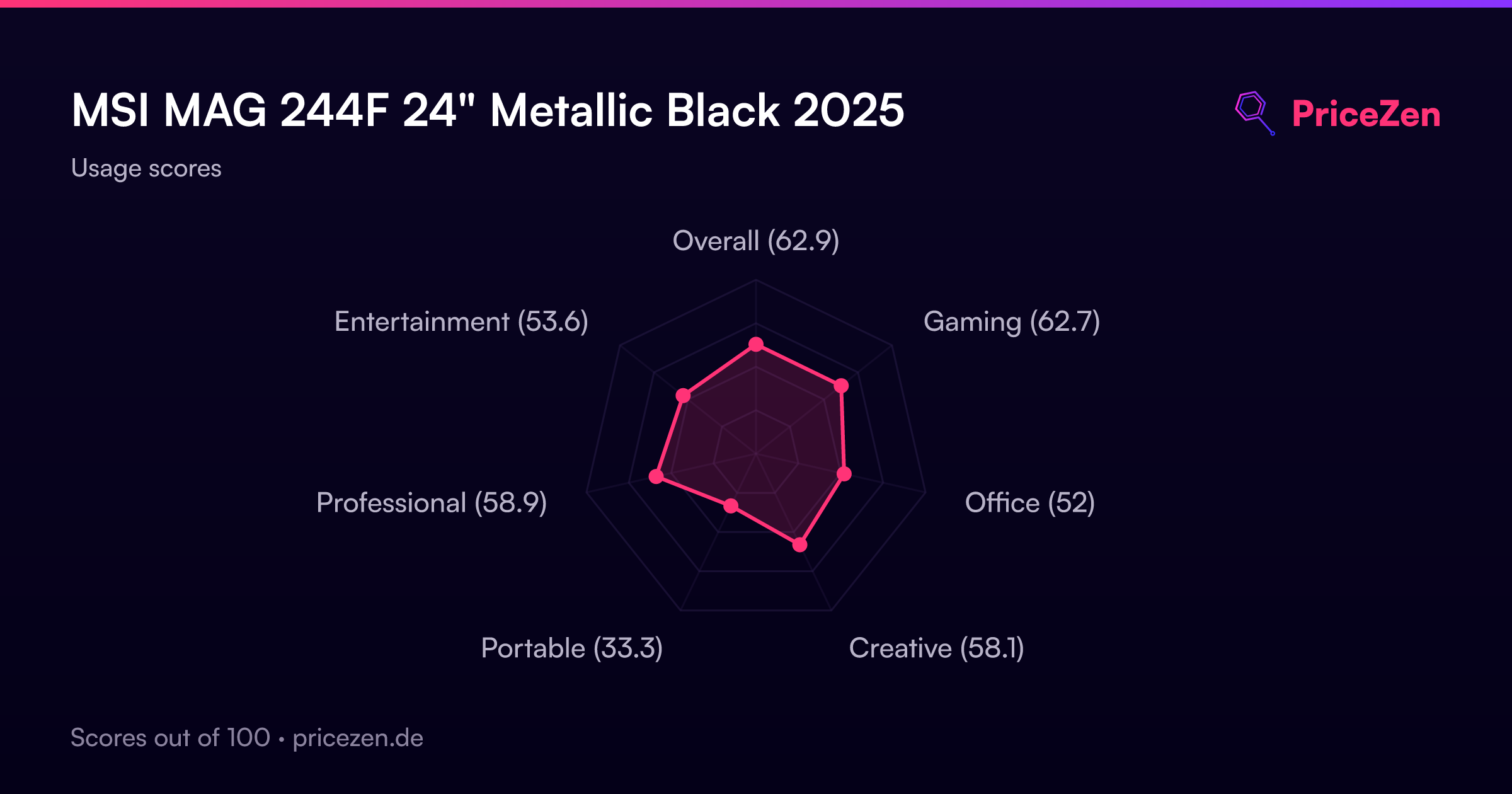
- Overall62.9
- Gaming62.7
- Office52
- Creative58.1
- Portable33.3
- Professional58.9
- Entertainment53.6