LG UltraFine 32UP83AK-W 32" White 2025

One USB-C cable for picture and sound verified Nov 20
69/100 overall score 4.2 average from 146 owner ratings
- Screen
- 32"
- Resolution
- 3840 x 2160
- Panel
- IPS
- Refresh
- 60 Hz
- Response time
- 5 ms
- HDR
- HDR10
Compare prices at 1 store
Cheapest first. New, refurbished and bundled offers are kept apart, so you compare like with like.
| Store | Sold by | Colour and condition | Price | vs lowest | Last checked | Link |
|---|---|---|---|---|---|---|
| New1 offerSingle unit | ||||||
| Out of stock when last checked | ||||||
| Amazon | Not known | Not listed | No price | Out of stock | Nov 7 | Go to store |
 Source: PriceZen, checked Nov 7, 2026
A price counts as current when we checked it in the last 7 days. “Marketplace seller” means a third-party seller on that store, not the store itself.
Price history
Checked that dayNot checked that day, still on offer
Source: PriceZen, checked Oct 31, 2026











Snapshot
The 30-Second Version
A stunning 4K panel with a USB-C port that might ghost you. Great monitor, questionable hub.
Pros & Cons
Pros
- Gorgeous 4K IPS panel with excellent color accuracy 95th
- 95% DCI-P3 coverage, great for photo and video editing 93rd
- Fully adjustable stand with height, tilt, and pivot 87th
- USB-C with 60W power delivery for single-cable laptop setups 79th
Cons
- USB-C connection is unreliable, random disconnects reported
- USB hub failures are a recurring complaint
- Only 60Hz, not great for fast-paced gaming
- 60W power delivery is weak for larger laptops
What owners think
The Word on the Street
- Owners consistently rave about the sharp 4K resolution and accurate colors, especially for photo work.
- A recurring gripe is the USB-C port randomly disconnecting or the hub just dying entirely.
- Some buyers call it a great value, while others warn people away due to reliability concerns.
How owner sentiment changed over time
ExclusiveBased on when customers actually wrote their reviews - so you can see whether early praise held up.
Happy owners: 70% lately, 83% in 2025
Too few reviews to call that a change.
Across all 146 store ratings: 4.2★. Most owners rate without writing a review. The chart counts the 22 written reviews with stars and their own date.
4 written reviews without stars are left out of the trend.
Show the numbers
| Period | Reviews | Happy | Mixed | Unhappy | Happy share |
|---|---|---|---|---|---|
| 2025 | 12 | 10 | 0 | 2 | 83% |
| Jan – Sep 2026 | 10 | 7 | 1 | 2 | 70% |
- Jul – Sep 20262 of 3 happy
Buyers praised image quality, setup ease, and Mac compatibility, but one reported a defective panel with dead pixels after two years, raising reliability concerns.
- Crisp, vibrant images and sharp clarity praised by two buyers.
- Easy setup and use, plus good connectivity with Mac mini and extra USB ports.
- One monitor developed horizontal dark line and vertical dead pixel band after two years, deemed defective.
- Jan – Mar 20265 of 7 happy · 1 without stars
Buyers praised the 4K resolution, color accuracy, and USB-C connectivity, with one noting a solid build and adjustable stand. However, one reviewer reported USB hub failure after months and startup input detection issues.
- 4K resolution, contrast, and color are repeatedly praised as perfect or vibrant, with sharp text.
- USB-C single-cable connectivity for video and audio is highlighted as easy and convenient.
- USB hub ports failed after several months; resetting didn't fix, though other ports remain usable.
- Startup input detection can be wonky with Auto mode; manually selecting USB resolves it.
Each column joins calendar quarters until it holds at least 10 reviews with stars and their own date. Happy = 4-5★, mixed = 3★, unhappy = 1-2★. Period summaries are in English.
The proof
Performance
The panel itself is a standout. 4K at 32 inches gives you roughly 140 PPI, which means text is razor sharp and you can fit a ton of windows on screen without squinting. Color accuracy is excellent out of the box, and the 95% DCI-P3 coverage puts it in the top tier for photo and video work at this price. The 60Hz refresh rate and 5ms response time are fine for office work and casual gaming, but don't expect smooth competitive play. What surprised us is how good the ergonomics are: height, tilt, and pivot adjustments all feel solid, which is rare on a monitor this affordable. The built-in speakers are serviceable for video calls but nothing to write home about.
Specifications
Full Specifications
Display
| Size | 32" |
| Resolution | 3840x2160 (4K UHD) |
| Panel Type | IPS |
| Aspect Ratio | 16:9 |
| Curved | No |
| Screen Finish | matte |
Performance
| Refresh Rate | 60 Hz |
| Response Time | 5 |
Color & HDR
| Brightness | 350 nits |
| Color Gamut | 95% DCI-P3 |
| Color Depth | 10-bit |
| HDR | HDR10 |
| HDR Support | HDR |
Connectivity
| HDMI Ports | 2 |
| DisplayPort | 1 |
| USB-C | 1 |
| Speakers | Yes |
| Headphone Jack | Yes |
Ergonomics
| Height Adjustable | Yes |
| Tilt | Yes |
| Swivel | No |
| Pivot | Yes |
| VESA Mount | 100x100 |
Features
| Webcam | No |
| Touchscreen | No |
| PIP/PBP | No |
| Power | 55 |
| Weight | 8.3 kg / 18.3 lbs |
vs Competition
Against the ASUS ROG Strix XG27UCDMG and MSI MAG 271QPX QD-OLED, the LG is a different beast entirely. Those are 27-inch OLED gaming monitors with 240Hz+ refresh rates and near-instant response times, but they cost significantly more and sacrifice screen real estate. The LG's 32 inches of 4K real estate is better for productivity and creative work. The Samsung Odyssey G60SD and Gigabyte M Series OLED MO27U2 SA are similarly gaming-focused. If you want a workhorse monitor for coding, design, or office tasks, the LG is the better fit. If you want to game at high refresh rates, look elsewhere.
| Spec | LG UltraFine 32UP83AK-W 32" | ASUS ROG Strix XG27UCDMG 27" | Dell UltraSharp U4025QW 39.7" | Alienware AW-Series AW3425DW 34" | MSI MAG 271QPX QD-OLED E2 27" | Samsung Odyssey G60SD 27" |
|---|---|---|---|---|---|---|
| Screen Size | 32 | 27 | 39.7 | 34 | 27 | 27 |
| Resolution | 3840 x 2160 | 3840 x 2160 | 5120 x 2160 | 3440 x 1440 | 2560 x 1440 | 2560 x 1440 |
| Panel Type | IPS | QD-OLED | IPS | QD-OLED | QD-OLED | OLED |
| Refresh Rate | 60 | 240 | 120 | 240 | 240 | 360 |
| Response Time Ms | 5 | 0.03 | 5 | 0.03 | 0.03 | 0.03 |
| Adaptive Sync | - | FreeSync Premium Pro | Adaptive-Sync | FreeSync Premium Pro | FreeSync Premium Pro | FreeSync Premium Pro |
| Hdr | HDR10 | DisplayHDR True Black 400 | HDR600 | HDR400 | DisplayHDR True Black 400 | HDR10+ |
| Compare | Compare | Compare | Compare | Compare |
| Product | Color | Portability | Display | Feature | User Sentiment | Ergonomic | Performance | Connectivity | Social Proof |
|---|---|---|---|---|---|---|---|---|---|
| LG UltraFine 32UP83AK-W 32" | 92.6 | 62.8 | 95.1 | 70 | 10.4 | 78.6 | 22.3 | 87.4 | 62.1 |
| ASUS ROG Strix XG27UCDMG 27" Compare | 96.5 | 57.3 | 97.7 | 85 | 99.3 | 90.8 | 97.9 | 81 | 98.9 |
| Dell UltraSharp U4025QW 39.7" Compare | 97.9 | 76.5 | 98.6 | 96.3 | 85.4 | 90.8 | 56.1 | 99.3 | 96.8 |
| Alienware AW-Series AW3425DW 34" Compare | 98.9 | 73.9 | 84 | 96.3 | 95.7 | 90.8 | 97.9 | 95.4 | 96.8 |
| MSI MAG 271QPX QD-OLED E2 27" Compare | 99.2 | 57.3 | 73.4 | 85 | 95.7 | 90.8 | 97.9 | 81 | 98.9 |
| Samsung Odyssey G60SD 27" Compare | 90.7 | 39.3 | 73.4 | 70 | 95.7 | 90.8 | 99.5 | 87.4 | 91.9 |
Price
Value & Pricing
At USD 375 to USD 430 across US retailers, this monitor is a solid deal if you get a good unit. The best price we're seeing is USD 375, which is a steal for a 32-inch 4K IPS panel with this color coverage. But the reliability concerns make it a gamble. If you're in Canada, prices range from CAD 500 to CAD 584, so shop around. The value proposition hinges entirely on whether your USB-C port holds up. If it does, you're getting a fantastic display for the money. If it doesn't, you're stuck with a beautiful paperweight.
Read more
Overview
The LG UltraFine 32UP83AK-W is a 32-inch 4K IPS panel that nails the basics for productivity and creative work, but it's got a serious Achilles' heel: USB-C reliability. The display quality is genuinely top-tier for this price bracket, with 95% DCI-P3 coverage and 350 nits of brightness that make text crisp and colors pop. But when a chunk of your user base reports random disconnects and hub failures on the one port that's supposed to simplify your setup, that's a red flag you can't ignore.
Common Questions
Q: Is this monitor good for photo editing?
Yes, the 95% DCI-P3 coverage and 4K resolution make it excellent for photo work. Colors are accurate out of the box and the 32-inch size gives you plenty of room for toolbars and previews.
Q: Can I charge my laptop through the USB-C port?
Yes, it delivers 60W of power, which is enough for most ultrabooks like a MacBook Air or ThinkPad X1 Carbon. But larger laptops with discrete GPUs may need more power and could drain the battery under heavy load.
Q: Does the USB-C port actually work reliably?
This is the big question mark. Many users report flawless single-cable setups, but a significant number complain about random disconnects and hub failures. If USB-C is critical for you, consider using HDMI or DisplayPort instead, or look at a different monitor.
Who Should Skip This
If you're buying this specifically for the USB-C single-cable experience, skip it. The reliability issues are too widespread to ignore. Get a Dell UltraSharp or a BenQ PD series monitor instead, they have more dependable USB-C implementations. Also, if you're a competitive gamer, this 60Hz panel isn't for you. Look at a 144Hz+ monitor like the Gigabyte M27Q or ASUS TUF Gaming series.
Verdict
The LG UltraFine 32UP83AK-W is a fantastic display trapped in a body with a questionable USB-C implementation. If you're willing to use HDMI or DisplayPort instead of USB-C, you'll likely love this monitor. The panel quality, color accuracy, and ergonomics are all excellent for the price. But if you're buying this specifically for the single-cable USB-C convenience, you're rolling the dice. We'd recommend it for desktop users who don't need USB-C, and suggest looking at alternatives if USB-C is a must-have.
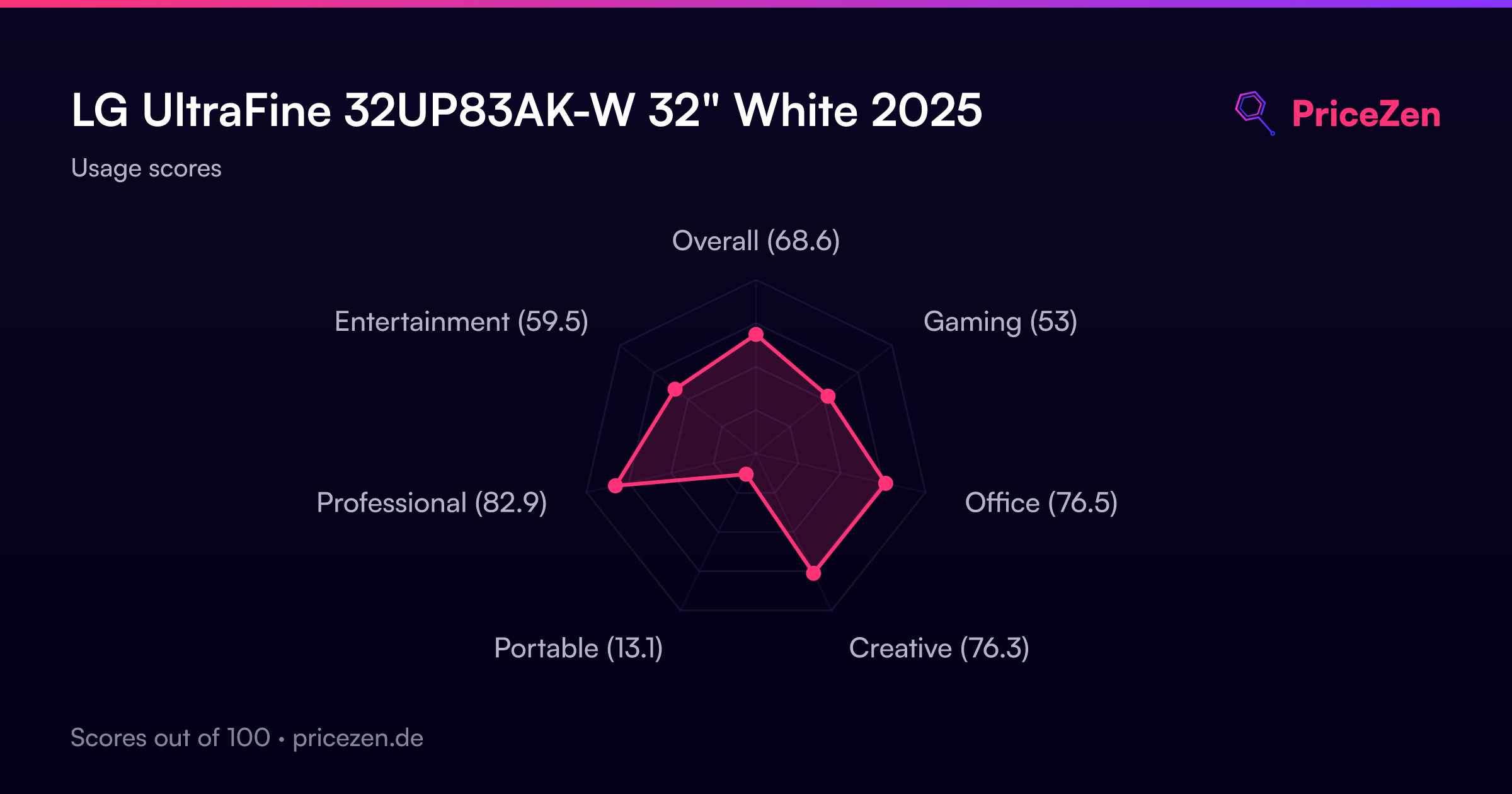
Usage Scores
- Overall68.6
- Gaming53
- Office76.5
- Creative76.3
- Portable13.1
- Professional82.9
- Entertainment59.5