ASUS Eye Care VA249QG 23.8" Silver 2025
A 120Hz refresh rate and 1ms MPRT on an IPS panel with Adaptive-Sync make this a standout for smooth, tear-free motion in a budget-conscious 24-inch display. Its frameless design and TÜV Rheinland-certified eye care technologies provide a comfortable, expansive viewing experience for long sessions. This monitor is best for home office users and casual gamers who prioritize eye comfort and fluid visuals over high-end HDR or 4K resolution.

No current retailer price











Snapshot
The 30-Second Version
The ASUS VA249QG's 120Hz refresh rate is its killer feature, landing it in the 74th percentile for performance. The IPS panel covers 99% sRGB for solid color, but the 1080p resolution and barebones feature set hold it back. Owners are largely happy, with sentiment at 78 out of 100 in our data, though uneven backlighting is the recurring gripe. Grab it on sale for a smooth, budget-friendly upgrade.
Pros & Cons
Pros
- 120Hz refresh rate makes motion significantly smoother than 60Hz 70th
- 99% sRGB coverage delivers accurate, vibrant colors for the price
- IPS panel provides wide 178-degree viewing angles
- VESA mount compatibility lets you ditch the basic tilt-only stand
- Owner sentiment scores 78 out of 100 in our data, with buyers happy about what they get for the money
Cons
- Display score in the 22nd percentile, held back by 1080p resolution
- Built-in speakers are tinny and lack any real bass
- 300-nit brightness is just adequate and can't handle HDR
- Portable score is a dismal 24.6 out of 100, it's not meant for travel
- Uneven backlighting is the most repeated owner complaint, so panel quality varies unit to unit
What owners think
The Word on the Street
How owner sentiment changed over time
ExclusiveBased on when customers actually wrote their reviews - so you can see whether early praise held up.
9 written reviews, May 2025 – Apr 2026: 8 happy, 1 mixed
Across all 84 store ratings: 4.5★. Most owners rate without writing a review. The chart counts the 9 written reviews.
Each dot is one written review, in the month it was written. Happy = 4-5★, mixed = 3★, unhappy = 1-2★.
The proof
Performance
The 120Hz refresh rate is the star of the show here. Paired with Adaptive-Sync, it eliminates screen tearing and makes fast motion look clean, which is a real step up from the 60Hz panels most people are still using. The 1ms MPRT helps keep ghosting to a minimum, though it's worth noting this is a moving picture response time, not a true gray-to-gray measurement. In practice, games like Valorant or Rocket League feel responsive and fluid. Our performance score of 74th percentile puts it ahead of most basic office monitors but well behind dedicated high-refresh gaming displays.
Color performance is a mixed bag. The 99% sRGB coverage is great for an IPS panel at this price, and the 178-degree viewing angles mean colors don't shift much when you're not sitting dead center. However, the 300-nit peak brightness and 8-bit panel (likely 6-bit + FRC) mean it can't handle HDR content in any meaningful way. The color score sits at the 62nd percentile, which is about average. For photo editing, it's fine for web work, but you'll want a calibrated, higher-end display for print. The backlight uniformity can be a bit of a lottery, with some users reporting slight delays in backlight response on certain transitions.
Specifications
Full Specifications
Display
| Size | 23.8" |
| Resolution | 1920x1080 (Full HD) |
| Panel Type | IPS |
| Aspect Ratio | 16:9 |
| Curved | No |
| Screen Finish | matte |
Performance
| Refresh Rate | 120 Hz |
| Response Time | 1 |
| Adaptive Sync | Adaptive-Sync |
Color & HDR
| Brightness | 300 nits |
| Color Gamut | 99% sRGB |
| Color Depth | 8-bit |
Connectivity
| HDMI Ports | 1 |
| DisplayPort | 1 |
| USB-C | 0 |
| Speakers | Yes |
| Headphone Jack | Yes |
Ergonomics
| Height Adjustable | No |
| Tilt | Yes |
| Swivel | No |
| Pivot | No |
| VESA Mount | 100x100 |
Features
| Webcam | No |
| Touchscreen | No |
| Weight | 4.8 kg / 10.5 lbs |
vs Competition
Stacked against the competition, the ASUS VA249QG is a budget brawler that punches above its weight class in motion clarity but gets outclassed in resolution and features. The Dell S2725QC and Gigabyte M27UP SA are in a different league with 4K resolution and USB-C connectivity, but they also cost significantly more. The Acer Nitro XV272U W2 offers a higher 1440p resolution and faster 180Hz refresh rate for not much more money when on sale, making it a direct threat if you can stretch your budget. The HP OMEN 27qs G2 also jumps to 1440p and a higher refresh rate. Where the ASUS wins is pure value at its lowest price point. If you have a hard $110 budget and need an IPS panel that's smooth for gaming, nothing else comes close. But if you can spend $50 to $100 more, you'll get a massive jump in pixel density and speed.
| Spec | ASUS Eye Care VA249QG 23.8" | MSI MAG 271QPX QD-OLED E2 27" | Samsung Odyssey G60SD 27" | LG UltraGear 27G810A-B 27" | Dell S2725QC 27" | BenQ MA Series MA270U 27" |
|---|---|---|---|---|---|---|
| Screen Size | 23.799999237060547 | 27 | 27 | 27 | 27 | 27 |
| Resolution | 1920 x 1080 | 2560 x 1440 | 2560 x 1440 | 3840 x 2160 | 3840 x 2160 | 3840 x 2160 |
| Panel Type | IPS | QD-OLED | OLED | IPS | IPS | IPS |
| Refresh Rate | 120 | 240 | 360 | 180 | 120 | 60 |
| Response Time Ms | 1 | 0.029999999329447746 | 0.029999999329447746 | 1 | 8 | 5 |
| Adaptive Sync | Adaptive-Sync | FreeSync Premium Pro | FreeSync Premium Pro | FreeSync Premium | FreeSync Premium | - |
| Hdr | - | DisplayHDR True Black 400 | HDR10+ | HDR400 | HDR | HDR10 |
| Compare | Compare | Compare | Compare | Compare |
| Product | Color | Portability | Display | Feature | User Sentiment | Ergonomic | Performance | Connectivity | Social Proof |
|---|---|---|---|---|---|---|---|---|---|
| ASUS Eye Care VA249QG 23.8" | 53.7 | 43.4 | 21.3 | 21.3 | 48 | 47.3 | 69.9 | 43.3 | 60.4 |
| MSI MAG 271QPX QD-OLED E2 27" Compare | 99.2 | 57.5 | 73.5 | 85.1 | 95.7 | 90.8 | 97.9 | 81.2 | 98.9 |
| Samsung Odyssey G60SD 27" Compare | 90.8 | 39.5 | 73.5 | 70.2 | 95.7 | 90.8 | 99.5 | 87.6 | 92 |
| LG UltraGear 27G810A-B 27" Compare | 93.8 | 68 | 87.1 | 70.2 | 76.4 | 90.8 | 81.8 | 98.2 | 67.2 |
| Dell S2725QC 27" Compare | 71.9 | 76.6 | 87.1 | 70.2 | 95.7 | 90.8 | 44.2 | 87.6 | 96.8 |
| BenQ MA Series MA270U 27" Compare | 92.4 | 83.9 | 87.1 | 70.2 | 95.7 | 90.8 | 22.3 | 97.8 | 84 |
Price
Value & Pricing
Pricing on this monitor is all over the place, with a wild spread from $110 to $2586 across different vendors. Let's be real, anything over $150 is a bad deal for this panel. At its low point around $110, the price-to-performance ratio is excellent. You're getting a 120Hz IPS panel with good sRGB coverage for less than many 75Hz office monitors. The sweet spot is finding it on sale at Amazon or Best Buy for that sub-$130 price. If you see it creeping toward $200, just walk away and look at newer 144Hz or 165Hz options that often go on sale in that range.
Price history
Read more
Overview
The ASUS VA249QG lands in the 74th percentile for performance in our database, which is solid for a budget-friendly 24-inch panel. You're getting a 120Hz refresh rate and a 1ms MPRT response time, a combo that makes everyday desktop use and casual gaming feel noticeably smoother than a standard 60Hz office monitor. The IPS panel covers 99% of the sRGB color space, so colors look accurate out of the box, and the 300-nit brightness is enough for most indoor setups. But the display category score sits in the 22nd percentile, dragged down by its basic 1080p resolution and lack of HDR support. This is a straightforward screen that prioritizes motion clarity over pixel density or premium features.
At around 3kg, it's not particularly light, and the portable score is a rough 24.6 out of 100, so don't plan on lugging this to LAN parties every weekend. The stand only offers tilt adjustment, which is pretty standard for this price bracket, but the VESA mount support gives you an easy path to a cleaner desk setup. The built-in speakers are there if you need them, but they're tinny, as you'd expect. For a monitor that can often be found under $110, the value proposition is strong if you know exactly what you're getting into: a no-frills, fast IPS panel for work and light play.
Common Questions
Q: Is the 1ms response time real?
The 1ms figure is MPRT (Moving Picture Response Time), which uses backlight strobing to reduce perceived blur, not a true gray-to-gray pixel response time. It helps motion clarity at 120Hz, but the actual pixel response is slower than a high-end TN or fast-IPS gaming panel. For casual gaming, it's perfectly fine and a big step up from a standard 60Hz office monitor.
Q: Can I mount this monitor on a monitor arm?
Yes, it has a standard VESA 100x100 mount on the back. The included stand only offers tilt adjustment, so using a monitor arm is a great way to free up desk space and get better ergonomics. The monitor weighs about 3kg, so any basic gas-spring arm will handle it easily.
Q: How are the built-in speakers?
They're functional but not great. The speakers are 2W stereo units that sound tinny and lack bass, which is typical for monitor audio. They'll work for system sounds or a quick video call, but you'll want dedicated speakers or a headset for music, movies, or gaming. The monitor does have a headphone jack for easy audio passthrough.
Who Should Skip This
Anyone who needs a high-resolution display for detailed creative work or wants a true HDR experience should look elsewhere. The 1080p resolution on a 24-inch screen is fine for general use, but the display score sits in the 22nd percentile, meaning it lacks the sharpness and brightness for professional photo or video editing. If you're a competitive gamer chasing every last frame, a 144Hz or 240Hz panel with a faster true response time will serve you better. And if portability matters, the 24.6 out of 100 score in that category tells you everything you need to know, this monitor is meant to stay on a desk.
Verdict
The ASUS VA249QG is a smart buy if your expectations are grounded in reality. It's a 1080p workhorse with a genuinely useful 120Hz refresh rate that makes everything from scrolling to gaming feel better, and the color accuracy is a nice bonus for an IPS panel in this price range. Owners back that up: sentiment sits at 78 out of 100 in our data, which is a healthy showing for a budget screen. Just don't expect it to be bright enough for a sun-drenched room, and check the backlight early, since uneven illumination is the complaint that comes up most often. For a secondary monitor or a first gaming display on a tight budget, it's a data-backed winner.
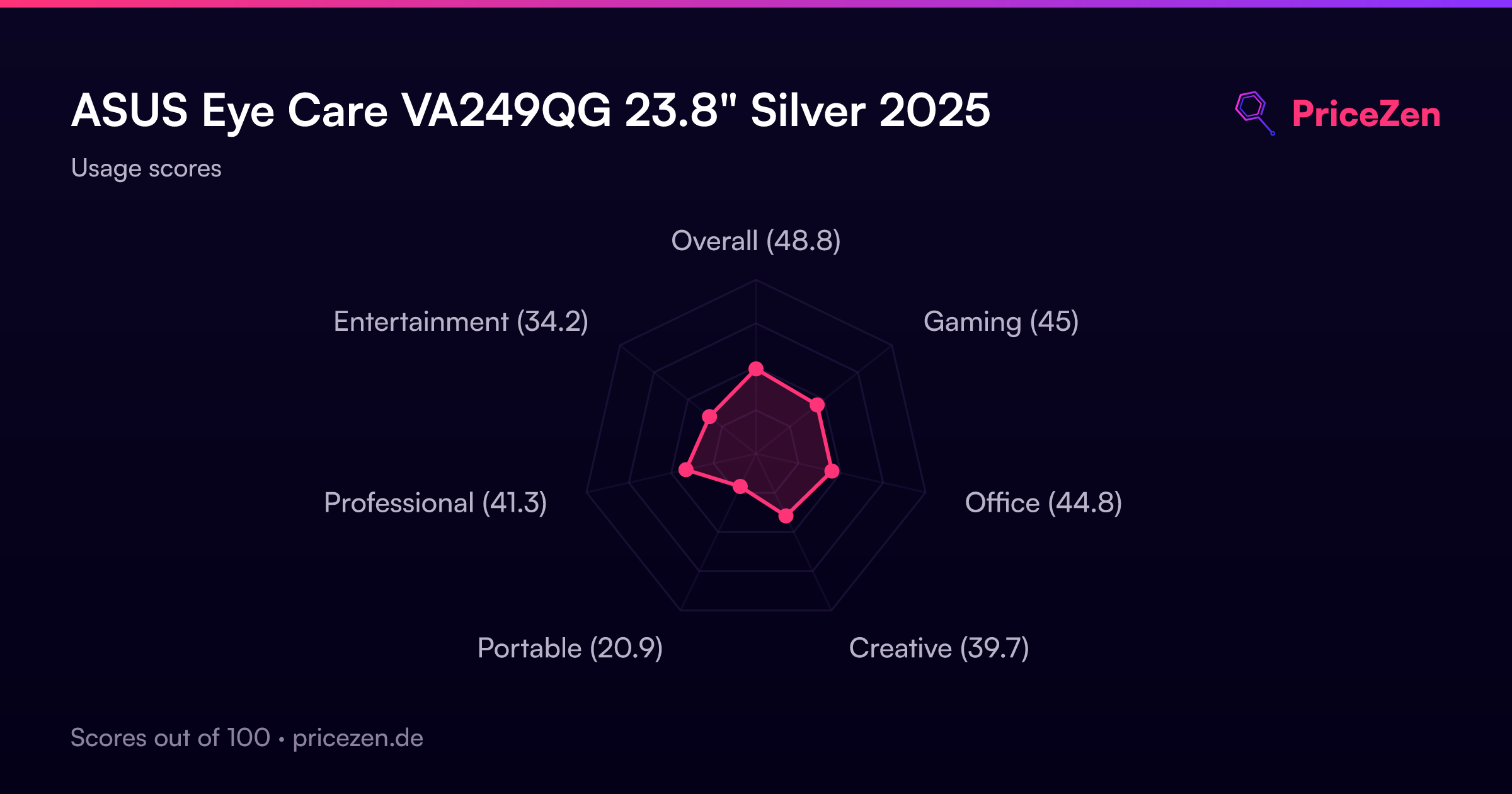
Usage Scores
- Overall48.8
- Gaming45
- Office44.8
- Creative39.7
- Portable20.9
- Professional41.3
- Entertainment34.2