Kingston 8GB DDR4-3200 CL22 SODIMM (KCP432SS6/8)

44/100 overall score 4.8 average from 67 owner ratings
- Capacity
- 8GB
- Kit
- 1 x 8GB
- Memory
- DDR4
- Speed
- 3200 MT/s
- CAS latency
- CL22
- Form factor
- SODIMM




Snapshot
The 30-Second Version
A boring, reliable 8GB SODIMM stick that gets the job done. If your laptop needs a cheap memory bump, this is it.
Pros & Cons
Pros
- Dirt cheap and widely available 76th
- Plug-and-play JEDEC standard, no BIOS fiddling needed
- Kingston reliability with a 4.7-star rating from 71 buyers
- Low 1.20V power draw keeps laptops cool
Cons
- 8GB is barely enough for modern multitasking
- CL22 latency is mediocre even for DDR4
- Single stick means no dual-channel benefit
- Zero headroom for overclocking
What owners think
The Word on the Street
- Buyers consistently praise the plug-and-play install and instant performance boost on older laptops.
- A few owners wish they'd gone with 16GB from the start, especially for heavier multitasking.
The proof
Performance
The 3200 MT/s speed lands right in the middle of the pack, and CL22 latency is nothing to write home about either. But here's what surprised us: for a budget stick, it holds its own in real-world laptop use. You won't notice the difference between this and a fancier kit unless you're benchmarking for fun. The single-rank 1Rx8 config is fine for most laptops, though it won't win any overclocking awards.
Specifications
Full Specifications
Memory
| Type | DDR4 |
| Form Factor | SODIMM |
| Total Capacity | 8192 |
| Modules | 1 |
| Per Module | 8192 |
| Pins | 260 |
| Rank | 1Rx8 |
Performance
| Speed | 3200 |
| CAS Latency | 22 |
| Voltage | 1.2 |
Class
| ECC | No |
| Registered | No |
Features
| RGB | No |
| Heat Spreader | No |
vs Competition
Against the Corsair Vengeance LPX and G.Skill Flare X5, this Kingston stick looks pretty pedestrian. Those are desktop kits with higher speeds and lower latencies, but they're also more expensive and won't fit in a laptop. For SODIMM buyers, the real competition is other 8GB DDR4 3200 sticks, and Kingston's pricing and availability make it the default pick. The Timetec Pinnacle Konduit is the only other budget SODIMM worth a look, but Kingston's brand reputation tips the scales.
| Spec | Kingston 8GB DDR4 SODIMM | G.Skill Trident Z5 Royal | Corsair VENGEANCE RGB | Team Group T-CREATE EXPERT | Crucial Pro Overclocking | XPG Lancer Blade RGB |
|---|---|---|---|---|---|---|
| Capacity | 8GB | 64GB | 64GB | 32GB | 32GB | 32GB |
| Kit | 1 x 8GB | 2 x 32GB | 2 x 32GB | 2 x 16GB | 2 x 16GB | 2 x 16GB |
| Memory Type | DDR4 | DDR5 | DDR5 | DDR5 | DDR5 | DDR5 |
| Speed Mts | 3200 | 6000 | 6400 | 6400 | 6400 | 6000 |
| Cas Latency | CL22 | CL26 | CL32 | CL32 | CL32 | CL30 |
| Form Factor | SODIMM | UDIMM | UDIMM | UDIMM | UDIMM | UDIMM |
| Ecc | No | No | No | No | No | No |
| Compare | Compare | Compare | Compare | Compare |
| Product | Speed | Feature | Latency | Capacity | Social Proof | Affordability |
|---|---|---|---|---|---|---|
| Kingston 8GB DDR4 SODIMM | 53.2 | 18 | 57.6 | 22.3 | 58.6 | 76.4 |
| G.Skill Trident Z5 Royal Compare | 87.6 | 89.6 | 99 | 89.4 | 58.7 | 3.9 |
| Corsair VENGEANCE RGB Compare | 94.8 | 89.6 | 87.6 | 89.4 | 96.4 | 6.8 |
| Team Group T-CREATE EXPERT Compare | 94.8 | 74.8 | 87.6 | 70.4 | 87.3 | 24 |
| Crucial Pro Overclocking Compare | 94.8 | 74.8 | 87.6 | 70.4 | 77 | 27 |
| XPG Lancer Blade RGB Compare | 87.6 | 89.6 | 87.6 | 70.4 | 96.4 | 16.5 |
Price
Value & Pricing
At USD 70 to USD 126 depending on where you shop, this stick is a solid budget buy. Amazon has the best deal at the low end of that range, and that's where we'd grab it. Just don't expect miracles from 8GB in 2024. If your laptop has a free slot and you're on a tight budget, this is the sensible choice.
Read more
Overview
This is a no-nonsense 8GB DDR4 SODIMM stick for laptops that just works. Kingston's KCP432SS6/8 runs at 3200 MT/s with CL22 timings, which is about as standard as it gets for DDR4 laptop memory. The one thing to know? It's cheap, reliable, and boring in the best way possible.
Common Questions
Q: Will this work in my laptop?
If your laptop takes DDR4 SODIMM and supports 3200 MT/s, yes. It's a standard JEDEC stick, so it'll downclock to match slower systems too. Check your laptop's manual for max supported speed and capacity.
Q: Should I get one 8GB stick or two for dual-channel?
Two sticks in dual-channel will give you better performance, especially with integrated graphics. But if you're on a budget, one stick now and another later is a perfectly fine upgrade path.
Q: Is 8GB enough for Windows 11?
Barely. It'll run, but you'll feel the squeeze with more than a few browser tabs open. If you can stretch to 16GB, do it.
Who Should Skip This
If you're building a gaming rig or doing heavy video editing, this isn't your RAM. Go grab a 16GB or 32GB kit instead. And if your laptop supports DDR5, don't bother with DDR4 at all.
Verdict
Buy it if you need a cheap, reliable 8GB SODIMM stick to revive an older laptop. It's not exciting, it's not fast, but it does exactly what it says on the box. For most budget laptop upgrades, this is the one to get.
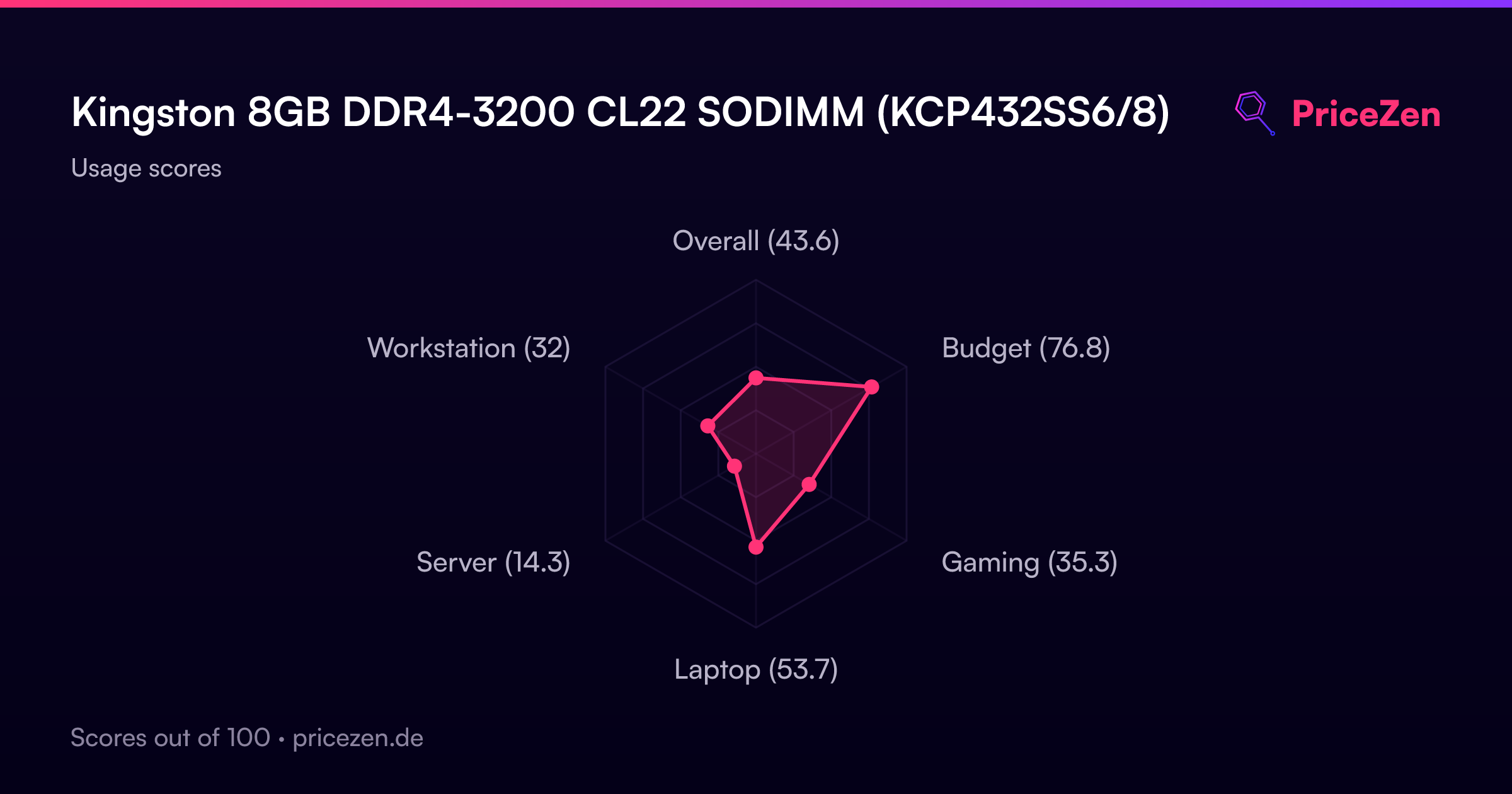
Usage Scores
- Overall43.6
- Budget76.7
- Gaming35.3
- Laptop53.7
- Server14.3
- Workstation32