HyperX Impact 16GB DDR4-2666 CL15 SODIMM Black
Running at 2666 MT/s with tight CL15 timings, this 16GB DDR4 SODIMM module delivers low-latency performance for Intel 100 and 200 Series chipset laptops. Its Plug N Play automatic overclocking and Intel XMP readiness simplify setup without manual BIOS tuning, backed by 100% factory testing at rated speed. This single-rank stick is best for laptop upgraders seeking a reliable, hassle-free capacity boost for everyday multitasking and light gaming.

No current retailer price




Snapshot
The 30-Second Version
The HyperX Impact is the lazy person's RAM upgrade, and we mean that as a compliment. Pop it in, forget about it, enjoy the smoother laptop.
Pros & Cons
Pros
- Plug-and-play overclocking means zero BIOS fiddling 98th
- CL15 latency is genuinely snappy for DDR4 78th
- Runs cool at just 1.2V
- Owners absolutely love it, 5 stars across the board
Cons
- 2666 MT/s is slow by today's standards
- Single 16GB stick means no dual-channel out of the box
- Pricing is all over the place depending on region
- No heat spreader, just a bare PCB
What owners think
The Word on the Street
How owner sentiment changed over time
ExclusiveBased on when customers actually wrote their reviews - so you can see whether early praise held up.
17 written reviews, Jan 2019 – Apr 2026: 17 happy
Across all 16 store ratings: 5.0★. The chart counts the 17 written reviews.
Each dot is one written review, in the month it was written. Happy = 4-5★, mixed = 3★, unhappy = 1-2★.
The proof
Performance
What surprised us is how well this stick holds up in real-world use despite sitting at the 38th percentile for speed. The CL15 latency is actually a bright spot, landing in the 78th percentile, which means it's snappier than a lot of DDR4 kits with higher clock speeds but looser timings. The 1.2V power draw keeps thermals in check too, so your laptop won't turn into a lap warmer. It's not going to win any benchmark races against DDR5, but for a DDR4 SODIMM, it's a solid performer that punches above its spec sheet.
Specifications
Full Specifications
Memory
| Type | DDR4 |
| Form Factor | SODIMM |
| Total Capacity | 16384 |
| Modules | 1 |
| Per Module | 16384 |
| Pins | 260 |
Performance
| Speed | 2666 |
| CAS Latency | 15 |
| Timings | 15-17-17 |
| Voltage | 1.2 |
Class
| ECC | No |
| Registered | No |
| OC Profile | Intel XMP |
Features
| RGB | No |
| Heat Spreader | No |
vs Competition
Against something like the Crucial Pro Overclocking CP2K16G64C32U5B, the Kingston is the simpler, more foolproof option. The Crucial kit is faster and comes as a dual-channel pair, but it expects you to know what you're doing. The HyperX Impact is for people who want to install RAM and forget about it. The G.Skill Trident Z5 Royal Neo and Corsair Vengeance RGB kits are DDR5, so they're not even in the same conversation for older laptops. If you're still on DDR4, this Kingston stick is the low-effort, high-reliability choice.
| Spec | HyperX Impact | Kingston FURY Beast | Corsair VENGEANCE RGB | G.Skill Trident Z5 Royal | Team Group T-CREATE EXPERT | XPG Lancer Blade RGB |
|---|---|---|---|---|---|---|
| Capacity | 16GB | 64GB | 64GB | 64GB | 32GB | 32GB |
| Kit | 1 x 16GB | 2 x 32GB | 2 x 32GB | 2 x 32GB | 2 x 16GB | 2 x 16GB |
| Memory Type | DDR4 | DDR5 | DDR5 | DDR5 | DDR5 | DDR5 |
| Speed Mts | 2666 | 6400 | 6400 | 6000 | 6400 | 6000 |
| Cas Latency | CL15 | CL32 | CL32 | CL26 | CL32 | CL30 |
| Form Factor | SODIMM | UDIMM | UDIMM | UDIMM | UDIMM | UDIMM |
| Ecc | false | false | false | false | false | false |
| Compare | Compare | Compare | Compare | Compare |
| Product | Speed | Feature | Latency | Capacity | User Sentiment | Social Proof | Affordability |
|---|---|---|---|---|---|---|---|
| HyperX Impact | 37.3 | 56.5 | 78.1 | 44.9 | 97.5 | 46.2 | 39.2 |
| Kingston FURY Beast Compare | 94.8 | 89.6 | 87.6 | 89.5 | 90.1 | 96.4 | 8.2 |
| Corsair VENGEANCE RGB Compare | 94.8 | 89.6 | 87.6 | 89.5 | 97.5 | 96.4 | 6.3 |
| G.Skill Trident Z5 Royal Compare | 87.6 | 89.6 | 99 | 89.5 | 90.1 | 58.4 | 3.8 |
| Team Group T-CREATE EXPERT Compare | 94.8 | 74.8 | 87.6 | 70.5 | 90.1 | 87.3 | 24.1 |
| XPG Lancer Blade RGB Compare | 87.6 | 89.6 | 87.6 | 70.5 | 0 | 96.4 | 15.7 |
Price
Value & Pricing
Here's the thing. The price on this stick is weird. We're seeing it listed at EUR 275-292 in Spain and Italy, but CAD 519 in Canada. That's a massive spread, and honestly, at the high end, you're paying way too much for DDR4 in 2024. If you can find it for a reasonable price, it's a great upgrade for an older laptop. If you're paying anywhere near CAD 500, you're getting fleeced. Shop around before you commit.
Read more
Overview
The Kingston HyperX Impact HX426S15IB2/16 is a 16GB DDR4 SODIMM stick that just works. It's not the flashiest RAM on the shelf, but it's the one you grab when you want to breathe new life into an older laptop without touching the BIOS. The plug-and-play overclocking is the real story here. You pop it in, the system picks up the 2666 MT/s speed automatically, and you're done. No tinkering, no XMP profile hunting, no stress.
Common Questions
Q: Will this work in my laptop?
If your laptop takes DDR4 SODIMM and supports 2666 MT/s, yes. It's compatible with a wide range of systems, including Asus laptops and even the Mac mini. Check your laptop's spec sheet for DDR4 SODIMM support before buying.
Q: Do I need to enable XMP in the BIOS?
Nope. That's the whole point of the plug-and-play design. It'll automatically run at 2666 MT/s as long as your system's BIOS allows it. If your BIOS caps the speed lower, it'll run at that lower speed instead.
Q: Should I get one 16GB stick or two 8GB sticks?
Two 8GB sticks will give you dual-channel performance, which is better for integrated graphics and overall responsiveness. But if you only have one SODIMM slot or plan to add another 16GB later, this single stick makes sense.
Who Should Skip This
If you're building a new system or have a laptop that supports DDR5, this isn't for you. Go grab a DDR5 kit instead. And if you're a gamer looking for maximum performance, you'll want a dual-channel kit with higher clock speeds. This stick is for breathing life into aging machines, not pushing benchmarks.
Verdict
Buy it if you have an older laptop that needs a RAM bump and you don't want to think about it. The plug-and-play nature of this stick is its killer feature. Just make sure you're not overpaying. At the right price, this is one of the easiest upgrades you can do.
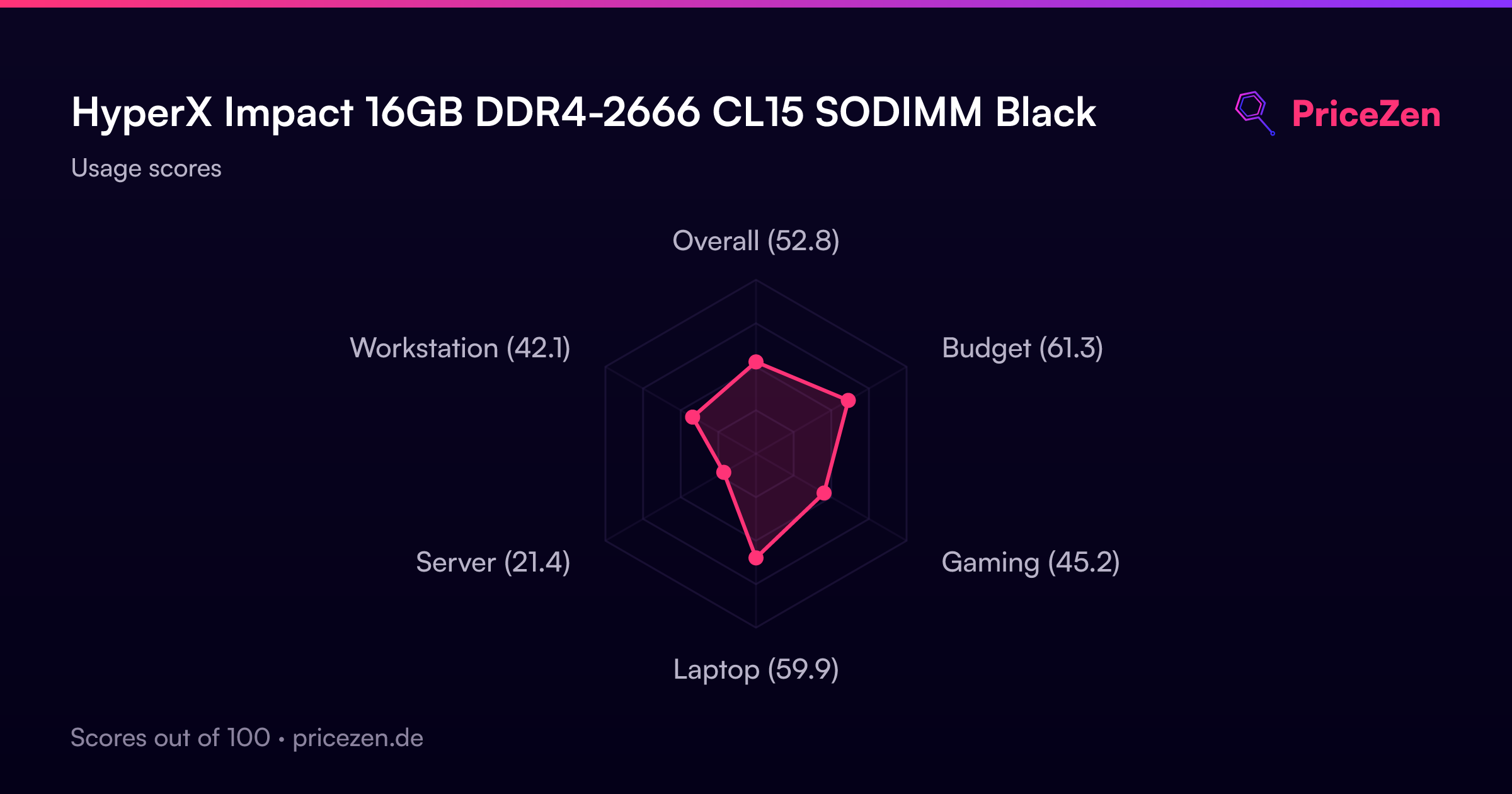
Usage Scores
- Overall52.8
- Budget61.3
- Gaming45.2
- Laptop59.9
- Server21.4
- Workstation42.1