Timetec Premium 16GB DDR4-3200 CL22 SODIMM Black
A single 16GB DDR4-3200 module with a dual-rank design delivers solid bandwidth for multitasking, while its plug-and-play installation requires no technical expertise. The black PCB and automatic downclocking to 2933MHz or 2666MHz ensure broad compatibility across laptops, notebooks, and mini PCs. This module is best for budget-conscious users seeking a straightforward, lifetime-warrantied memory upgrade for older or entry-level portable systems.











Snapshot
The 30-Second Version
The Timetec Premium 16GB DDR4 SODIMM is a reliable, affordable laptop memory upgrade with a 4.7-star average from 2,592 reviews. It runs at 3200 MT/s with CL22 timings, which is about average for DDR4 SODIMM, but the dual rank configuration gives it a small performance edge. At $98 USD, it's a solid value that's easy to install and backed by a lifetime warranty. If your laptop is struggling with 8GB, this is a great fix.
Pros & Cons
Pros
- Excellent user sentiment, 92/100 score with a 4.7-star average from 2,592 reviews 90th
- Easy plug-and-play installation, no technical expertise needed 87th
- Dual rank (2Rx8) configuration gives a small free performance boost 73rd
- Lifetime limited warranty with responsive customer service
- Strong value, 73rd percentile for affordability in our database
Cons
- No overclocking headroom, CL22 timings are locked down
- Feature set is bare bones, 18th percentile for features
- PCB color and rank configuration can vary between batches
- Capacity is middle of the pack at 16GB, 45th percentile
- Minor compatibility issues reported with some laptop models
What owners think
The Word on the Street
How owner sentiment changed over time
ExclusiveBased on when customers actually wrote their reviews - so you can see whether early praise held up.
13 written reviews, Sep 2023 – Apr 2026: 13 happy
Across all 2,592 store ratings: 4.7★. Most owners rate without writing a review. The chart counts the 13 written reviews.
Each dot is one written review, in the month it was written. Happy = 4-5★, mixed = 3★, unhappy = 1-2★.
The proof
Performance
Let's talk numbers. This stick runs at 3200 MT/s with CL22 timings at 1.2V. In our database, that puts it at the 54th percentile for speed and the 58th percentile for latency. Translation: it's about average for DDR4 SODIMM. Not a barn burner, but not slow either. For a laptop upgrade, that's honestly fine. Most laptops that shipped with DDR4 were running 2666 MT/s or 2933 MT/s, so jumping to 3200 MT/s is a real improvement, assuming your system supports it. And if it doesn't, Timetec says the module will automatically downclock to 2933 or 2666, which is a nice safety net.
The dual rank configuration is worth mentioning. Dual rank modules can offer a small performance advantage over single rank at the same speed because they allow for better memory interleaving. It's not a huge difference, maybe a few percent in memory-intensive tasks, but it's free performance. The CL22 latency is nothing special, but for a laptop, you're not going to notice the difference between CL22 and CL19 in day-to-day use. What you will notice is going from 8GB to 16GB. That's the upgrade that makes Chrome stop choking when you have 40 tabs open.
Specifications
Full Specifications
Memory
| Type | DDR4 |
| Form Factor | SODIMM |
| Total Capacity | 16384 |
| Modules | 1 |
| Per Module | 16384 |
| Pins | 260 |
| Rank | 2Rx8 |
Performance
| Speed | 3200 |
| CAS Latency | 22 |
| Voltage | 1.2 |
Class
| ECC | No |
| Registered | No |
Features
| RGB | No |
| Heat Spreader | No |
vs Competition
When you stack this against the competition, the picture gets clearer. The Corsair Vengeance RGB Pro SL and G.Skill TridentZ RGB are both desktop DIMMs with higher speeds and lower latencies, but they're also more expensive and completely useless if you have a laptop. For SODIMM buyers, the real competitors are other value-oriented brands like Crucial, Kingston, and Team Group. Timetec holds its own against those, especially on price and warranty.
The Team Group Xtreem and PNY XLR8 kits are faster, but they're aimed at desktop gaming rigs with overclocking in mind. That's a different market entirely. If you're upgrading a laptop, you don't need 7200 MT/s memory. You need something that fits, works, and doesn't cost a fortune. The Timetec Premium delivers exactly that. The trade-off is that you give up any overclocking potential and the feature set is minimal, but for a laptop upgrade, those are non-issues.
| Spec | Timetec Premium | Corsair Vengeance RGB Pro SL | G.Skill TridentZ RGB | Team Group Xtreem | PNY XLR8 Gaming EPIC-X RGB | Crucial Pro Overclocking |
|---|---|---|---|---|---|---|
| Capacity | 16GB | 32GB | 32GB | 32GB | 32GB | 16GB |
| Kit | 1 x 16GB | 2 x 16GB | 2 x 16GB | 2 x 16GB | 2 x 16GB | 1 x 16GB |
| Memory Type | DDR4 | DDR4 | DDR4 | DDR5 | DDR4 | DDR5 |
| Speed Mts | 3200 | 3600 | 4000 | 7200 | 3200 | 6000 |
| Cas Latency | CL22 | CL18 | CL18 | CL34 | CL16 | CL36 |
| Form Factor | SODIMM | UDIMM | UDIMM | UDIMM | UDIMM | UDIMM |
| Ecc | false | false | false | false | false | false |
| Compare | Compare | Compare | Compare | Compare |
| Product | Speed | Feature | Latency | Capacity | User Sentiment | Social Proof | Affordability |
|---|---|---|---|---|---|---|---|
| Timetec Premium | 53.5 | 18 | 57.5 | 44.9 | 90.3 | 87.3 | 73.3 |
| Corsair Vengeance RGB Pro SL Compare | 63.3 | 89.5 | 87.6 | 70.6 | 77.9 | 96.4 | 32.1 |
| G.Skill TridentZ RGB Compare | 64.8 | 89.5 | 98.1 | 70.6 | 0 | 96.4 | 40.8 |
| Team Group Xtreem Compare | 98.3 | 74.7 | 95.9 | 70.6 | 21.8 | 50.2 | 27.1 |
| PNY XLR8 Gaming EPIC-X RGB Compare | 53.5 | 89.5 | 87.6 | 70.6 | 77.9 | 87.3 | 45.7 |
| Crucial Pro Overclocking Compare | 87.6 | 61.4 | 75.1 | 44.9 | 61.9 | 69.2 | 45.6 |
Price
Value & Pricing
Here's where things get interesting. The Timetec Premium 16GB stick is listed at $98 USD in the US, which puts it in the 73rd percentile for affordability in our database. That's not the cheapest DDR4 SODIMM out there, but it's well below the premium brands. For comparison, you're looking at Corsair and G.Skill kits that often run significantly more for similar specs, and those are usually desktop DIMMs anyway. In the SODIMM space specifically, Timetec is one of the better value plays.
European buyers are looking at 109 to 115 EUR, which is a bit steeper relative to US pricing, but that's true of most RAM right now. The user sentiment summary mentions that RAM prices are high due to data center demand, and that's a real factor. DDR4 production is winding down as DDR5 takes over, so prices for DDR4 modules have been creeping up. If you need the upgrade now, this is a reasonable price. If you can wait, there's a chance prices drop, but I wouldn't count on it.
Amazon 1 offer From €109
Price history
Read more
Overview
The Timetec Premium 16GB DDR4 SODIMM is one of those rare products that just quietly does its job without any fuss. It's a single stick of laptop memory running at 3200 MT/s with CL22 timings, and it's aimed squarely at people who want to breathe new life into an aging laptop, mini PC, or all-in-one without spending a fortune. No RGB, no heat spreaders with aggressive styling, no marketing nonsense. Just a green (or black, or blue, depending on the batch) PCB with some memory chips on it.
What makes this interesting is the price-to-performance story. In our database, this module lands in the 73rd percentile for affordability and the 87th percentile for user sentiment. That combination is unusual. Usually cheap RAM gets mediocre reviews because people hit compatibility issues or stability problems. But Timetec has managed to build a reputation for reliable, boring memory that works, and the 4.7-star average across 2,592 reviews backs that up.
This is a 16GB single module, which means it's perfect for laptops with one open SODIMM slot or for people who want to upgrade from 8GB to 16GB without replacing both sticks. It's dual rank (2Rx8), which actually helps performance a bit compared to single rank modules at the same speed. The 3200 MT/s speed is solidly middle of the pack for DDR4 SODIMM, but for most laptop workloads, capacity matters more than raw speed anyway.
Common Questions
Q: Will this work in my laptop?
This is a 260-pin DDR4 SODIMM, which is the standard for most laptops, mini PCs, and all-in-one systems from roughly 2015 onward. It will not fit in desktop DIMM slots. The module runs at 3200 MT/s but will automatically downclock to 2933 or 2666 MT/s if your system doesn't support the higher speed. Check your laptop's manual or use a system scanner to confirm it supports DDR4 SODIMM before buying.
Q: Is 16GB enough, or should I get 32GB?
For most people, 16GB is the sweet spot for everyday use, web browsing, office work, and light photo or video editing. If you regularly run virtual machines, do heavy video editing, or keep dozens of browser tabs open while running other demanding apps, 32GB might be worth the extra cost. This module is a single 16GB stick, so you can start with one and add another later if your laptop has a second open slot.
Q: Does this support overclocking or XMP profiles?
No. This module runs at its rated 3200 MT/s with CL22 timings at 1.2V, and there's no XMP profile or overclocking headroom. It's designed for stable, reliable operation at stock speeds. If you're looking to overclock memory, you'll need to look at enthusiast-grade desktop DIMMs from brands like G.Skill or Corsair, which are a different product category entirely.
Q: What does dual rank (2Rx8) mean, and does it matter?
Dual rank means the module has memory chips on both sides of the PCB, organized into two ranks. This can provide a small performance advantage over single rank modules at the same speed because the memory controller can interleave accesses across ranks. The difference is typically a few percent in memory-intensive workloads, so it's a nice bonus but not a reason to choose this module over another on its own.
Who Should Skip This
If you're building or upgrading a desktop PC, skip this entirely. It's a SODIMM module, which means it physically won't fit in desktop DIMM slots. You need standard DIMMs, and you probably want something with lower latency or higher speeds anyway. Look at Corsair, G.Skill, or Team Group desktop kits instead.
Also skip this if you need more than 16GB in a single module. This is a 16GB stick, and while you can pair it with another 16GB stick for 32GB total, some laptops only have one SODIMM slot. If you're running memory-hungry workloads like 4K video editing, large datasets, or multiple virtual machines, you'll want to look at 32GB modules or a 2x16GB kit from the start. And if you're the type who wants to squeeze every last drop of performance out of your hardware, the lack of overclocking headroom will frustrate you. This is a set-it-and-forget-it upgrade, not a tweaker's toy.
Verdict
If you have a laptop with 8GB of RAM and you're tired of it crawling when you have too many browser tabs open, this is a no-brainer. The Timetec Premium 16GB stick is easy to install, reliable, and backed by a lifetime warranty. The user sentiment is overwhelmingly positive, with multiple owners reporting significant performance boosts after installation. For everyday productivity, web browsing, and light content creation, 16GB is the sweet spot, and this module gets you there without breaking the bank.
For power users who need 32GB or more, you'll want to look at a 2x16GB kit instead, or consider whether your laptop even supports that much RAM. And if you're building a desktop gaming rig, this is the wrong product entirely. You need DIMMs, not SODIMMs, and you probably want something with lower latency and higher speeds. But for the laptop crowd, this is one of the best value upgrades you can make right now.
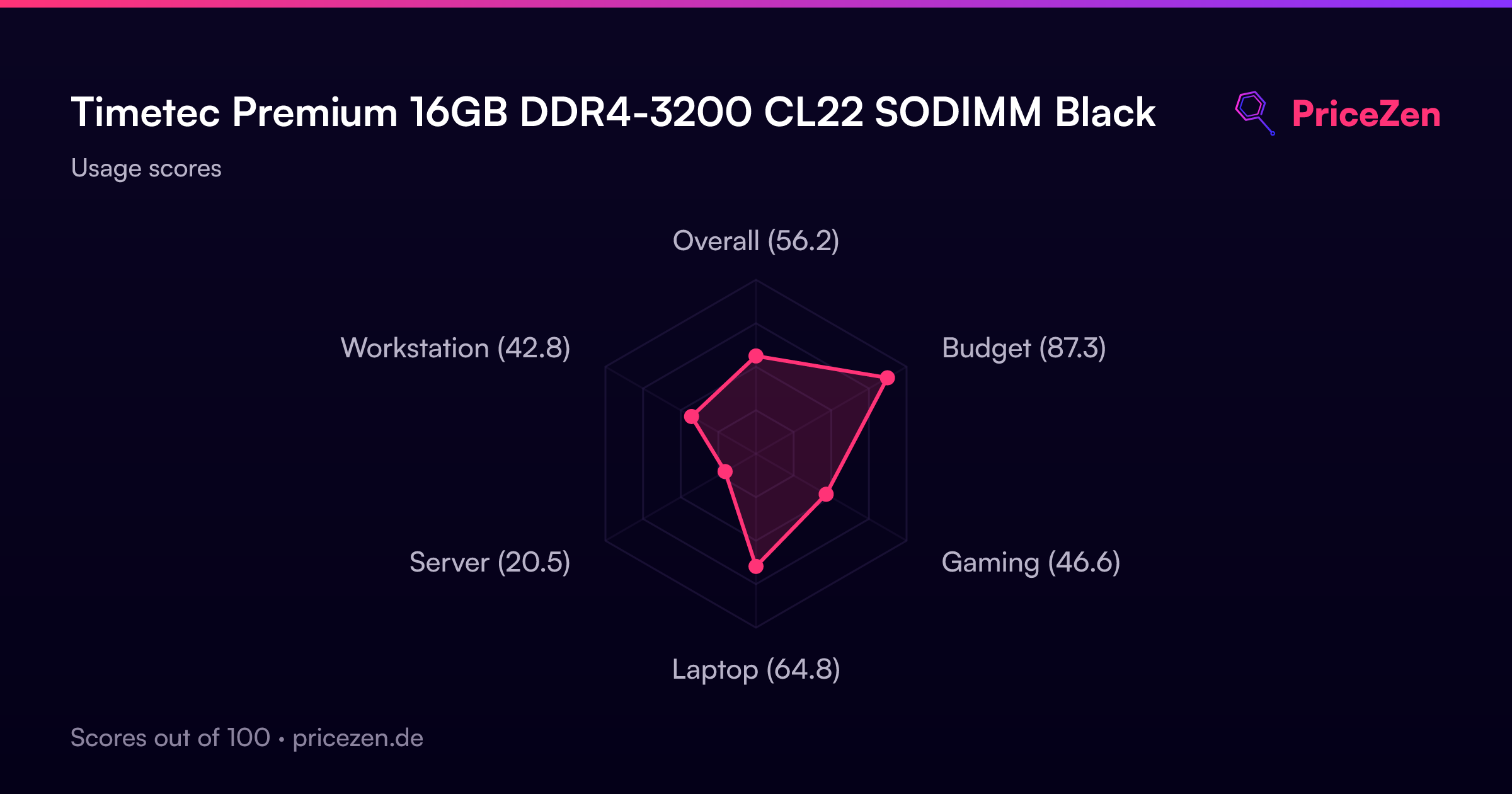
Usage Scores
- Overall56.2
- Budget87.3
- Gaming46.6
- Laptop64.8
- Server20.5
- Workstation42.8