Transcend JetRam 32GB DDR5-4800 CL40 SODIMM Black
A single 32GB stick of DDR5-4800 CL40 memory with on-die ECC provides a straightforward capacity upgrade while maintaining data integrity for critical tasks. Its unbuffered, 260-pin SO-DIMM design ensures broad compatibility with the latest compact workstations and high-end laptops. This module is best for IT administrators and engineers upgrading mini-PCs or mobile workstations for virtualization and data-sensitive applications.












Snapshot
The 30-Second Version
The Transcend JetRam JM4800ASE-32G is a 32GB DDR5 SODIMM running at JEDEC standard 4800 MT/s with CL40 timings. It's a simple, reliable capacity upgrade for laptops, with on-die ECC and low 1.1V power draw. Pricing in Europe ranges from EUR 504 to EUR 667, so shop around before you buy. Best for productivity users who need more RAM without any fuss, not for gamers or overclockers.
Pros & Cons
Pros
- 32GB capacity in a single SODIMM, 71st percentile for capacity 71st
- Runs at JEDEC standard 4800 MT/s, no BIOS tweaking needed 68th
- 1.1V low voltage helps with laptop battery life and thermals
- On-die ECC improves data integrity without performance cost
- Single stick leaves room for a future 64GB upgrade
Cons
- CL40 latency is near the bottom at 17th percentile
- Feature set is barebones, 18th percentile, no heat spreader or RGB
- Affordability is weak at 24th percentile
- No overclocking headroom or XMP support
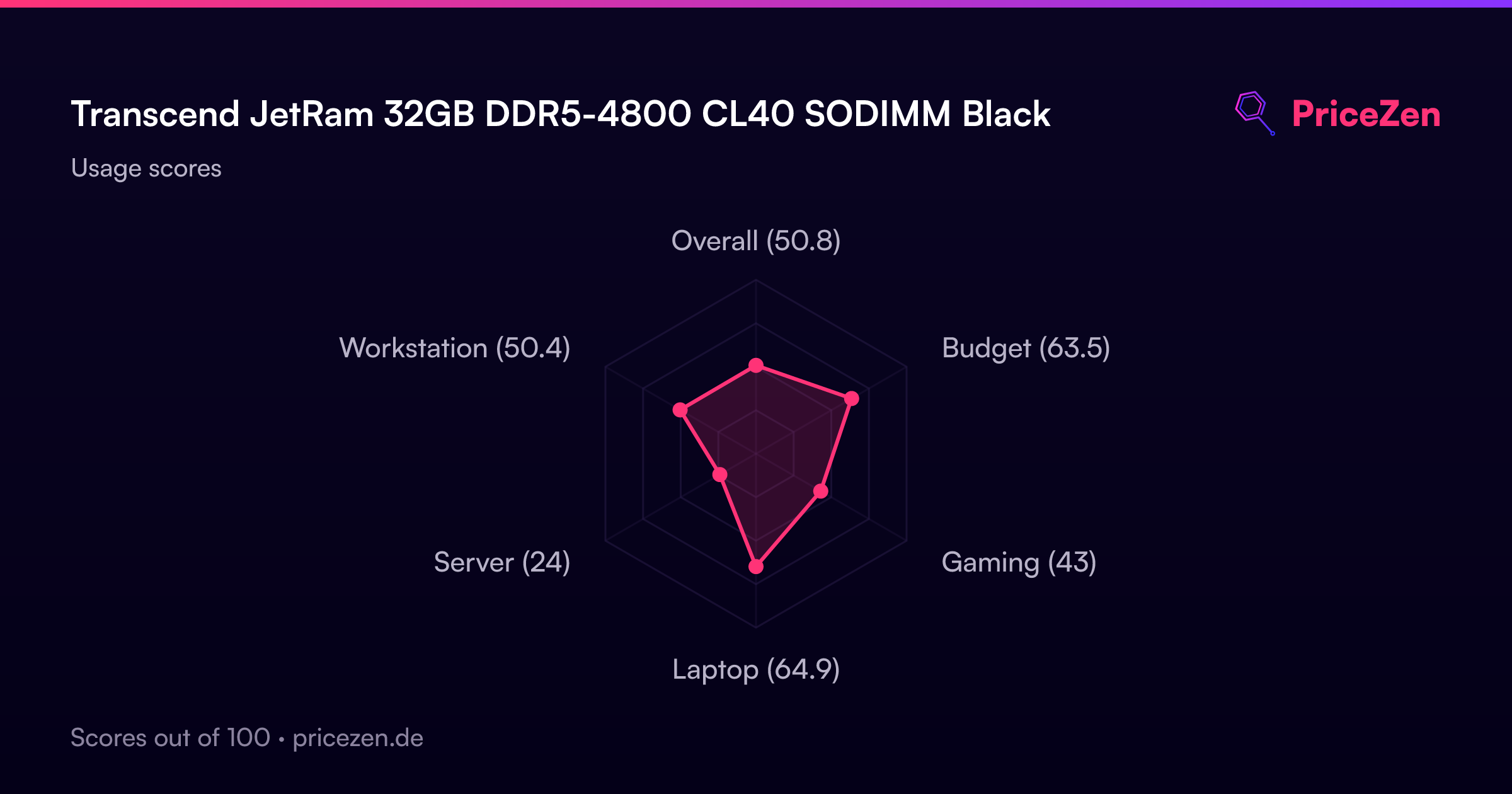
- Server use is a non-starter, 24.9 out of 100 in that category
The proof
Performance
At 4800 MT/s, this stick sits at the 68th percentile for speed in our database. That's solidly middle of the pack for DDR5 SODIMMs. It's not going to blow anyone away, but it's also not a slouch. For most laptop workloads, you'll feel the capacity more than the speed. Going from 8GB or 16GB to 32GB eliminates swap thrashing, and that's a bigger real-world win than chasing higher frequencies on a thermally constrained laptop.
The CL40 latency is where things get less exciting. That lands at the 17th percentile, which is near the bottom of the charts. Higher latency means slightly slower response times in latency-sensitive tasks. In practice, you'd notice this in things like heavily modded games or certain database operations. But for everyday use, the difference between CL40 and CL36 at these speeds is subtle. The 1.1V voltage is standard for JEDEC DDR5 and helps keep power draw in check, which is a genuine plus for battery life.
Specifications
Full Specifications
Memory
| Type | DDR5 |
| Form Factor | SODIMM |
| Total Capacity | 32768 |
| Modules | 1 |
| Per Module | 32768 |
| Pins | 260 |
Performance
| Speed | 4800 |
| CAS Latency | 40 |
| Voltage | 1.1 |
Class
| ECC | Yes |
| Registered | No |
Features
| Heat Spreader | No |
vs Competition
The Corsair VENGEANCE RGB CMH64GX5M2Y6400C32 and Kingston FURY Beast KF560C30BWEAK2-64 are both 64GB kits running at much higher speeds, 6400 MT/s and 6000 MT/s respectively. Those are desktop-oriented kits with aggressive timings and, in Corsair's case, RGB. They'll crush this Transcend stick in raw performance, but they're also kits, not single SODIMMs, and they're aimed at desktops. If you're building a desktop and want speed, those are the better call.
The Crucial Pro Overclocking CP2K16G64C32U5B is a 32GB kit (2x16GB) that also targets the overclocking crowd. For a laptop, though, the Transcend makes more sense as a single 32GB SODIMM. The G.Skill Trident Z5 Royal Neo RGB is another desktop kit with flashy aesthetics and high clocks. None of these competitors directly overlap with what the Transcend is doing: a no-nonsense, high-capacity laptop memory upgrade. The trade-off is clear. You give up speed and features for capacity and simplicity.
| Spec | Transcend JetRam | Kingston FURY Beast | Corsair VENGEANCE RGB | G.Skill Trident Z5 Royal Neo RGB | Team Group T-CREATE EXPERT | XPG Lancer Blade RGB |
|---|---|---|---|---|---|---|
| Capacity | 32GB | 64GB | 64GB | 32GB | 32GB | 32GB |
| Kit | 1 x 32GB | 2 x 32GB | 2 x 32GB | 2 x 16GB | 2 x 16GB | 2 x 16GB |
| Memory Type | DDR5 | DDR5 | DDR5 | DDR5 | DDR5 | DDR5 |
| Speed Mts | 4800 | 6400 | 6400 | 6000 | 6400 | 6000 |
| Cas Latency | CL40 | CL32 | CL32 | CL28 | CL32 | CL30 |
| Form Factor | SODIMM | UDIMM | UDIMM | UDIMM | UDIMM | UDIMM |
| Ecc | true | false | false | false | false | false |
| Compare | Compare | Compare | Compare | Compare |
| Product | Speed | Feature | Latency | Capacity | Affordability |
|---|---|---|---|---|---|
| Transcend JetRam | 67.8 | 18.1 | 17.2 | 70.5 | 24.6 |
| Kingston FURY Beast Compare | 94.8 | 89.6 | 87.6 | 89.5 | 8.2 |
| Corsair VENGEANCE RGB Compare | 94.8 | 89.6 | 87.6 | 89.5 | 6.5 |
| G.Skill Trident Z5 Royal Neo RGB Compare | 87.6 | 89.6 | 97.1 | 70.5 | 12.3 |
| Team Group T-CREATE EXPERT Compare | 94.8 | 74.8 | 87.6 | 70.5 | 24.2 |
| XPG Lancer Blade RGB Compare | 87.6 | 89.6 | 87.6 | 70.5 | 15.7 |
Price
Value & Pricing
Pricing is all over the map depending on where you shop. In Europe, listings range from EUR 504 to EUR 667 across German, Spanish, French, and Italian retailers. That's a EUR 163 spread for the exact same stick, which is wild. If you're buying in the EU, it pays to shop around. The lower end of that range is more reasonable for a 32GB DDR5 SODIMM, but the upper end starts to feel like you're paying a premium for the Transcend name.
Affordability sits at the 24th percentile, which means this is not a budget pick. You can find 32GB DDR5 SODIMMs from other brands for less, especially if you're willing to go with a less recognizable name. The value proposition here is really about reliability and the ETT grade chips that Transcend claims to screen. Whether that's worth the premium depends on how much you value peace of mind in a laptop that's already a pain to open up.
Amazon 1 offer From €535
Price history
Read more
Overview
The Transcend JetRam JM4800ASE-32G is a 32GB DDR5 SODIMM stick aimed squarely at laptop owners who need a big capacity bump without any fuss. It runs at 4800 MT/s with CL40 timings, which is the JEDEC baseline for DDR5. Nothing exotic here, just a straightforward module that should drop into most modern laptops without BIOS tweaking or XMP profiles.
Who is this for? Mostly people running memory-hungry workloads on a laptop. Think video editors, developers juggling VMs, or anyone who keeps 80 browser tabs open and wonders why their machine is choking. A single 32GB stick means you can max out many two-slot laptops at 64GB later, which is a nice upgrade path if your board supports it.
The interesting bit is the on-die ECC and the 1.1V operating voltage. DDR5 moved power management onto the module itself with a PMIC, and Transcend leans into that with claims about reduced signal noise and lower power draw. For a laptop, that matters. Less heat, less battery drain, and a bit more stability. The feature percentile is low at 18th, but that's mostly because this is a barebones module. No RGB, no heat spreader, no overclocking headroom. Just memory doing memory things.
Common Questions
Q: Will this work in my laptop?
This is a standard 260-pin DDR5 SODIMM, so it should work in any laptop that supports DDR5 memory. Check your laptop's manual or manufacturer's site to confirm it takes DDR5 SODIMMs and supports 32GB modules. Most modern laptops from the last couple of years do, but older DDR4 laptops will not be compatible.
Q: Can I mix this with my existing RAM?
Technically yes, but it's not ideal. Mixing different capacities or speeds can cause the system to run at the slower module's speed or even drop to single-channel mode. For best results, use identical sticks. If you're adding this to an existing 8GB or 16GB stick, you'll get more total capacity but may lose some performance.
Q: Is 4800 MT/s fast enough for gaming?
For most games, yes, especially on a laptop where the GPU is usually the bottleneck. The CL40 latency is on the slower side, so you might see slightly lower frame rates in CPU-bound titles compared to faster kits. But the difference is usually small, and the extra capacity often matters more than raw speed for smooth gameplay.
Q: Does this support XMP or overclocking?
No. This module runs at JEDEC standard speeds and timings with no XMP profile. It's designed to be plug-and-play at 4800 MT/s CL40. If you want to overclock or run tighter timings, you'll need a different kit with XMP support and likely a desktop motherboard that allows memory tuning.
Who Should Skip This
Gamers chasing every last frame should look elsewhere. The CL40 latency and lack of overclocking support mean this stick will hold you back in CPU-bound scenarios. A kit with tighter timings and higher clocks, even if it costs a bit more, will serve you better. Look at options from Kingston or Corsair if you want speed.
Server builders should absolutely skip this. The 24.9 out of 100 server score tells you everything. This is not ECC registered memory, and it's not designed for the sustained load and reliability demands of a server environment. If you're building a NAS or home server, get proper ECC UDIMMs or RDIMMs instead. And if you're on a tight budget, the 24th percentile affordability ranking means there are cheaper 32GB DDR5 SODIMMs out there that will do the same job.
Verdict
If you have a laptop with a single open SODIMM slot and you need 32GB without touching anything in the BIOS, this Transcend stick does the job. It's not exciting, but it's reliable and the on-die ECC is a nice safety net. The 4800 MT/s speed is fine for most productivity work, and the 1.1V draw is kind to your battery. Just make sure you're not overpaying. At the lower end of the EU price range, it's a reasonable buy. At the top end, you're getting fleeced.
For gamers or anyone chasing maximum frame rates, look elsewhere. The CL40 latency and lack of overclocking support mean you're leaving performance on the table. A faster kit with tighter timings will serve you better, even if it means dealing with XMP or manual tuning. And if you're building a server, forget it. This stick scored 24.9 out of 100 for server use, which is about as clear a signal as you'll get.
Usage Scores
- Overall50.8
- Budget63.5
- Gaming43
- Laptop64.9
- Server24
- Workstation50.4