Total Micro 8GB DDR3-1600 CL16 SODIMM (A7022339-TM)

SODIMM size for laptops and mini PCs verified Nov 28
15/100 overall score
- Capacity
- 8GB
- Kit
- 1 x 8GB
- Memory
- DDR3
- Speed
- 1600 MT/s
- CAS latency
- CL16
- Form factor
- SODIMM
Snapshot
The 30-Second Version
The Total Micro A7022339-TM is an 8GB DDR3 SODIMM memory module for older laptops. It runs at 1600 MT/s with loose CL16 timings, so performance is nothing special even by DDR3 standards. It'll get the job done if you're upgrading from 4GB, but the price is high and faster options exist if you can find them.
Pros & Cons
Pros
- Gets an old DDR3 laptop from 4GB to 8GB 78th
- Standard 204-pin SODIMM fits most DDR3 notebooks
- Runs at the common 1600 MT/s speed
- Single stick leaves a slot open for future upgrades
- Easy drop-in upgrade, no BIOS tweaking needed
Cons
- CL16 timings are loose even for DDR3
- Price is high for what you get
- No heat spreader or any kind of cooling
- 8GB is the ceiling for many older laptops
- Zero overclocking headroom
The proof
Performance
Let's be honest about what this is. 1600 MT/s with CL16 timings is entry-level DDR3 performance. The latency score sits in the 14th percentile and speed is also at the 14th percentile, which means this module is near the bottom of the barrel compared to other memory products in our database. That's not a surprise, DDR3 is two generations old at this point, but it's worth knowing that even within DDR3, these timings are loose. A lot of DDR3 SODIMMs run at CL11 or tighter, so CL16 is noticeably relaxed.
In practice, for the kind of laptop this goes into, the performance difference between this and a faster DDR3 kit won't be dramatic. You're not gaming on a machine that takes this RAM, or if you are, you've got bigger problems than memory timings. The real win here is going from 4GB to 8GB, which eliminates the constant disk swapping that makes old laptops feel unusable. The capacity itself is only in the 23rd percentile, so 8GB is on the smaller side by modern standards, but for a DDR3 machine it's usually the sweet spot.
Specifications
Full Specifications
Memory
| Type | DDR3 |
| Form Factor | SODIMM |
| Total Capacity | 8192 |
| Modules | 1 |
| Per Module | 8192 |
| Pins | 240 |
Performance
| Speed | 1600 |
| CAS Latency | 16 |
| Timings | 16-18-18-36 |
| Voltage | 1.5 |
Class
| ECC | No |
| Registered | No |
Features
| RGB | No |
vs Competition
Comparing this to the Corsair Vengeance RGB Pro SL, Team Group T-FORCE VULCAN Z, or G.Skill TridentZ RGB is almost unfair. Those are DDR4 desktop kits with heat spreaders, RGB lighting, and much tighter timings. They're also completely incompatible with a DDR3 laptop, so the comparison is mostly academic. What it does tell you is that the Total Micro A7022339-TM occupies a very specific niche: keeping old hardware alive.
Within the DDR3 SODIMM space, the real competition is from brands like Timetec and Patriot, though their current lineup has largely moved to DDR4. If you're shopping for DDR3 specifically, you're often choosing between whatever is actually in stock rather than comparing specs. The Total Micro module's main advantage is that it's a known quantity from a retailer like Best Buy, with a price match guarantee and easy returns. That peace of mind might be worth a few extra bucks if you're not comfortable buying used memory from a marketplace seller.
| Spec | Total Micro 8GB DDR3 SODIMM | Kingston FURY Beast | G.Skill Trident Z5 Royal | Corsair VENGEANCE RGB | Team Group T-CREATE EXPERT | XPG Lancer Blade RGB |
|---|---|---|---|---|---|---|
| Capacity | 8GB | 64GB | 64GB | 64GB | 32GB | 32GB |
| Kit | 1 x 8GB | 2 x 32GB | 2 x 32GB | 2 x 32GB | 2 x 16GB | 2 x 16GB |
| Memory Type | DDR3 | DDR5 | DDR5 | DDR5 | DDR5 | DDR5 |
| Speed Mts | 1600 | 6400 | 6000 | 6400 | 6400 | 6000 |
| Cas Latency | CL16 | CL32 | CL26 | CL32 | CL32 | CL30 |
| Form Factor | SODIMM | UDIMM | UDIMM | UDIMM | UDIMM | UDIMM |
| Ecc | No | No | No | No | No | No |
| Compare | Compare | Compare | Compare | Compare |
| Product | Speed | Feature | Latency | Capacity | Affordability |
|---|---|---|---|---|---|
| Total Micro 8GB DDR3 SODIMM | 13.4 | 18 | 13.4 | 22.3 | 77.7 |
| Kingston FURY Beast Compare | 94.8 | 89.5 | 87.6 | 89.5 | 7.6 |
| G.Skill Trident Z5 Royal Compare | 87.6 | 89.5 | 99 | 89.5 | 3.9 |
| Corsair VENGEANCE RGB Compare | 94.8 | 89.5 | 87.6 | 89.5 | 6.7 |
| Team Group T-CREATE EXPERT Compare | 94.8 | 74.8 | 87.6 | 70.5 | 23.7 |
| XPG Lancer Blade RGB Compare | 87.6 | 89.5 | 87.6 | 70.5 | 16.5 |
Price
Value & Pricing
Value is where this gets tricky. At USD 57, you're paying a premium for what is essentially commodity DDR3. You can often find used or refurbished 8GB DDR3 SODIMMs for less, and some budget brands sell new sticks in the USD 30-40 range. The 85th percentile affordability score reflects that this is cheap compared to high-end DDR4 and DDR5 kits, not that it's a good deal within its own category. If you're in a market where this is the only readily available option, fine, but if you can shop around, you should. The Timetec Pinnacle Konduit and Patriot Viper Steel are both competitors that offer better value in the broader memory market, though they're DDR4 and won't fit a DDR3 laptop.
Read more
Overview
The Total Micro A7022339-TM is an 8GB DDR3 SODIMM memory module aimed at older laptops that still run on DDR3. It's a single stick running at 1600 MT/s with CL16 timings, which puts it firmly in the budget upgrade category. If you've got an aging notebook that's choking on 4GB of RAM, this is the kind of part you'd search for when you want to breathe a little life back into it without spending much.
Pricing is all over the map depending on where you look. We're seeing it listed around USD 57 in the US, BRL 394 in Brazil, INR 9,276 in India, and JPY 5,994 in Japan. That's not exactly cheap for DDR3 in 2025, but availability for this older standard is getting spotty, so you sometimes pay a convenience tax. The affordability score lands in the 85th percentile, which sounds good until you remember that DDR3 as a category is cheap, so being affordable within a cheap category isn't a huge flex.
This is a no-frills module. No heat spreaders, no RGB, no overclocking headroom. It's a 204-pin SO-DIMM, which is the standard laptop form factor for DDR3. If you're wondering whether this will fit your machine, the answer is yes if your laptop takes DDR3 SODIMMs, but you'll want to double-check your specific model's max supported capacity and speed before pulling the trigger.
Common Questions
Q: Is the Total Micro A7022339-TM compatible with my laptop?
It fits any laptop that uses 204-pin DDR3 SODIMM memory. Check your laptop's manual or use a memory configurator tool to confirm it supports 8GB modules and 1600 MT/s speed.
Q: Can I mix this 8GB stick with my existing 4GB DDR3 module?
Yes, in most cases you can run 12GB total, but the system will run both sticks at the slower module's speed and timings. For best results, match the speed and voltage of your existing stick.
Q: Is 8GB of DDR3 RAM enough for Windows 10 or 11?
For basic tasks like web browsing, email, and office work, 8GB is workable on Windows 10. Windows 11 officially requires 4GB minimum, but 8GB is the realistic floor for a smooth experience on either OS.
Q: Will this memory work in a desktop PC?
No, this is a SODIMM module designed for laptops and small form factor devices. Desktop DDR3 systems use full-size DIMMs with 240 pins, so this stick won't physically fit.
Who Should Skip This
Skip this if your laptop already has 8GB and you're hoping for a performance boost, because adding more of the same won't help much unless you're running heavy multitasking or virtual machines. Also skip it if your laptop supports DDR4, since this won't fit and DDR4 is faster and often cheaper per gigabyte now. If you're building or upgrading a desktop, this is the wrong form factor entirely, look for full-size DIMMs instead. And if you're on a tight budget, used DDR3 SODIMMs from reputable sellers can often be had for significantly less than this new module costs.
Verdict
Should you buy this? If you have an older laptop with 4GB of RAM and you're not ready to replace the whole machine, an 8GB upgrade is the single best thing you can do for it. The Total Micro A7022339-TM will do that job. It's compatible, it's available, and it's backed by a major retailer. But the price is hard to swallow when faster DDR3 kits with tighter timings exist for less money, assuming you can find them in stock.
If this is the only 8GB DDR3 SODIMM you can find without rolling the dice on a used stick from an unknown seller, go for it. Your laptop will thank you. If you have the patience to hunt for a better deal, you can probably save USD 15-20 and get better timings in the process. Either way, this is a stopgap, not an investment. The laptop this goes into is already on borrowed time.
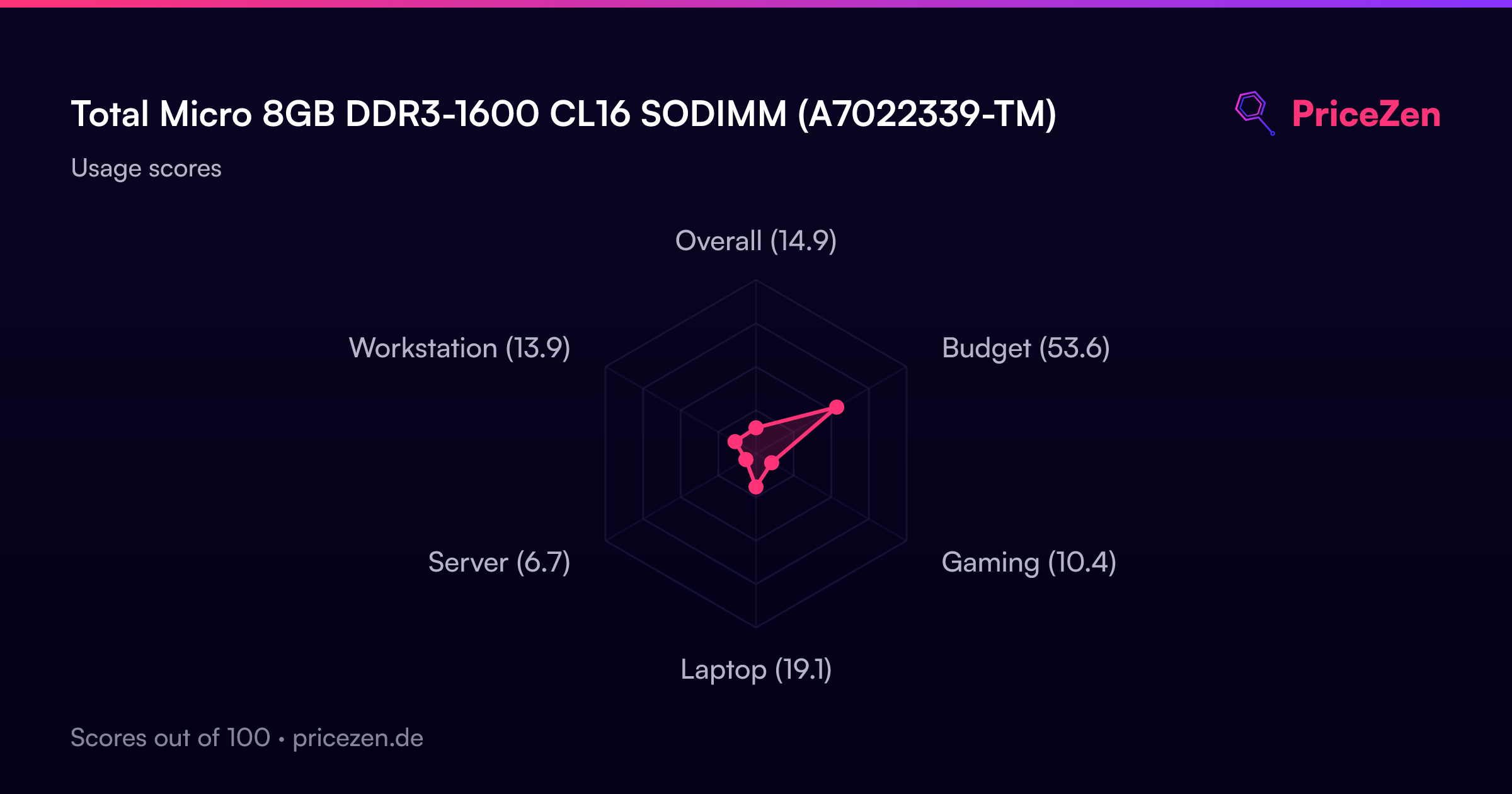
Usage Scores
- Overall14.9
- Budget53.6
- Gaming10.4
- Laptop19.1
- Server6.7
- Workstation13.9