G.Skill Aegis 8GB DDR4-3200 CL16 Black
Delivering 3200 MT/s with CL16 timings, this single 8GB DDR4 stick provides a straightforward path to enabling dual-channel configurations on budget-conscious builds. Its standard 1.35V profile and unbuffered design ensure broad compatibility without the frills of heat spreaders. This module is best for office PC builders or entry-level gamers who need a reliable, no-frills capacity upgrade at a low cost.

No current retailer price











Snapshot
The 30-Second Version
The Aegis is a single 8GB DDR4-3200 stick with genuinely tight CL16 timings, ranking among the best for latency but near the bottom for capacity. It's a top-up part, not a foundation for a new build. Canadian listings run CAD 100 to CAD 168, and Newegg is currently at the top of that range at CAD 168, so shop around. Buy it to fill an empty slot cheaply, skip it if you need capacity or ECC.
Pros & Cons
Pros
- CL16 at 3200 MT/s puts latency among the best we track, tight for the money 88th
- Budget score of 72.3/100, our strongest rating for this module 70th
- Low-profile design with no bulky heatspreader, so clearance under big air coolers isn't a fight
- Intel XMP 2.0 means the rated 3200 CL16 profile is a single BIOS toggle
- 4.4/5 across 25 owner reviews, with several reporting it worked straight out of the box
Cons
- 8GB on one stick ranks near the bottom for capacity, thin for current games and heavy multitasking
- Single module means single-channel bandwidth until you buy a second one
- Gaming score of just 48.6/100 despite the good timings
- Server suitability scores 17.8/100, non-ECC and unbuffered rules out serious workstation duty
- CAD pricing spans CAD 100 to CAD 168 across three listings, so where you buy matters more than usual
What owners think
The Word on the Street
How owner sentiment changed over time
ExclusiveBased on when customers actually wrote their reviews - so you can see whether early praise held up.
28 written reviews, Apr 2026: 20 happy, 3 unhappy, 5 without stars
Each dot is one written review, in the month it was written. Happy = 4-5★, mixed = 3★, unhappy = 1-2★.
The proof
Performance
Let's unpack the numbers, because they pull in opposite directions. Speed ranks around the middle of the pack, which is fair: 3200 MT/s is the sensible default for DDR4, not a headline. But latency is a standout, among the best we track, and that's the part that actually affects how snappy a system feels. CAS latency is how many clock cycles the module waits before it hands over requested data, and CL16 paired with 3200 MT/s means shorter waits than the looser CL18 and CL22 kits floating around at similar speeds. In practice that shows up as slightly better frame consistency in CPU-bound games and less stutter when a lot of small memory requests pile up. You'll need to enable XMP 2.0 in your BIOS to get the rated 3200 CL16 profile, otherwise the board will fall back to a slower default. Owners describe that as a one-time toggle and then forget about it.
Capacity is where reality bites. At 8GB on a single stick, it lags behind most of what we track, and it also means you're running single-channel until you add a matching module. Single-channel roughly halves the memory bandwidth available to your CPU, which matters a lot on integrated graphics and noticeably in modern games. Our gaming score of 48.6/100 reflects that combination: good timings, not enough RAM to let them shine on their own. Feature score sits at 57, about average, since you get XMP and nothing else. And the server score of 17.8/100 is a real letdown, but honestly it's the wrong tool for that job anyway. Non-ECC unbuffered memory has no business in a machine where a flipped bit costs you data.
Specifications
Full Specifications
Memory
| Type | DDR4 |
| Form Factor | UDIMM |
| Total Capacity | 8192 |
| Modules | 1 |
| Per Module | 8192 |
| Pins | 288 |
Performance
| Speed | 3200 |
| CAS Latency | 16 |
| Timings | 16-18-18-38 |
| Voltage | 1.35 |
Class
| ECC | No |
| Registered | No |
| OC Profile | Intel XMP 2.0 |
Features
| RGB | No |
| Heat Spreader | No |
vs Competition
The obvious cross-shops here are Kingston FURY Beast, Crucial Pro Overclocking and Team Group Xtreem. Against those, the Aegis wins on latency, being among the best we track, and on physical simplicity. If you've got a large tower cooler hanging over your DIMM slots, a bare module with no heatspreader is the path of least resistance, and multiple owners specifically mention fit being a non-issue. Where it gives ground is capacity and total polish: our overall score of 49.3/100 and capacity ranking near the bottom mean most kits in this group will hand you more usable memory out of the box. If you're building fresh rather than topping up, start with the kits, not this stick.
If you care about looks, Corsair Vengeance RGB Pro SL and PNY XLR8 Gaming EPIC-X RGB are the ones to look at, because the Aegis deliberately isn't playing that game. Its feature score of 57 is about average, and there's no lighting or software layer here at all. Some buyers treat that as the selling point, and one owner told us they picked it precisely because it lacked a heatspreader. So the split is clean: cross-shop the RGB options if the inside of your case is part of the fun, and stay with the Aegis if you want tight timings, low height and the lowest price you can find.
| Spec | G.Skill Aegis | Kingston FURY Beast | Corsair VENGEANCE RGB | Team Group T-CREATE EXPERT | ADATA Lancer Blade RGB | Crucial Pro OC Gaming |
|---|---|---|---|---|---|---|
| Capacity | 8GB | 64GB | 64GB | 32GB | 32GB | 64GB |
| Kit | 1 x 8GB | 2 x 32GB | 2 x 32GB | 2 x 16GB | 2 x 16GB | 2 x 32GB |
| Memory Type | DDR4 | DDR5 | DDR5 | DDR5 | DDR5 | DDR5 |
| Speed Mts | 3200 | 6400 | 6400 | 6400 | 6000 | 6000 |
| Cas Latency | CL16 | CL32 | CL32 | CL32 | CL30 | CL40 |
| Form Factor | UDIMM | UDIMM | UDIMM | UDIMM | UDIMM | UDIMM |
| Ecc | false | false | false | false | false | false |
| Compare | Compare | Compare | Compare | Compare |
| Product | Speed | Feature | Latency | Capacity | Affordability |
|---|---|---|---|---|---|
| G.Skill Aegis | 53.5 | 56.5 | 87.6 | 22.5 | 70.1 |
| Kingston FURY Beast Compare | 94.8 | 89.6 | 87.6 | 89.6 | 8.1 |
| Corsair VENGEANCE RGB Compare | 94.8 | 89.6 | 87.6 | 89.6 | 7 |
| Team Group T-CREATE EXPERT Compare | 94.8 | 74.8 | 87.6 | 70.6 | 24.1 |
| ADATA Lancer Blade RGB Compare | 87.6 | 89.6 | 87.6 | 70.6 | 15.8 |
| Crucial Pro OC Gaming Compare | 87.6 | 74.8 | 68.8 | 89.6 | 15.1 |
Price
Value & Pricing
Here's the annoying part. We track this module across three Canadian listings and the spread runs from CAD 100 to CAD 168, a CAD 68 gap on the same part number. That's not a rounding error, that's most of a second stick. The only per-store price we currently have in stock is Newegg at CAD 168, which sits at the top of that range. If you're buying today, it's worth hunting for the cheaper end before you click, because our affordability ranking is among the better ones we track, assuming you're not paying the worst price on the board. There's also a Japanese listing at JPY 18,403 if you happen to be shopping there.
At the low end of the CAD range, this is a genuinely sensible purchase: tight timings, a name brand, and a budget score of 72.3/100. At CAD 168 the math gets shakier, because you're paying a premium for a single 8GB module in a market where capacity is the thing most builds are short on. Our rule of thumb with parts like this: the value case lives or dies on the price you actually pay, not the price on the box.
Read more
Overview
The G.Skill Aegis F4-3200C16S-8GIS is about as no-nonsense as desktop memory gets. One stick, 8GB of DDR4, running at 3200 MT/s with CL16 timings (16-18-18-38) at 1.35V. No RGB, no chunky heatspreader, no marketing story about airflow. It's a 288-pin unbuffered, non-ECC module with Intel XMP 2.0 support, and that's the whole pitch.
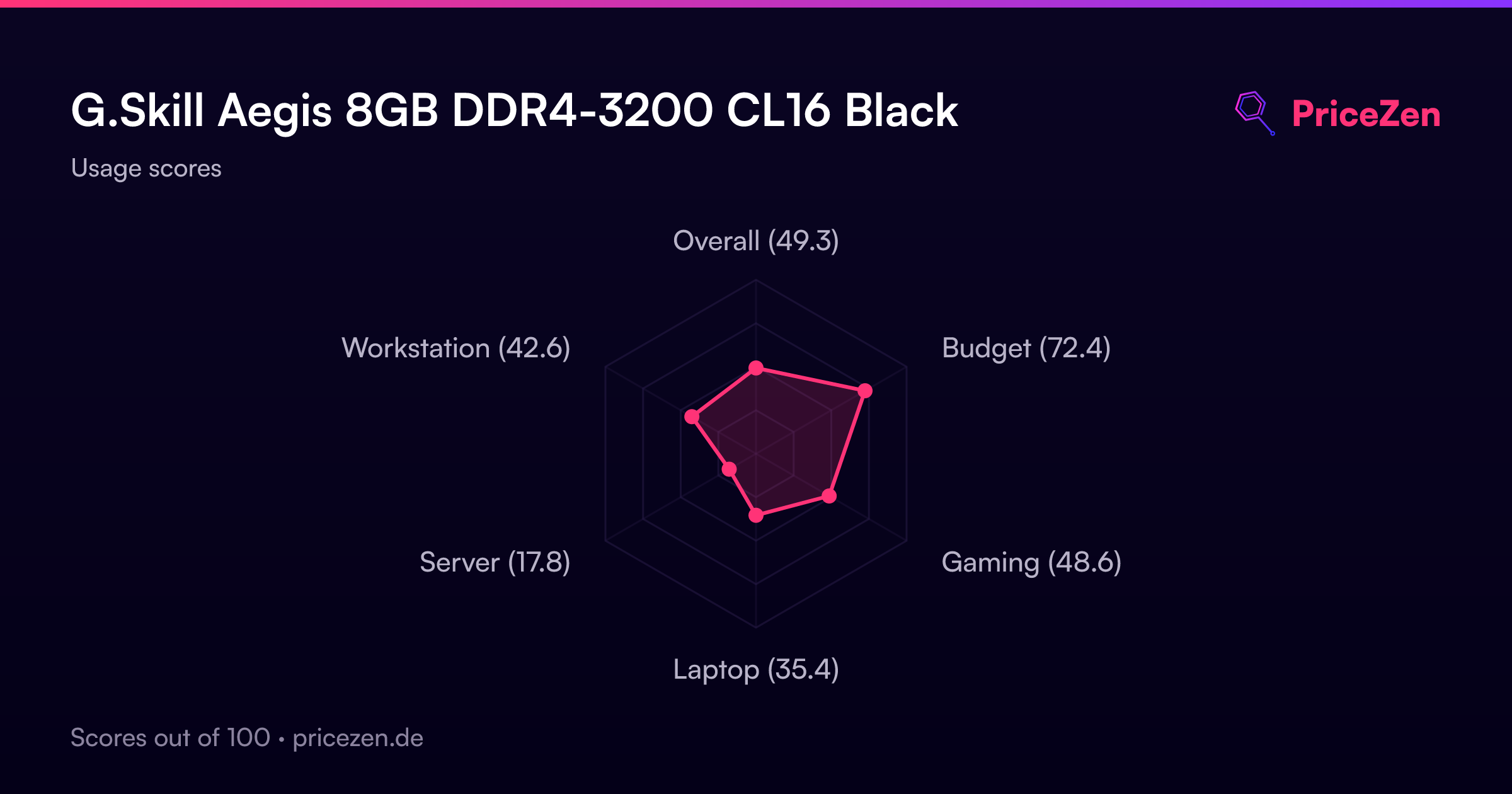
This is a stick for people patching an existing DDR4 build rather than building something new from scratch. Maybe you're bumping an aging office box from 8GB to 16GB by adding a second module. Maybe you're filling an empty slot on a Ryzen or Intel board you already own. Our scoring model puts it at 72.3/100 for budget value but only 49.3/100 overall, which tells you exactly what it is: cheap, competent, and not trying to be anything else.
What makes it interesting is the latency. CL16 at 3200 MT/s is among the best we track in this category, so the timings are genuinely tight for the price bracket. The catch is capacity. A single 8GB module sits near the bottom of the pile there, and that one number shapes almost every recommendation we can make about it.
Common Questions
Q: Is 8GB on a single stick enough for gaming right now?
On its own, no, and our numbers back that up: capacity ranks near the bottom and the gaming score is 48.6/100. A single module also runs single-channel, which cuts available memory bandwidth compared to two sticks. Treat this as half of a 16GB dual-channel setup rather than a complete gaming memory solution.
Q: Do I need to change BIOS settings to get 3200 CL16?
Yes. The rated 3200 MT/s at 16-18-18-38 and 1.35V comes from the Intel XMP 2.0 profile, which you enable in your motherboard's BIOS. Without it the board falls back to a slower default speed and looser timings. Owners consistently describe this as a one-time toggle rather than ongoing tinkering.
Q: Does the missing heatspreader matter?
For a module running 1.35V at DDR4-3200, heat output is modest, and several owners argue the heatspreader debate is overblown on parts like this. The practical upside is height: a bare module clears large air coolers without fuss, which owners mention repeatedly. If you want the aesthetic of a finned, lit-up kit, look at the RGB options in this category instead.
Q: Can I use this in a home server or NAS?
We'd steer you away. It's unbuffered and non-ECC, and our server suitability score is 17.8/100, the weakest area for this product by a wide margin. Error-correcting memory exists for machines where data integrity matters more than saving money, and this isn't that.
Who Should Skip This
Skip this if you're starting from an empty motherboard. Buying one 8GB stick to save money now and another later usually costs more in total than a matched kit, and you spend the interim running single-channel with a capacity ranking near the bottom. Anyone gaming seriously, editing video, or keeping a dozen browser tabs and a couple of VMs open should be shopping kits with more memory, like Kingston FURY Beast or Crucial Pro Overclocking.
Also skip it if the inside of your case is part of the appeal. There's no lighting and no heatspreader here, so Corsair Vengeance RGB Pro SL or PNY XLR8 Gaming EPIC-X RGB are the better fit for a windowed build. And if you're building anything that stores data you can't afford to lose, the non-ECC design and 17.8/100 server score mean you should be looking at proper ECC memory instead.
Verdict
If you're upgrading an existing DDR4 desktop that already has a stick installed, this is an easy yes at the cheaper end of the CAD range. Adding a second 8GB module gets you dual-channel and 16GB total, and the CL16 timings mean you're not sacrificing responsiveness to save money. Same story for a basic home or office machine where the workload is browser tabs, documents and video calls. The 72.3/100 budget score is earned in exactly those scenarios.
If you're building a new gaming rig or doing anything memory-hungry like video editing or running virtual machines, buy a matched kit with more capacity instead. Our gaming score of 48.6/100 and the weak capacity ranking aren't flaws in the module, they're a mismatch between what this product is and what those jobs need. And for anything resembling a server, the 17.8/100 score plus non-ECC unbuffered design is a hard stop. Good stick, narrow job.
Usage Scores
- Overall49.3
- Budget72.4
- Gaming48.6
- Laptop35.4
- Server17.8
- Workstation42.6