Crucial m4 64GB SATA III 2.5"
The 64GB Crucial m4 delivers 415 MB/s sequential reads and 40K random read IOPS on SATA III, with MLC NAND for reliable endurance. It runs quieter and cooler than mechanical drives, withstands shock and vibration, and is backward compatible with SATA 3Gb/s systems. Best for budget-conscious users upgrading an older laptop or desktop to speed up boot and application load times without breaking the bank.

No current retailer price


Snapshot
The 30-Second Version
The Crucial m4 makes old machines boot fast, and owners love it (4.5/5 from 3878 reviews). Its best score is affordability at the top 14%, but 64GB and 95 MB/s writes drag it to 18.8/100 overall. Worth CAD 102 as a revival drive, not as your main storage.
Pros & Cons
Pros
- Boot times drop hard, and owners rave about it. 86th
- Affordability ranks in the top 14%, so it's cheap for what it fixes. 79th
- SATA 6Gb/s with backward compatibility to 3Gb/s means it fits older machines. 71st
- Installation is simple enough that first-timers report doing it solo.
Cons
- 64GB fills up almost immediately.
- 95 MB/s writes and 20K random write IOPS lag behind most drives we track.
- Firmware updates involve burning an ISO, which owners find clunky.
- Endurance ranks in the bottom quarter of the category.
What owners think
The Word on the Street
How owner sentiment changed over time
ExclusiveBased on when customers actually wrote their reviews - so you can see whether early praise held up.
7 written reviews, Aug 2011 – Nov 2012: 7 happy
Across all 3,878 store ratings: 4.5★. Most owners rate without writing a review. The chart counts the 7 written reviews.
Each dot is one written review, in the month it was written. Happy = 4-5★, mixed = 3★, unhappy = 1-2★.
The proof
Performance
The 415 MB/s sequential read is the headline, and it's enough to make boot times and app launches feel dramatically quicker than a spinning disk. Owners say exactly that, over and over. The 95 MB/s write is the weak spot, and 20K random write IOPS lands in the bottom tenth of drives we track. Random performance overall ranks in the bottom tenth, so heavy multitasking or lots of small file writes will expose it fast. Endurance sits in the bottom sixth too, which lines up with owners worrying about lifespan. And 64GB is barely room for an OS plus a couple of programs. Speed ranks in the bottom 2% against the category, capacity in the bottom 2%. This is a boot drive, not a workhorse.
Specifications
Full Specifications
Drive
| Capacity | 64 |
| Form Factor | 2.5" |
| Interface | SATA III |
| Protocol | SATA |
| External | No |
Performance
| Sequential Read (MB/s) | 415 |
| Sequential Write (MB/s) | 95 |
| Random Read (IOPS) | 40000 |
| Random Write (IOPS) | 20000 |
Hardware
| NAND | MLC |
vs Competition
Against the WD_BLACK SN8100 and Samsung 9100 PRO, this isn't a fair fight, those are the drives you buy for a current build, and the m4's bottom 2% speed ranking says everything about the gap. The XPG GAMMIX S70 Blade is the same story. More interesting is the Kingston 1TB SSD and MSI 1TB SSD, because they attack the m4's real problem: 64GB versus a full terabyte. If you're picking a main drive, cross-shop those two first. The m4 only wins when your machine is limited to SATA and you just want faster boots for the least money.
| Spec | Crucial m4 | Western Digital WD_BLACK SN8100 | Samsung 9100 PRO | Kingston FURY Renegade | SanDisk WD_BLACK | Seagate FireCuda 530R |
|---|---|---|---|---|---|---|
| Capacity | 64GB | 4TB | 8TB | 4TB | 8TB | 4TB |
| Form Factor | 2.5" | M.2 2280 | M.2 2280 | M.2 2280 | M.2 2280 | M.2 2280 |
| Interface | SATA III | PCIe 5.0 x4 | PCIe 5.0 x4 | PCIe 4.0 x4 | PCIe 5.0 x4 | PCIe 4.0 x4 |
| Seq Read | 415 MB/s | 14,900 MB/s | 14,800 MB/s | 7,300 MB/s | 14,900 MB/s | 7,400 MB/s |
| Nand Type | MLC | TLC | TLC | TLC | TLC | TLC |
| Dram Cache | - | false | true | true | true | false |
| Endurance | - | 2400 TBW | 4800 TBW | 4000 TBW | 4800 TBW | 5050 TBW |
| Compare | Compare | Compare | Compare | Compare |
| Product | Speed | Random | Feature | Capacity | User Sentiment | Endurance | Social Proof | Affordability |
|---|---|---|---|---|---|---|---|---|
| Crucial m4 | 2.1 | 7.6 | 71 | 2.3 | 79.2 | 14.7 | 64.8 | 86.4 |
| Western Digital WD_BLACK SN8100 Compare | 99.7 | 99.6 | 85.8 | 92.5 | 95 | 80.3 | 94.9 | 8.3 |
| Samsung 9100 PRO Compare | 99.2 | 99.8 | 99.7 | 98.1 | 57.1 | 85.6 | 94.9 | 1.9 |
| Kingston FURY Renegade Compare | 93.3 | 94.4 | 93.9 | 92.5 | 79.2 | 94 | 94.9 | 10.7 |
| SanDisk WD_BLACK Compare | 99.1 | 99.3 | 97.5 | 98.1 | 95 | 80.3 | 40 | 3.2 |
| Seagate FireCuda 530R Compare | 92.9 | 96.8 | 52.8 | 92.5 | 65.9 | 95.6 | 85.8 | 7.5 |
Price
Value & Pricing
At CAD 102 from Amazon, this is a cheap way to revive a machine that's crawling on a hard drive. Affordability ranks in the top 14% in our data, and owners repeatedly call it good value for money. But be honest about what you're buying: 64GB of slow-writing storage. If your budget stretches at all, more capacity is the better spend. As a targeted fix for an old laptop you refuse to throw out, the price makes sense. As your only drive, it doesn't.
Read more
Overview
The Crucial m4 CT064M4SSD2 is a 64GB 2.5-inch SATA III drive built on MLC NAND, and it's aimed at one job: making an old machine boot faster. It reads at 415 MB/s and writes at 95 MB/s, with 40K random read IOPS and 20K random write IOPS. That read speed is fine. Everything else about the spec sheet is dated.
Owners love it anyway. A 4.5/5 rating across 3878 reviews and an 88/100 sentiment score tell you people are happy with what it does for their aging desktops and laptops. But our scoring model puts it at 18.8/100 overall, because capacity and speed sit near the bottom of the internal SSD category. Great little upgrade drive, bad modern main drive.
Common Questions
Q: Will 64GB be enough for Windows and my programs?
Realistically it's an OS drive plus a handful of apps, and capacity ranks in the bottom 2% in our data. Keep your files and games on a second drive.
Q: Does it work in an older SATA 3Gb/s machine?
Yes, it's SATA 6Gb/s and backward compatible with 3Gb/s, so it'll run in older systems at the lower interface speed.
Q: Do I need to update the firmware?
Owners strongly recommend it and report noticeable gains afterward, but the update process involves burning an ISO, so set aside some patience.
Who Should Skip This
If this is going to be your only drive, skip it. 64GB and 95 MB/s writes will frustrate you within a week. Same goes for anyone doing video work, big file transfers or heavy multitasking, the random performance ranks in the bottom tenth and endurance sits in the bottom sixth. And if your board takes a modern NVMe drive, buying SATA here is leaving free speed on the table.
Verdict
Buy this if you've got an older SATA-only desktop or laptop that still boots off a hard drive and you want it snappy again without spending much. Owners report huge responsiveness gains and easy installs, and the 4.5/5 rating backs that up. Do a fresh OS install so TRIM works, and plan on updating the firmware even though the process is annoying. Everyone else should keep scrolling.
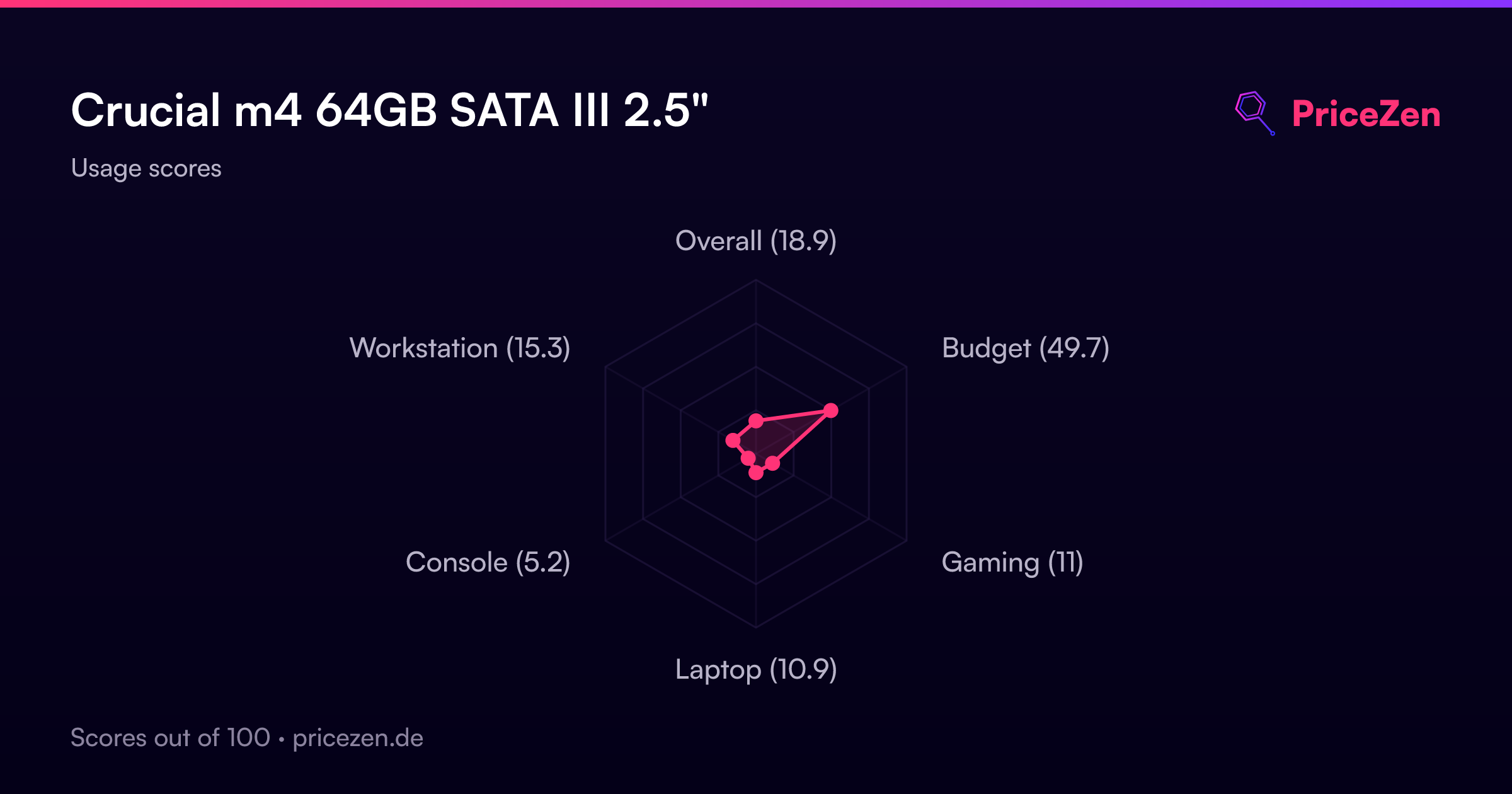
Usage Scores
- Overall18.6
- Budget49.5
- Gaming10.8
- Laptop10.5
- Console5.2
- Portable3.7
- Workstation15