fanxiang S501 128GB PCIe 3.0 x4 NVMe M.2 2280
The 128GB capacity and PCIe 3.0 x4 interface deliver 1100 MB/s reads and 600 MB/s writes, roughly five times SATA III speeds, with TLC NAND and LDPC ECC for stability. Hardware encryption and a DRAM-less design keep power draw low, while the M.2 2280 form factor fits most laptops and desktops, though it lacks PS5 support. This is a budget pick for users upgrading an older system or adding a secondary drive for everyday tasks, not for heavy workloads or portable use.

No current retailer price


Snapshot
The 30-Second Version
The fanxiang S501 is a dirt-cheap 128GB NVMe drive that's fine for booting Windows or reviving an old laptop. It's one of the most affordable drives we've tracked, but the tiny capacity and weak endurance are real compromises. Worth it for budget repairs, not for heavy daily use.
Pros & Cons
Pros
- Dirt cheap way to add NVMe speed to an older system 94th
- Easy drop-in installation for most M.2 slots 78th
- TLC NAND instead of cheaper QLC
- Hardware encryption included at this price is a nice touch
Cons
- 128GB capacity is painfully small for modern games or media
- DRAM-less design hurts sustained write performance
- Endurance rating is near the bottom of the barrel
- One verified buyer got a dead, read-only unit out of the box
What owners think
The Word on the Street
How owner sentiment changed over time
ExclusiveBased on when customers actually wrote their reviews - so you can see whether early praise held up.
10 written reviews, Nov 2022 – Mar 2026: 9 happy, 1 unhappy
Across all 985 store ratings: 4.4★. Most owners rate without writing a review. The chart counts the 10 written reviews.
Each dot is one written review, in the month it was written. Happy = 4-5★, mixed = 3★, unhappy = 1-2★.
The proof
Performance
Sequential reads hit 1,100 MB/s and writes land at 600 MB/s, which puts it right around the middle of the pack for speed at the 42nd percentile. That's roughly five times faster than a SATA SSD on paper, and for booting Windows or launching everyday apps it feels snappy enough. But the DRAM-less design means sustained writes can get choppy, and the 128GB capacity fills up fast. Endurance is a real weak spot at the 15th percentile, so this isn't a drive you want to hammer with constant large transfers. For light use it's fine. For anything heavy, it'll show its limits quickly.
Specifications
Full Specifications
Drive
| Capacity | 128 |
| Form Factor | M.2 2280 |
| Interface | PCIe 3.0 x4 |
| Protocol | NVMe |
| PCIe Generation | 3 |
| External | No |
Performance
| Sequential Read (MB/s) | 1100 |
| Sequential Write (MB/s) | 600 |
Hardware
| NAND | TLC |
| DRAM Cache | No |
Features
| Hardware Encryption | Yes |
vs Competition
Stacked against the Crucial P5 Plus, Corsair MP600 Elite, or SanDisk Optimus GX 7100, the S501 looks like a different species entirely. Those drives offer 1TB capacities, DRAM caches, and read speeds in the 5,000 to 7,000 MB/s range. The S501's 1,100 MB/s read is closer to a fast SATA drive than a modern Gen4 NVMe. The Team Group MP44L and MSI SPATIUM M560 are also budget-oriented but typically come in larger capacities with better endurance. The S501 wins on price alone, but every competitor here beats it on capacity, speed, and long-term reliability.
| Spec | fanxiang S501 | Western Digital WD_BLACK SN8100 | Samsung 9100 PRO | Kingston FURY Renegade | Crucial T700 | SanDisk WD_BLACK |
|---|---|---|---|---|---|---|
| Capacity | 128GB | 4TB | 8TB | 4TB | 2TB | 8TB |
| Form Factor | M.2 2280 | M.2 2280 | M.2 2280 | M.2 2280 | M.2 2280 | M.2 2280 |
| Interface | PCIe 3.0 x4 | PCIe 5.0 x4 | PCIe 5.0 x4 | PCIe 4.0 x4 | PCIe 5.0 x4 | PCIe 5.0 x4 |
| Seq Read | 1,100 MB/s | 14,900 MB/s | 14,800 MB/s | 7,300 MB/s | 12,400 MB/s | 14,900 MB/s |
| Nand Type | TLC | TLC | TLC | TLC | TLC | TLC |
| Dram Cache | false | false | true | true | true | true |
| Endurance | - | 2400 TBW | 4800 TBW | 4000 TBW | 1200 TBW | 4800 TBW |
| Compare | Compare | Compare | Compare | Compare |
| Product | Speed | Random | Feature | Capacity | User Sentiment | Endurance | Social Proof | Affordability |
|---|---|---|---|---|---|---|---|---|
| fanxiang S501 | 41.5 | 61.7 | 78.4 | 7.3 | 43.4 | 14.6 | 57.5 | 94.1 |
| Western Digital WD_BLACK SN8100 Compare | 99.7 | 99.6 | 85.8 | 92.5 | 95.1 | 80.4 | 94.9 | 8.4 |
| Samsung 9100 PRO Compare | 99.2 | 99.8 | 99.7 | 98.1 | 57.3 | 85.7 | 94.9 | 1.9 |
| Kingston FURY Renegade Compare | 93.4 | 94.4 | 93.9 | 92.5 | 79.5 | 94 | 94.9 | 10.8 |
| Crucial T700 Compare | 96.6 | 97.6 | 97.5 | 78.6 | 79.5 | 82.5 | 75.1 | 21.9 |
| SanDisk WD_BLACK Compare | 99.1 | 99.3 | 97.5 | 98.1 | 95.1 | 80.4 | 40 | 3.3 |
Price
Value & Pricing
At around $40 USD, this is one of the most affordable NVMe drives in our database, sitting at the 94th percentile for affordability. For that money you get a genuine PCIe 3.0 x4 drive with TLC NAND and hardware encryption, which is a solid deal if you just need a boot drive or a cheap upgrade for an old laptop. The catch is the 128GB capacity and weak endurance. You're paying for convenience, not longevity. If you can stretch your budget a bit, a 256GB or 512GB drive from a more established brand will serve you better long-term.
Read more
Overview
The fanxiang S501 is a budget NVMe drive that gets you off a spinning hard drive for very little cash. It's a 128GB M.2 2280 stick with PCIe 3.0 x4, TLC NAND, and no DRAM cache. Read speeds top out around 1,100 MB/s with writes at 600 MB/s, which is fine for a boot drive or light office work but nothing to write home about.
At 128GB, this thing is tiny. It's really aimed at reviving old laptops, cheap desktops, or acting as a dedicated OS drive. The affordability score is a standout at the 94th percentile, so you're getting NVMe convenience at a price that's hard to argue with. Just don't expect it to hang with pricier drives when you're moving big files around.
Common Questions
Q: Will this work in a PS5?
No. The manufacturer explicitly states this drive does not work in a PS5. It's designed for PCs and laptops with a standard M.2 NVMe slot.
Q: Is 128GB enough for Windows and a few programs?
Yes, for a basic boot drive with Windows and light applications it's workable. But you'll run out of space quickly if you install games, large media files, or creative software.
Q: Does the lack of DRAM affect everyday performance?
For booting and light tasks, you probably won't notice much difference. Sustained writes and heavy multitasking will show slowdowns compared to a DRAM-equipped drive.
Who Should Skip This
Skip this if you need more than a basic boot drive. The 128GB capacity is a dealbreaker for anyone storing games, video projects, or large photo libraries. If you're planning to use this as a primary drive in a machine you depend on daily, the weak endurance and DRAM-less design make it a risky choice. Look for at least 256GB or 512GB from a brand with a longer track record, even if it costs a bit more.
Verdict
Buy this if you need the cheapest possible NVMe boot drive for an older machine and you're realistic about the trade-offs. It's a fine way to breathe life into a sluggish laptop or build a basic office PC on a tight budget. The 128GB capacity means you'll be managing storage constantly, and the endurance numbers suggest you shouldn't trust it with anything irreplaceable. For a secondary drive or a quick repair job, it makes sense. For a primary drive in a system you rely on daily, spend a little more and get something with more room and better longevity.
Usage Scores
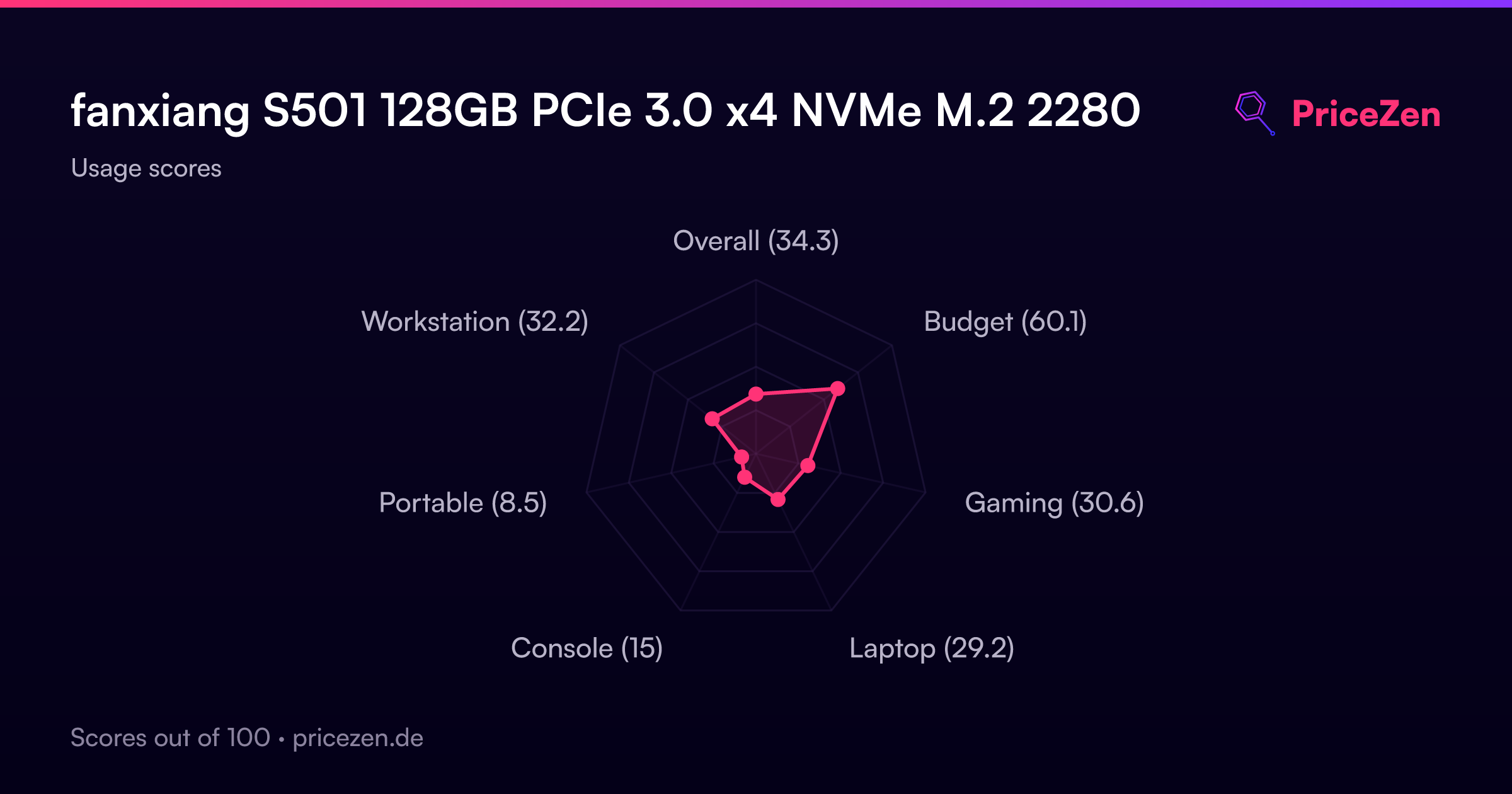
- Overall34.3
- Budget60.1
- Gaming30.6
- Laptop29.2
- Console15
- Portable8.5
- Workstation32.2