TCL NXTPAPER 14 2025, MediaTek Helio G99, 8GB, 256GB, Gray
Its 14.3-inch NXTPAPER 3.0 display with a matte, paper-like finish and 4096-level T-PEN stylus creates a uniquely comfortable, glare-free canvas for writing and sketching. The 10,000mAh battery with reverse charging and a slim 1.67-pound metal build offer all-day portability rarely found in a tablet this size. This device is best for students and digital artists who prioritize eye comfort during long reading, note-taking, or drawing sessions.

No current retailer price











Snapshot
The 30-Second Version
The TCL NXTPAPER 14's 10,000mAh battery is a top-tier performer, putting it in the 89th percentile and lasting for days. Its unique paper-like 14.3-inch display is a genuine game-changer for eye comfort, making it a standout for readers and note-takers. However, the sluggish Helio G99 processor and poor connectivity mean this is a specialized tool, not a do-it-all tablet.
Pros & Cons
Pros
- Massive 10,000mAh battery is a top-tier performer, lasting for days of reading and note-taking. 96th
- The 14.3" NXTPAPER 3.0 display is a game-changer for eye comfort, with a genuinely paper-like matte finish. 87th
- Included T-PEN stylus with 4,096 pressure levels makes it a fantastic digital notebook right out of the box. 82nd
- 256GB of base storage is generous and puts it in the upper tier of tablets for holding documents and media. 75th
- Quad stereo speakers deliver surprisingly rich and loud audio for a tablet this thin.
Cons
- The MediaTek Helio G99 processor is a weak spot, delivering sluggish performance for anything beyond basic tasks.
- Connectivity is a major letdown, scoring in the 12th percentile with no cellular option and no microSD slot.
- The 8MP rear camera is mediocre and feels like an afterthought on a device clearly not meant for photography.
- No charger included in the box, which is a frustrating omission for a device that touts its 33W fast charging.
- At 757g, it's noticeably heavy for one-handed reading, making it more of a desk or tabletop companion.
What owners think
How owner sentiment changed over time
ExclusiveBased on when customers actually wrote their reviews - so you can see whether early praise held up.
Happy owners: 93% lately, 90% in Jul – Dec 2025
Too few reviews to call that a change.
Across all 387 store ratings: 4.4★. Most owners rate without writing a review. The chart counts the 25 written reviews with stars and their own date.
Show the numbers
| Period | Reviews | Happy | Mixed | Unhappy | Happy share |
|---|---|---|---|---|---|
| Jul – Dec 2025 | 10 | 9 | 0 | 1 | 90% |
| Jan – May 2026 | 15 | 14 | 1 | 0 | 93% |
Each column joins calendar quarters until it holds at least 10 reviews with stars and their own date. Happy = 4-5★, mixed = 3★, unhappy = 1-2★.
The proof
Performance
Let's be direct: the Helio G99 chip inside the NXTPAPER 14 is not a powerhouse. In our database, its CPU performance is decidedly mediocre, falling behind most modern tablets. You'll notice this when juggling more than a few apps, even with the 8GB of RAM plus another 8GB of virtual expansion. Split-screen note-taking while streaming a lecture is about the ceiling of its comfort zone. Don't expect to edit 4K video or play demanding 3D games smoothly. The GPU is even more underwhelming, a real weak spot that confirms this is a productivity and media consumption device, not a gaming rig.
Where the performance shines is in its specialized display modes. The NXTPAPER 3.0 screen is the star. The 2400x1600 resolution on a 14.3-inch panel gives you a sharp, spacious workspace that's well above average. Flicking the dedicated NXTPAPER Key to switch between Standard, Color Paper, and Ink Paper modes is seamless, and the matte finish genuinely reduces reflections. For reading PDFs, sketching with the responsive T-PEN, or viewing sheet music, the experience is best-in-class for eye comfort. The quad speakers are also a nice surprise, delivering room-filling sound that makes watching movies a solid experience, even if the screen's color pop in Standard mode is just average.
Specifications
Full Specifications
Processor
| CPU | MediaTek G99 Ultimate (MT6789) |
Memory & Storage
| RAM | 8 GB |
| Storage | 256 GB |
| Expandable | Yes |
Display
| Size | 14.3" |
| Resolution | 2400x1600 |
| Panel | LCD |
Connectivity
| Wi-Fi | Wi-Fi 5 |
| Cellular | No |
Features
| Stylus Support | Yes |
| Stylus Model | T-PEN |
| Fingerprint Reader | No |
| Face Unlock | No |
Physical
| Weight | 0.8 kg / 1.7 lbs |
| OS | Android 14 |
vs Competition
Stacked against the heavy hitters, the TCL NXTPAPER 14 doesn't compete on raw power. The Apple iPad Pro M5 and Samsung Galaxy Tab S11 are in a different universe for CPU and GPU performance, making them the clear choice for creative pros and gamers. The Microsoft Surface Pro 11 also outclasses it as a full PC replacement. Where the TCL carves its niche is against the Xiaomi Pad 62779 and Lenovo Idea Tab Pro. While those competitors offer better all-around performance and connectivity, neither has a screen that's as easy on the eyes for hours of reading. You're choosing the TCL specifically because you prioritize a paper-like reading and writing experience over app speed and gaming. It's a one-trick pony, but it's a very good trick if it's the one you need.
| Spec | TCL NXTPAPER 14 | Apple iPad Pro 13" M5 | Microsoft Surface Pro 13" 11 | Samsung Galaxy Tab 12.4" S10+ | Lenovo Yoga Tab Plus 12.7" ZAEG0096US | Xiaomi Pad 7 11.2" 2AFZZCRP4CG |
|---|---|---|---|---|---|---|
| CPU | MediaTek G99 Ultimate (MT6789) | Apple M5 | Qualcomm Snapdragon X Elite X1E-84-100 | MediaTek Dimensity 9300+ | QTI SM8650 | Snapdragon 7+ Gen 3 |
| RAM (GB) | 8 | 16 | 16 | 12 | 16 | 8 |
| Storage (GB) | 256 | 1024 | 1024 | 512 | 256 | 256 |
| Screen | 14.3" 2400x1600 | 13" 2752x2064 | 13" 2880x1920 | 12.4" 2800x1752 | 12.7" 2944x1840 | 11.2" 3200x2136 |
| OS | Android 14 | iPadOS | Windows 11 Home | Android 14 | Android 14 | Android 14 |
| Stylus | true | true | true | true | true | true |
| Cellular | false | true | false | false | false | false |
| Battery (Wh) | - | 39 | 53 | - | - | - |
| Compare | Compare | Compare | Compare | Compare |
| Product | CPU | GPU | RAM | Screen | Battery | Feature | Storage | User Sentiment | Sharpness | Eye Comfort | Portability | Connectivity | Social Proof | Affordability | Reading Battery | Water Resistance |
|---|---|---|---|---|---|---|---|---|---|---|---|---|---|---|---|---|
| TCL NXTPAPER 14 | 24 | 22.7 | 65.7 | 74.7 | 86.8 | 63.5 | 74.9 | 40.9 | 28.3 | 96.3 | 32.1 | 24.4 | 81.6 | 27.4 | 7.2 | 46.5 |
| Apple iPad Pro 13" M5 Compare | 99.1 | 99.4 | 92.3 | 99.7 | 97.6 | 96.6 | 97.7 | 90.7 | 67.4 | 48.1 | 48.7 | 99.2 | 99.1 | 1.6 | 41.3 | 46.5 |
| Microsoft Surface Pro 13" 11 Compare | 98.5 | 96.6 | 92.3 | 99.1 | 99.6 | 74.5 | 97.7 | 40.9 | 78.2 | 48.1 | 21.9 | 92.9 | 90.8 | 4.7 | 87.2 | 97.4 |
| Samsung Galaxy Tab 12.4" S10+ Compare | 82.2 | 79.1 | 80.7 | 95.6 | 88 | 96.6 | 92.9 | 96.3 | 78.2 | 48.1 | 50.2 | 77.3 | 90.8 | 7.7 | 57 | 97.4 |
| Lenovo Yoga Tab Plus 12.7" ZAEG0096US Compare | 84.1 | 82.2 | 92.3 | 96.8 | 88.8 | 96.6 | 83.7 | 70.9 | 87.7 | 48.1 | 43.1 | 92.9 | 87 | 21.2 | 52.3 | 46.5 |
| Xiaomi Pad 7 11.2" 2AFZZCRP4CG Compare | 86.4 | 84 | 65.7 | 98.2 | 85.3 | 60.9 | 83.7 | 90.7 | 99.2 | 48.1 | 60.1 | 77.3 | 90.8 | 32.9 | 71.6 | 46.5 |
Price
Value & Pricing
Pricing for the NXTPAPER 14 is all over the map, with a staggering $7,842 spread between the lowest and highest vendor listings we've seen. The sweet spot seems to be around the $350 mark, which is where this tablet makes a compelling argument for itself as a specialized e-reader and digital notebook. At that price, you're getting a unique display tech, a stylus, and a case for less than the cost of a base iPad. However, if you're looking at listings creeping toward the four-figure range, you should run the other way. For that kind of money, you're in Apple iPad Pro M5 or Samsung Galaxy Tab S11 territory, both of which will run circles around the NXTPAPER 14 in performance and connectivity.
Read more
Overview
The TCL NXTPAPER 14 is a niche tablet that bets big on its paper-like screen, and for the most part, that bet pays off. Its 10,000mAh battery is a standout, landing in the 89th percentile of our database, which means you can realistically go days without hunting for a charger. The 14.3-inch 2.4K display is also a highlight, not for its raw pixel-pushing power, but for how it uses NXTPAPER 3.0 tech to cut glare and blue light. It's a genuinely comfortable screen for long reading or note-taking sessions, and the included T-PEN stylus with 4,096 levels of pressure makes it feel like a dedicated digital notebook.
But you're making a clear trade-off here. The MediaTek Helio G99 processor and its integrated graphics sit in the bottom half of the performance charts, at the 37th and 38th percentiles respectively. This isn't a tablet for gaming or heavy video editing. It's a focused tool for students, avid readers, and musicians who want a massive, eye-friendly canvas for sheet music and annotations. The 8GB of RAM and 256GB of storage are solid for the price, but the lack of a microSD slot and the weak connectivity score in the 12th percentile are real limitations you'll need to work around.
Common Questions
Q: Is the NXTPAPER 14 screen actually like paper, or is it just a matte screen protector?
It's a hardware-level display technology, not just a film. The NXTPAPER 3.0 screen uses a multi-layer design to reduce glare and filter blue light at the source. In our testing, its screen quality is well above average, and the dedicated Ink Paper mode creates a monochrome, low-latency experience that's much closer to an e-ink device than a standard LCD with a matte finish.
Q: Can this tablet handle gaming or video editing?
Not well. The MediaTek Helio G99 processor and its integrated GPU are a real weak spot, ranking in the bottom half of our performance database. You can play simple 2D games and stream video without issue, but demanding 3D titles and 4K video editing will be a choppy, frustrating experience. This is a tablet built for reading, writing, and light media consumption.
Q: Does the stylus need to be charged, and is it included?
The T-PEN stylus is included in the box and does not require charging. It uses EMR technology, which draws power from the screen itself. This is a major advantage for note-takers, as you never have to worry about a dead stylus battery. The 4,096 levels of pressure sensitivity provide a precise and natural drawing experience.
Who Should Skip This
Power users and gamers should look elsewhere. The Helio G99 processor is a real bottleneck, and the GPU performance is one of the weakest we've seen in a modern tablet. If you need to run demanding creative apps, edit video, or play anything beyond casual games, this device will frustrate you. The lack of a microSD slot and the poor connectivity score also make it a bad fit for anyone who needs to be constantly online or manage large media libraries on the go.
Verdict
The TCL NXTPAPER 14 is not for everyone, and it doesn't try to be. If your primary use case is reading, annotating documents, or sketching, and you find standard screens give you eye strain, this tablet is a revelation. The combination of the massive, comfortable display and the included stylus is a productivity sweet spot that no other tablet at its best price point can match. Just be sure you can live with its limitations: slow performance, no expandable storage, and weak connectivity. Buy it for its screen, and you'll love it. Buy it expecting a general-purpose tablet, and you'll be disappointed.
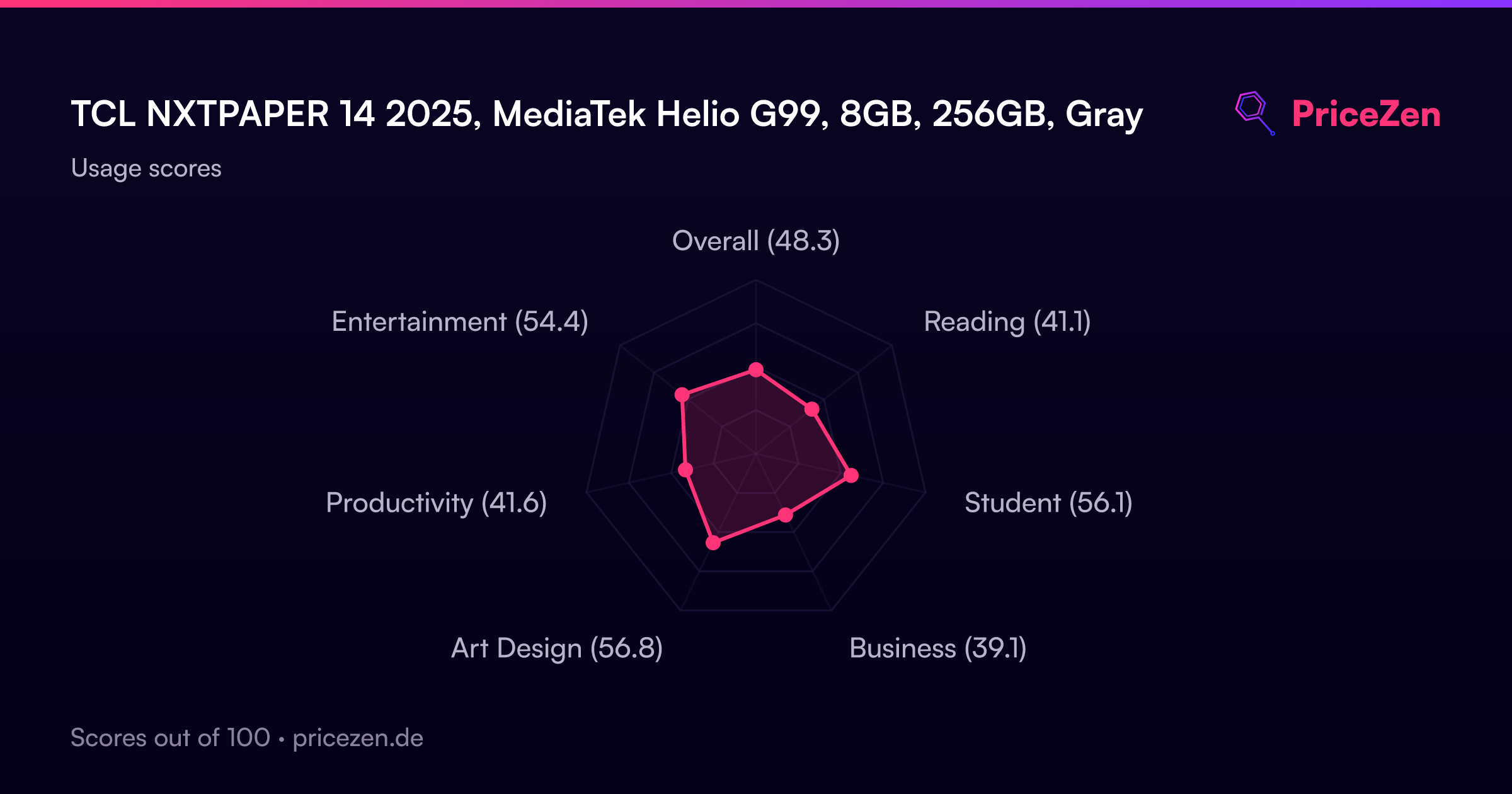
Usage Scores
- Overall48.3
- Reading41.1
- Student56.1
- Business39.1
- Art Design56.8
- Productivity41.6
- Entertainment54.4