Lenovo Tab 11.5" ZADX0081US 2025, MediaTek Helio G99, 8GB, 256GB, Luna Grey

Stylus support for sketching and notes verified Nov 29
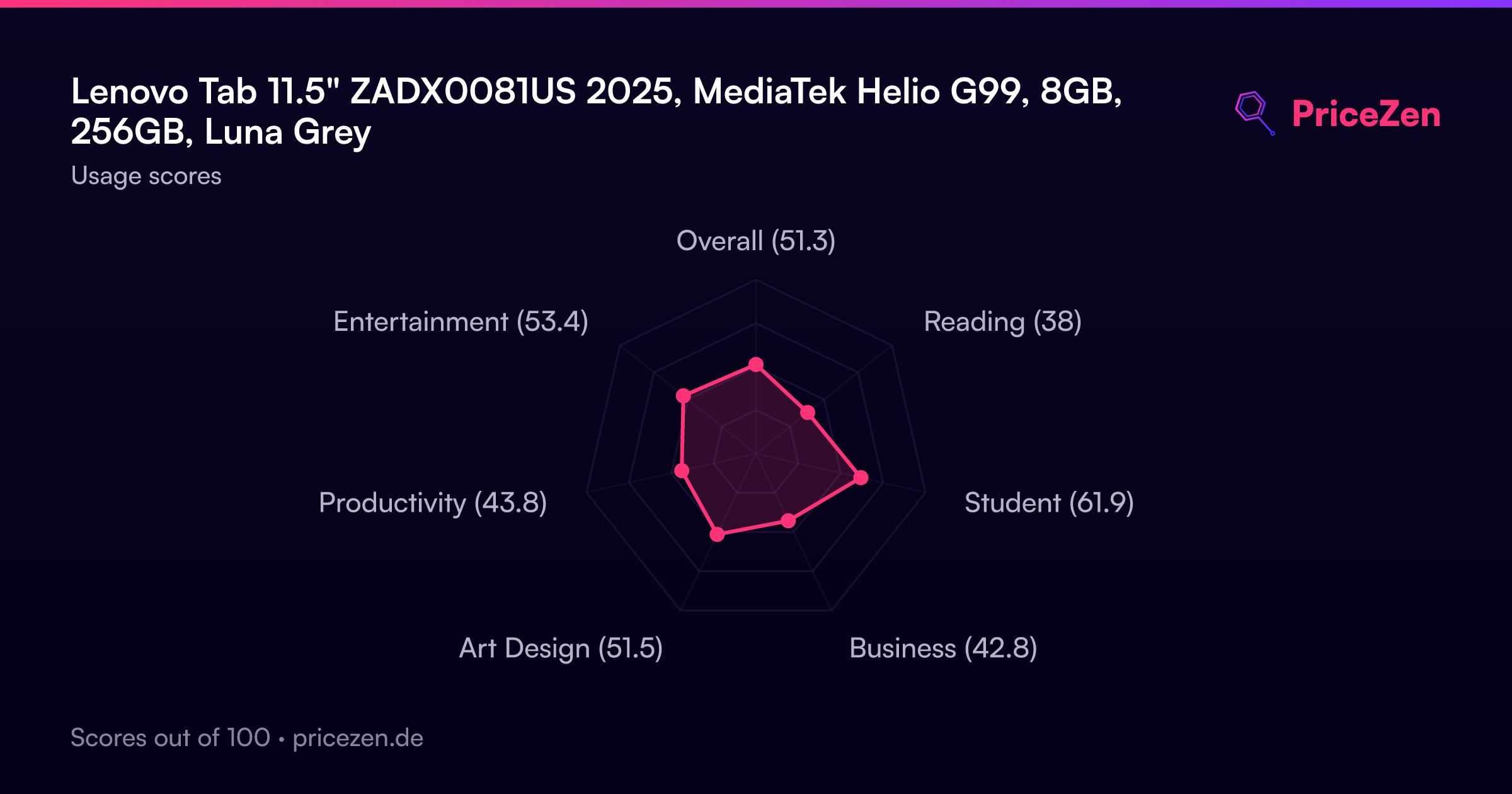
51/100 overall score
Prices checked on 1 days so far, too few to say what is usual.
- CPU
- MediaTek Helio G99
- RAM
- 8 GB
- Storage
- 256 GB
- Screen
- 11.5" 2000x1200
- OS
- Android 14
- Stylus
- Yes
Compare prices at 1 store
Cheapest first. New, refurbished and bundled offers are kept apart, so you compare like with like.
| Store | Sold by | Colour and condition | Price | vs lowest | Last checked | Link |
|---|---|---|---|---|---|---|
| New1 offerSingle unit | ||||||
| Amazon | Marketplace seller | Not listed | €405.00 | Lowest price | Yesterday | Go to store |
 Source: PriceZen, checked Nov 28, 2026
A price counts as current when we checked it in the last 7 days. “Marketplace seller” means a third-party seller on that store, not the store itself.











Snapshot
The 30-Second Version
The Lenovo Tab Plus is an affordable 11.5-inch Android tablet that gets the basics right: a crisp 2000x1200 screen, stylus support, and excellent battery life. It's not a speed demon, but for streaming, browsing, and note-taking it's a great value, especially around the $270 mark.
Pros & Cons
Pros
- Sharp 2000x1200 display with 90Hz for smooth scrolling 84th
- Stellar battery life for all-day media and note-taking 84th
- Generous 256GB storage that's easily expandable 66th
- Stylus and keyboard connector add flexibility for students
- Strong value when found around $270
Cons
- 400-nit screen struggles in bright outdoor light
- MediaTek G99 chip stutters under heavy multitasking
- Only Wi-Fi 5, no Wi-Fi 6 support
- Cameras are basic and not suitable for anything beyond video calls
- Not built for serious gaming or professional art
What owners think
The Word on the Street
- Early buyers consistently praise the bright, sharp 2000x1200 display for watching videos and reading.
- A recurring gripe is that the tablet can feel laggy with several apps running at once, likely due to the chipset.
- Many appreciate the expandable storage and keyboard connector, though they wish the screen got brighter outdoors.
The proof
Performance
In the real world, the Tab Plus moves without much fuss. The Helio G99 sits around the 83rd percentile for tablet CPUs in our database, which means it's above average but far from cutting edge. You'll breeze through YouTube, TikTok, and flipping through PDFs. Split screen works decently with a couple of apps, though you will notice a hiccup or two if you try to push a dozen Chrome tabs and a video call at once. The 8GB of LPDDR4X is right at the 66th percentile, enough but not generous.
The 8600mAh battery is a highlight. At the 84th percentile, it's one of the stronger runners in its class, easily giving you 10+ hours of video playback. That's great for long flights or binge-watching sessions. The GPU performance is similarly average but serviceable. It'll handle casual games without turning the tablet into a toaster, but don't expect smooth frame rates in Genshin Impact at high settings. Screen-wise, the 2000x1200 resolution looks crisp, but the 400-nit brightness lands it in the middle of the pack, so using it outdoors on a sunny day is a bit of a squint-fest.
Specifications
Full Specifications
Processor
| CPU | MediaTek Helio G99 |
| Cores | 8 |
| GPU | Arm Mali-G57 MC2 |
Memory & Storage
| RAM | 8 GB |
| RAM Generation | LPDDR4X |
| Storage | 256 GB |
| Storage Type | UFS |
| Expandable | Yes |
Display
| Size | 11.5" |
| Resolution | 2000x1200 |
| Panel | IPS |
| Refresh Rate | 90 Hz |
| Brightness | 400 nits |
Connectivity
| Wi-Fi | Wi-Fi 5 |
| Bluetooth | Bluetooth 5.2 |
| USB-C | 1 |
| Cellular | No |
Features
| Stylus Support | Yes |
| Stylus Model | Tab Pen Plus |
| Fingerprint Reader | No |
| Face Unlock | No |
| IP Rating | IP52 |
Physical
| Weight | 0.6 kg / 1.4 lbs |
| OS | Android 14 |
vs Competition
The biggest alternative is the Samsung Galaxy Tab S9 FE+. That slate brings a brighter screen, the included S Pen, and a more polished software experience for around $450 and up. It's a more capable drawing companion and handles multitasking better, but you'll pay for the privilege. Xiaomi Pad 7 Pro is another competitor that packs a more powerful Snapdragon chip and a 144Hz LCD, making it a better choice for gamers and power users, though it's harder to find in the US and often pricier. On the other end, the Apple iPad Pro M4 is in a completely different league, but it starts at over three times the price even for the smallest model. That one is for pros who need an exceptional screen and near-laptop performance. The Lenovo Tab Plus splits the difference: it's the budget-friendly pick for casual note-takers and streamers who don't need to push the tablet hard, leaving the heavy lifting to those pricier rivals.
| Spec | Lenovo Tab 11.5" ZADX0081US | Apple iPad Pro 11" M5 | Microsoft Surface Pro 12" EP2-33671 | Samsung Galaxy Tab S 12.4" S10+ | Xiaomi Pad 11.2" 62751 | TABWEE T60 Pro 13.4" |
|---|---|---|---|---|---|---|
| CPU | MediaTek Helio G99 | Apple M5 | Qualcomm Snapdragon X Plus X1P-64-100 | Mediatek MT6989 | Snapdragon 8s Gen 3 | Unisoc |
| RAM (GB) | 8 | 12 | 16 | 12 | 12 | 8 |
| Storage (GB) | 256 | 256 | 512 | 512 | 512 | 256 |
| Screen | 11.5" 2000x1200 | 11" 2420x1668 | 12" 2196x1464 | 12.4" 2800x1752 | 11.2" 3200x2136 | 13.4" 1920x1200 |
| OS | Android 14 | iPadOS | Windows 11 Home | Android 14 | Android 14 | Android 15 |
| Stylus | Yes | Yes | Yes | Yes | Yes | Yes |
| Cellular | No | Yes | No | No | No | No |
| Battery (Wh) | - | 31 | 38 | - | - | - |
| Compare | Compare | Compare | Compare | Compare |
| Product | CPU | GPU | RAM | Screen | Battery | Feature | Storage | Sharpness | Portability | Connectivity | Affordability | Reading Battery | Water Resistance |
|---|---|---|---|---|---|---|---|---|---|---|---|---|---|
| Lenovo Tab 11.5" ZADX0081US | 24.3 | 22.9 | 66.3 | 61.3 | 84 | 63.4 | 84.2 | 40.6 | 41.6 | 62.1 | 44.7 | 55.1 | 46.3 |
| Apple iPad Pro 11" M5 Compare | 99.1 | 99.4 | 84.5 | 98.8 | 95.1 | 96.2 | 84.2 | 87.6 | 81.7 | 98.1 | 9.1 | 64 | 46.3 |
| Microsoft Surface Pro 12" EP2-33671 Compare | 96.1 | 89.4 | 92.7 | 66.4 | 97 | 84.7 | 93.1 | 49.7 | 39 | 92.9 | 9.6 | 68.2 | 46.3 |
| Samsung Galaxy Tab S 12.4" S10+ Compare | 82.6 | 79.4 | 81.4 | 95.2 | 87.7 | 96.2 | 93.1 | 82.7 | 49.9 | 76.9 | 5.7 | 56.8 | 97.2 |
| Xiaomi Pad 11.2" 62751 Compare | 87.1 | 85.9 | 81.4 | 97.9 | 85 | 65.2 | 89.8 | 99.3 | 79 | 76.9 | 14.8 | 71.2 | 46.3 |
| TABWEE T60 Pro 13.4" Compare | 95.5 | 89 | 66.3 | 55.4 | 86.5 | 88.5 | 75.4 | 28.1 | 32.9 | 76.9 | 37.1 | 18.1 | 46.3 |
Price
Value & Pricing
Pricing is a rollercoaster. We tracked a $298 spread across sellers, and the best deal we found was $270 at Newegg. At that price, the Tab Plus is a compelling buy for someone who wants a big, stylus-ready Android tablet without spending iPad money. You're getting a large 11.5-inch screen, plenty of storage, and a battery that will outlast your workday. When you start inching toward the $400+ range, though, the value fades because better options like the Samsung Galaxy Tab S9 FE+ come into play with brighter displays and more powerful silicon. If you can snag it near the bottom of that price spread, it's a solid grab for the right user.
We started tracking prices for this product on Nov 28, 2026. The chart appears once we have more data.
Read more
Overview
If you're eyeing an 11.5-inch Android tablet that covers the essentials without breaking the bank, the Lenovo Tab Plus should be on your radar. With its 2000x1200 IPS panel, snappy 90Hz refresh, and stylus support via the Lenovo Tab Pen Plus, it's built for anyone who wants a bigger screen for doodling, streaming, or scrolling through documents. The specs won't blow your socks off, but for casual use, they hit a sweet spot. Our database shows it ranks in the top 15% for storage and battery life among tablets, so you get a lot of headroom there. Pricing is all over the map. We saw it from $270 up to $568 across vendors, but you can snag it for as low as $270 at Newegg right now. That's a solid deal for a tablet with 256GB of built-in storage and a microSD slot to expand further.
The MediaTek Helio G99 chip and 8GB of RAM keep everyday apps feeling fluid. It's not a powerhouse by any stretch, but it's perfectly fine for browsing, note-taking, and some light sketching. And while I wouldn't call this a replacement for an artist's dedicated drawing tablet, the Tab Pen Plus works reliably for quick markup or casual art. The keyboard connector also means you can slap on a keyboard cover and do some lightweight typing if you need to. Just don't expect desktop multitasking performance.
If your main question is "Is the Lenovo Tab Plus good for students or media lovers?", the short answer is yes, provided you're not pushing demanding games or working in direct sunlight. Those use cases are where its limitations, like the 400-nit brightness and older Wi-Fi 5, start to feel like real trade-offs.
Common Questions
Q: Is the Lenovo Tab Plus good for drawing?
It supports the Lenovo Tab Pen Plus and the 90Hz screen feels responsive, but the 400-nit brightness and modest GPU make it better for casual sketching than professional art.
Q: Can I use it as a laptop replacement?
With the optional keyboard cover and Android 14, you can handle basic word processing and email, but don't expect a full PC experience or heavy multitasking.
Q: Does the Lenovo Tab Plus have expandable storage?
Yes, it includes a microSD card slot, so you can easily add more space beyond the built-in 256GB.
Q: How long does the battery last?
The 8600mAh battery easily lasts a full day of mixed use, typically delivering over 10 hours of video playback.
Who Should Skip This
Skip the Tab Plus if you need serious performance for gaming or video editing, or if you plan to use it regularly in bright sunlight. The screen's limited peak brightness and older Wi-Fi standard will frustrate you. Artists who rely on pressure sensitivity and color accuracy should also look elsewhere. For more power and a better display in a similar size, check out the Samsung Galaxy Tab S9 FE+ or a refurbished iPad Air; both deliver a smoother experience for creative work, albeit at a higher price.
Verdict
Should you buy the Lenovo Tab Plus? If your day revolves around reading, streaming, light note-taking, or marking up PDFs, and you can find it for under $300, absolutely. It's comfortable to hold, has a sharp display, and the stylus support works without a hitch. The long battery life and expandable storage are genuine perks. But if you plan to do serious creative work, play demanding games, or use the tablet outdoors in bright light, you'll quickly run into its limits. For those folks, it's smarter to spend a bit more on a Galaxy Tab S9 FE+ or even a used iPad. For the rest of us who just want a capable big-screen Android tablet that won't drain our wallet, the Tab Plus does the job and then some.
Usage Scores
- Overall51.3
- Reading38
- Student61.9
- Business42.8
- Art Design51.5
- Productivity43.8
- Entertainment53.4