Lenovo Tab M8 4Th Gen 8" 2024, MediaTek Helio A22, 2GB, 32GB, Gray
Powered by a quad-core MediaTek Helio A22 chip and 2GB of RAM, this tablet handles basic tasks with its compact 8-inch 1280x800 display. The 32GB of storage and a direct 1-year Lenovo warranty provide a straightforward, low-cost entry point for casual use. It is best for users needing a simple device for light reading or streaming video, where its top entertainment score of 8.3/100 reflects its focused capability.

No current retailer price
Snapshot
The 30-Second Version
The Lenovo Tab M8 (4th Gen) is a budget 8-inch tablet that works fine for reading and light video, but struggles with anything more demanding. The 2GB of RAM and low-end MediaTek chip mean multitasking is painful, and the screen is one of the weakest in our database. Battery life is decent and the price is the best argument for it, with listings currently between USD 80 and USD 85. Buy it for a kid or as a dedicated e-reader, not as your main tablet.
Pros & Cons
Pros
- Very affordable, with prices as low as USD 80 83rd
- Lightweight at 323g and easy to hold one-handed
- Battery life is solid for basic tasks
- Durable plastic build survives drops
- Headphone jack included, which is rare these days
Cons
- 2GB of RAM makes multitasking painful
- Screen quality is near the bottom of our database
- Touch screen can be slow and unresponsive
- App crashes and instability are common complaints
- Android updates have made performance worse for some owners
What owners think
The Word on the Street
How owner sentiment changed over time
ExclusiveBased on when customers actually wrote their reviews - so you can see whether early praise held up.
11 written reviews, Oct 2023 – Feb 2026: 9 happy, 1 mixed, 1 unhappy
Across all 902 store ratings: 4.1★. Most owners rate without writing a review. The chart counts the 11 written reviews.
Each dot is one written review, in the month it was written. Happy = 4-5★, mixed = 3★, unhappy = 1-2★.
The proof
Performance
Let's talk about that Helio A22. It's a 4-core chip running at 2.0 GHz, and in our database it lands in the 35th percentile for CPU performance. That means roughly two-thirds of tablets we've tested are faster. The GPU situation is even less inspiring at the 36th percentile. In practice, this translates to a tablet that handles one app at a time okay, but starts wheezing the moment you try to multitask. Owners consistently mention app crashes and laggy performance after updates, and the 2GB of RAM is the main culprit. That's the 5th percentile for RAM, which is about as low as it gets in a modern tablet.
The 5100mAh battery is actually a bright spot. It sits at the 55th percentile, which is solidly average, but for a device this lightweight and low-powered, it stretches further than you'd expect. Multiple owners report getting through a full day of light use without hunting for a charger. The 8-inch 1280x800 display is where things get rough. It's in the 4th percentile for screen quality, and users mention visible pixels and a screen that feels dated. For reading text it's passable, but don't expect vibrant colors or sharp video. The 5MP rear camera and 2MP front camera are there because a tablet has to have cameras, not because anyone should use them for anything important.
Specifications
Full Specifications
Processor
| CPU | MediaTek |
| Cores | 4 |
| GPU | IMG |
Memory & Storage
| RAM | 2 GB |
| RAM Generation | LPDDR4X |
| Storage | 32 GB |
| Storage Type | SSD |
Display
| Size | 8" |
| Resolution | 1280x800 |
| Panel | LCD |
Connectivity
| Wi-Fi | Wi-Fi 4 |
| USB-C | 1 |
| Cellular | No |
Features
| Stylus Support | No |
Physical
| Weight | 0.7 kg / 1.6 lbs |
| OS | Android |
vs Competition
Our ranking compares every tablet against the others in its category, and the names sitting near the top of that list right now are the Apple iPad 10.2" 7th Gen, the Samsung Galaxy Tab A 11" A11+, the Nexall 12" T7250 and the Teclast T65 13.4". Look at those screen sizes and the pattern jumps out: everything else in this group is a bigger tablet. The M8 is the small one, and that's really its whole argument.
The iPad is the familiar alternative, and it's a different class of device. Apple's software support and app selection count for a lot if you want a tablet that still feels current years from now, and the M8's Android 12 Go Edition, 2GB of RAM and 4th-percentile screen aren't playing in that league. The Galaxy Tab A is the mainstream Android answer, and Lenovo's brand recognition and warranty support are the main things the M8 brings to that fight, because on paper it gives up ground everywhere else. The Nexall and the Teclast are the big-screen budget options, and if what you actually want is a large panel for video on the sofa, an 8-inch 1280x800 display is the wrong tool no matter how little it costs.
So the M8's advantage is size and weight, full stop. At 323g it's easier to hold one-handed in bed, easier for a kid to carry, and easier to shove in a bag than any of the larger tablets above. Its CPU lands in the 35th percentile and its RAM in the 5th, so don't buy it expecting to keep pace with them on performance. Buy it because you specifically want something small and cheap, and treat the rest as a compromise you've already agreed to.
| Spec | Lenovo Tab M8 4Th Gen 8" | Apple iPad Pro 13" M5 | Microsoft Surface Pro 11 13" | Samsung Galaxy Tab 12.4" S10+ | Xiaomi Pad 7 11.2" 2AFZZCRP4CG | TABWEE T60 Pro 13.4" |
|---|---|---|---|---|---|---|
| CPU | MediaTek | Apple M5 | Qualcomm Snapdragon X Elite X1E-84-100 | MediaTek Dimensity 9300+ | Snapdragon 7+ Gen 3 | Unisoc |
| RAM (GB) | 2 | 16 | 16 | 12 | 8 | 8 |
| Storage (GB) | 32 | 1024 | 1024 | 512 | 256 | 256 |
| Screen | 8" 1280x800 | 13" 2752x2064 | 13" 2880x1920 | 12.4" 2800x1752 | 11.2" 3200x2136 | 13.4" 1920x1200 |
| OS | Android | iPadOS | Windows 11 Home | Android 14 | Android 14 | Android 15 |
| Stylus | false | true | true | true | true | true |
| Cellular | false | true | false | false | false | false |
| Battery (Wh) | - | 39 | 53 | - | - | - |
| Compare | Compare | Compare | Compare | Compare |
| Product | CPU | GPU | RAM | Screen | Battery | Feature | Storage | User Sentiment | Sharpness | Portability | Connectivity | Social Proof | Affordability | Reading Battery | Water Resistance |
|---|---|---|---|---|---|---|---|---|---|---|---|---|---|---|---|
| Lenovo Tab M8 4Th Gen 8" | 37.9 | 36.4 | 5.3 | 7.8 | 59.5 | 7.4 | 16.1 | 27.2 | 35.8 | 35.3 | 46 | 62.7 | 50.2 | 82.9 | 46.4 |
| Apple iPad Pro 13" M5 Compare | 99.1 | 99.4 | 92.4 | 99.7 | 97.5 | 96.5 | 97.7 | 90.8 | 73.6 | 48.6 | 99.2 | 99.2 | 1.7 | 41.1 | 46.4 |
| Microsoft Surface Pro 11 13" Compare | 98.5 | 96.6 | 92.4 | 99.1 | 99.6 | 74.3 | 97.7 | 40.8 | 82.4 | 21.8 | 92.7 | 91 | 5.4 | 86.6 | 97.3 |
| Samsung Galaxy Tab 12.4" S10+ Compare | 82.1 | 79 | 80.9 | 95.3 | 87.9 | 96.5 | 92.9 | 96.4 | 82.4 | 50.1 | 76.9 | 91 | 8.5 | 56.6 | 97.3 |
| Xiaomi Pad 7 11.2" 2AFZZCRP4CG Compare | 86.3 | 84 | 65.8 | 98 | 85.2 | 60.8 | 83.7 | 90.8 | 99.3 | 60.1 | 76.9 | 91 | 33.7 | 71 | 46.4 |
| TABWEE T60 Pro 13.4" Compare | 95.3 | 88.9 | 65.8 | 55.1 | 86.7 | 88.5 | 74.9 | 82 | 27.6 | 32.6 | 76.9 | 87.1 | 36.5 | 17.9 | 46.4 |
Price
Value & Pricing
Here's where things get interesting. We track this tablet across US vendors, and right now the listings sit between USD 80 and USD 85. That's a tight band, and it's lower than where we've seen it before, which takes most of the guesswork out of buying one. You no longer have to hunt for the one sane listing among a pile of overpriced ones. Whichever vendor you land on, you're paying roughly the same small amount.
At USD 80, the math is easy. You're getting a name-brand tablet with a warranty and a headphone jack for less than a night out, and as a secondary screen for reading or light video that's a genuinely decent deal. Just don't expect it to feel premium. The plastic build is durable but cheap-feeling, the 1280x800 panel sits in the 4th percentile for screen quality in our data, and the overall experience matches the price. The value case here rests entirely on keeping your expectations small. If you go in wanting a do-everything tablet, no price makes this a good buy. If you go in wanting a cheap 8-inch screen for one job at a time, the current pricing is about as friendly as it gets.
Read more
Overview
The Lenovo Tab M8 (4th Gen) is the kind of tablet you buy when you know exactly what you're getting into. It's an 8-inch Android slate with a MediaTek Helio A22 quad-core chip, 2GB of RAM, and 32GB of storage. That spec sheet reads like a budget phone from 2019, and honestly, that's about what the experience feels like. But here's the thing: for the right person, that's totally fine. This isn't a productivity machine. It's a cheap screen for reading, light video, and keeping a kid occupied on a car ride.
Lenovo has been making M8 variants for years now, and the 4th Gen keeps the formula mostly intact. You get a 1280x800 LCD, a 5100mAh battery, and Android 12 Go Edition out of the box. The Go Edition matters more than you might think. It's a stripped-down version of Android designed for low-RAM devices, which means the OS itself is lighter but also more limited in what it can do. Some owners report the Android 13 update made things noticeably slower, which tracks with what we see in the sentiment data.
Who is this actually for? Kids, grandparents who just want to video call, and anyone who wants a dedicated e-reader with a little more flexibility than a Kindle. The reading score of 26.3 out of 100 in our database is the best use case, and that's still not exactly a ringing endorsement. But at the prices we're seeing, it's hard to be too harsh. This is a tablet you buy for a specific, narrow job, not one you expect to grow with you.
Common Questions
Q: Is the Lenovo Tab M8 good for kids?
Yes, with some caveats. The 323g weight and 8-inch size make it easy for small hands to hold, and the plastic build is durable enough to survive drops. The headphone jack is a plus for kids' headphones. Just keep in mind that the 2GB of RAM means it can only handle one app at a time, so don't expect smooth switching between games and videos. For basic educational apps and YouTube Kids, it's fine.
Q: Can I use this tablet for work or school?
Not really. The 2GB of RAM and Helio A22 processor are too weak for multitasking, document editing, or running productivity apps smoothly. The 1280x800 screen is also too low-resolution for comfortable reading of dense documents. If you need a tablet for school or work, look at something with more memory and a sharper display, like the Samsung Galaxy Tab A 11" A11+ or the Apple iPad 10.2" 7th Gen.
Q: How is the battery life on the Tab M8?
The 5100mAh battery is one of the better aspects of this tablet. It sits around the middle of our database for battery capacity, but because the processor is low-power and the screen is small, real-world battery life is solid. Multiple owners report getting a full day of light use like reading or watching videos without needing to charge. Heavy gaming or video streaming will drain it faster, but for basic use it's dependable.
Q: Does the Android 13 update slow down the tablet?
Several owners have reported that updating to Android 13 made the tablet feel slower. This is a common issue with low-RAM devices running newer Android versions, as the OS demands more resources. The tablet ships with Android 12 Go Edition, which is designed for 2GB of RAM, and the update to a fuller Android version seems to strain the hardware. If you buy one and it's still on Android 12, you might want to hold off on updating.
Who Should Skip This
If you're planning to use this as your primary tablet, don't. The 2GB of RAM, weak processor, and low-resolution screen will frustrate you within a week. Anyone who wants to multitask, edit documents, play games beyond simple puzzle titles, or use demanding apps should look elsewhere. The Samsung Galaxy Tab A 11" A11+ is the more sensible all-rounder, and the Apple iPad 10.2" 7th Gen is the safer long-term pick if you want a tablet that keeps getting software attention. If all you want is a big screen for video, the Nexall 12" T7250 and the Teclast T65 13.4" are built for that job in a way an 8-inch panel never will be.
Also skip it if you're sensitive to lag. The touch screen responsiveness is a common complaint, and that's the kind of thing that gets more annoying over time, not less. If you've used a modern smartphone and expect that level of responsiveness from a tablet, you'll be disappointed. This is a device for people who can accept compromises in exchange for a low price and small size.
Verdict
If you want a cheap, small tablet for reading e-books, watching YouTube in bed, or handing to a kid for educational apps, the Tab M8 is a reasonable choice, and the current pricing makes that easier to say. Listings between USD 80 and USD 85 mean you're not gambling on finding the right seller anymore. The battery life is good enough, the build survives drops, and the headphone jack is a nice touch for kids' headphones. Just keep your expectations in check. This is a single-task device. Open more than one app and you'll feel the 2GB of RAM fighting for its life.
But if you need anything more than the basics, skip it. Students who need to take notes, anyone who wants to edit documents, or people who just hate waiting for apps to load should look at the Apple iPad 10.2" 7th Gen or the Samsung Galaxy Tab A 11" A11+ instead. The M8's user sentiment score of 27th percentile tells the story. People who buy it for the right reasons are mostly happy. People who expect a general-purpose tablet end up frustrated. Know which one you are before you click buy.
Usage Scores
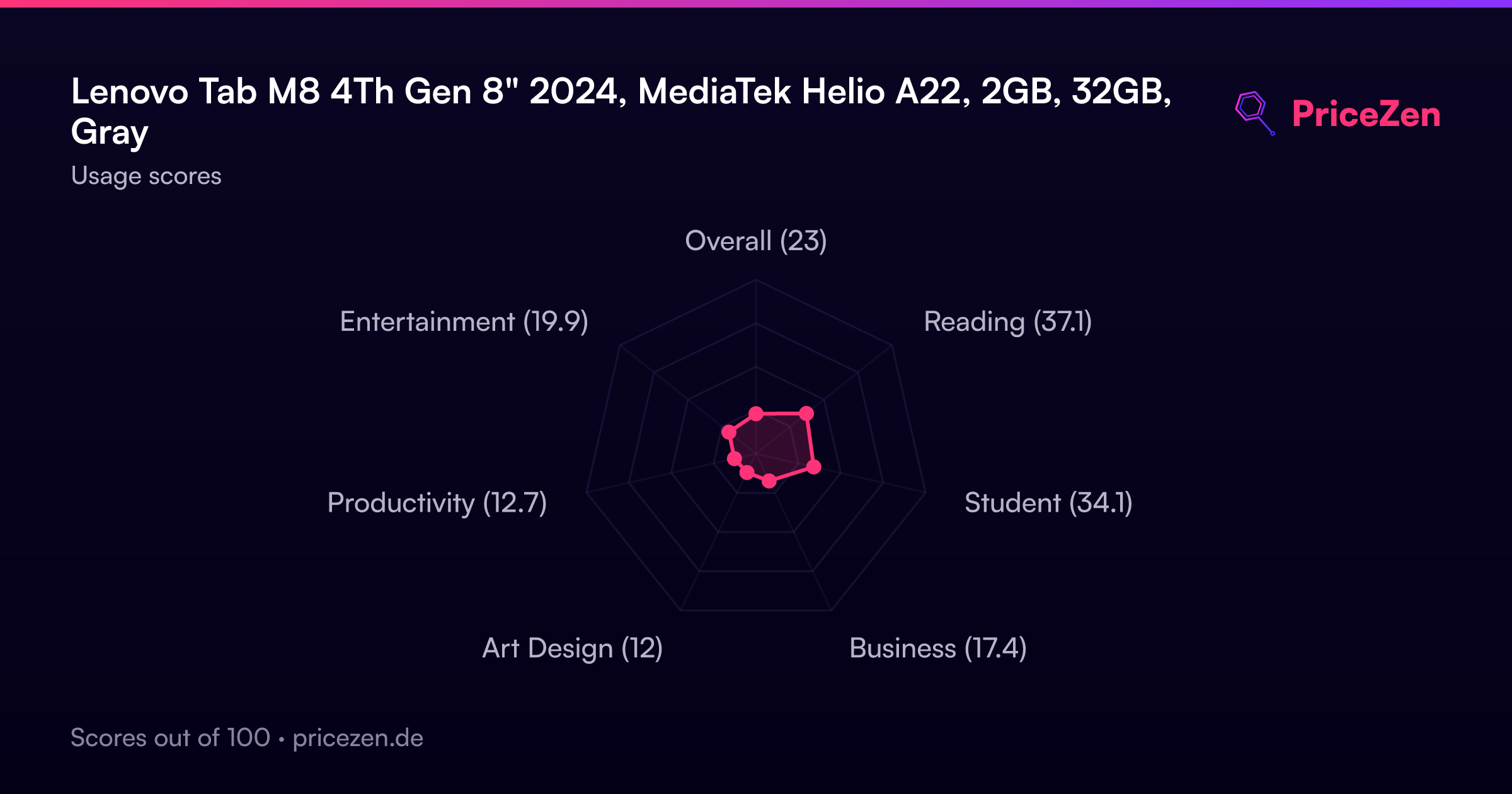
- Overall23
- Reading37.1
- Student34.1
- Business17.4
- Art Design12
- Productivity12.7
- Entertainment19.9