Lenovo ThinkCentre M90t Gen 5 2024, Core i7-14700, 16GB, 512GB SSD, Raven Black

A mid-tower with room for later upgrades verified Nov 24
67/100 overall score 5.0 average from 1 owner ratings
- CPU
- Intel Core i7 14700
- RAM
- 16 GB
- Storage
- 512 GB
- GPU
- Intel UHD Graphics 770
- Form factor
- mid-tower
- Psu
- 300 W
- OS
- Windows 11 Pro
Compare prices at 1 store
Cheapest first. New, refurbished and bundled offers are kept apart, so you compare like with like.
| Store | Sold by | Colour and condition | Price | vs lowest | Last checked | Link |
|---|---|---|---|---|---|---|
| New1 offerSingle unit | ||||||
| Out of stock when last checked | ||||||
| Amazon | Not known | Not listed | No price | Out of stock | Oct 20 | Go to store |
 Source: PriceZen, checked Oct 20, 2026
A price counts as current when we checked it in the last 7 days. “Marketplace seller” means a third-party seller on that store, not the store itself.











Snapshot
The 30-Second Version
A big, fast office tower with a killer CPU and zero gaming ambitions. If you need Windows 11 Pro and upgrade room, this is your machine, just don't pay the CAD 3,747 sucker price.
Pros & Cons
Pros
- 20-core i7-14700 crushes office multitasking 87th
- Huge mid-tower with real upgrade space 82nd
- Excellent port selection including USB-C and Wi-Fi 6E 70th
- Windows 11 Pro and vPro Enterprise support out of the box
Cons
- Integrated graphics make gaming a non-starter
- 512GB SSD feels tight for a machine this capable
- 300W PSU limits future GPU upgrades
- Heavy at 8.28kg, this thing is a desk anchor
What owners think
The Word on the Street
- Owners love the huge case and the room it gives them for future upgrades.
- Early impressions are strong, with buyers calling it a solid, dependable machine out of the box.
- The size is a plus for expandability but a minus if you were hoping for something compact.
How owner sentiment changed over time
ExclusiveBased on when customers actually wrote their reviews - so you can see whether early praise held up.
1 written review, Feb 2025: 1 happy
Across all 1 store ratings: 5.0★. The chart counts the 1 written review.
Each dot is one written review, in the month it was written. Happy = 4-5★, mixed = 3★, unhappy = 1-2★.
The proof
Performance
The Core i7-14700 is the star here. With 20 cores and a 2.1GHz base clock, it chews through multitasking, large spreadsheets, and demanding office apps without breaking a sweat. Our database puts the CPU well above average for this category, and the port selection is a standout too. But that integrated GPU is a real weak spot. It's fine for driving a couple of monitors and basic video playback, but it lags behind most dedicated graphics solutions. The 16GB of DDR5 RAM is solid, though the 512GB SSD is about average for this class. For a business desktop, the performance story is strong where it counts and forgettable where it doesn't.
Specifications
Full Specifications
Processor
| CPU | Intel Core i7 14700 |
| Cores | 20 |
| Frequency | 2.1 GHz |
| L3 Cache | 33 MB |
Graphics
| GPU | Intel UHD Graphics 770 |
| Type | Integrated |
| VRAM Type | Shared |
Memory & Storage
| RAM | 16 GB |
| RAM Generation | DDR5 |
| Storage | 512 GB |
| Storage Type | NVMe SSD |
Build
| Form Factor | mid-tower |
| PSU | 300 |
| Weight | 6.5 kg / 14.3 lbs |
Connectivity
| USB-C Ports | 1 |
| USB Ports | 8 |
| HDMI | 1x HDMI 2.1 |
| DisplayPort | 2x DisplayPort 1.4a, 1x DisplayPort 1.2 |
| Wi-Fi | Wi-Fi 6E |
| Bluetooth | Bluetooth 5.3 |
| Ethernet | Gigabit Ethernet |
System
| OS | Windows 11 Pro |
vs Competition
Against the HP OMEN GT22-3080 or ASUS ROG GM700, the ThinkCentre looks silly for gaming, those machines have dedicated GPUs and this one doesn't. But that's not the fight Lenovo is picking. The M90t is aimed squarely at the Dell Tower ECT1250 and other business desktops, and there it holds its own with a stronger CPU and better port selection. The Apple Mac Studio M4 Max is a different beast entirely, way more powerful for creative work but also a completely different platform and price bracket. If you need Windows, vPro, and a traditional tower with upgrade room, the ThinkCentre is the sensible pick.
| Spec | Lenovo ThinkCentre M90t Gen 5 | Apple Mac Studio M5 Max | HP OMEN GT16-0364 | Dell Desktop ECT1250 | ASUS ROG GM700 | MSI Aegis ZS2 A9NVP-1407US |
|---|---|---|---|---|---|---|
| CPU | Intel Core i7 14700 | Apple M5 Max | AMD Ryzen 7 8700F | Intel Core Ultra 7 265 | AMD Ryzen 7 9800X3D | AMD Ryzen 9 9900X |
| RAM (GB) | 16 | 48 | 32 | 32 | 32 | 32 |
| Storage (GB) | 512 | 1024 | 1024 | 2048 | 2048 | 2048 |
| GPU | Intel UHD Graphics 770 | Apple (40-Core) | NVIDIA GeForce RTX 5070 | Intel UHD Graphics | NVIDIA GeForce RTX 5070 Ti | NVIDIA GeForce RTX 5070 |
| Form Factor | mid-tower | mini | mid-tower | sff | mid-tower | mid-tower |
| Psu W | 300 | 480 | 850 | 180 | 850 | 750 |
| OS | Windows 11 Pro | macOS | Windows 11 Home | Windows 11 Home | Windows 11 Home | Windows 11 Home |
| Compare | Compare | Compare | Compare | Compare |
| Product | CPU | GPU | RAM | Ports | Storage | Reliability | Social Proof |
|---|---|---|---|---|---|---|---|
| Lenovo ThinkCentre M90t Gen 5 | 82.3 | 36.4 | 48.2 | 87.2 | 40.5 | 70.2 | 48.4 |
| Apple Mac Studio M5 Max Compare | 95.7 | 84.9 | 95 | 89.1 | 68.6 | 99.3 | 70.9 |
| HP OMEN GT16-0364 Compare | 69.3 | 90.7 | 87 | 97.9 | 53.2 | 70.2 | 98.1 |
| Dell Desktop ECT1250 Compare | 88 | 60 | 81.6 | 75 | 82.5 | 70.2 | 98.1 |
| ASUS ROG GM700 Compare | 80.3 | 94.6 | 81.6 | 96.1 | 90 | 37.7 | 99.2 |
| MSI Aegis ZS2 A9NVP-1407US Compare | 92.3 | 90.7 | 87 | 90.4 | 82.5 | 37.7 | 99.2 |
Price
Value & Pricing
Pricing is all over the map. In the US you're looking at USD 2,109 to 2,202, but in Canada the spread is wild, from CAD 2,363 all the way up to CAD 3,747. That's a CAD 1,384 gap between vendors for the same machine. If you're buying in Canada, shop around hard and don't pay anywhere near the top of that range. For a business desktop with this CPU and build quality, the lower end of that CAD range is fair. The higher end is someone taking you for a ride.
Read more
Overview
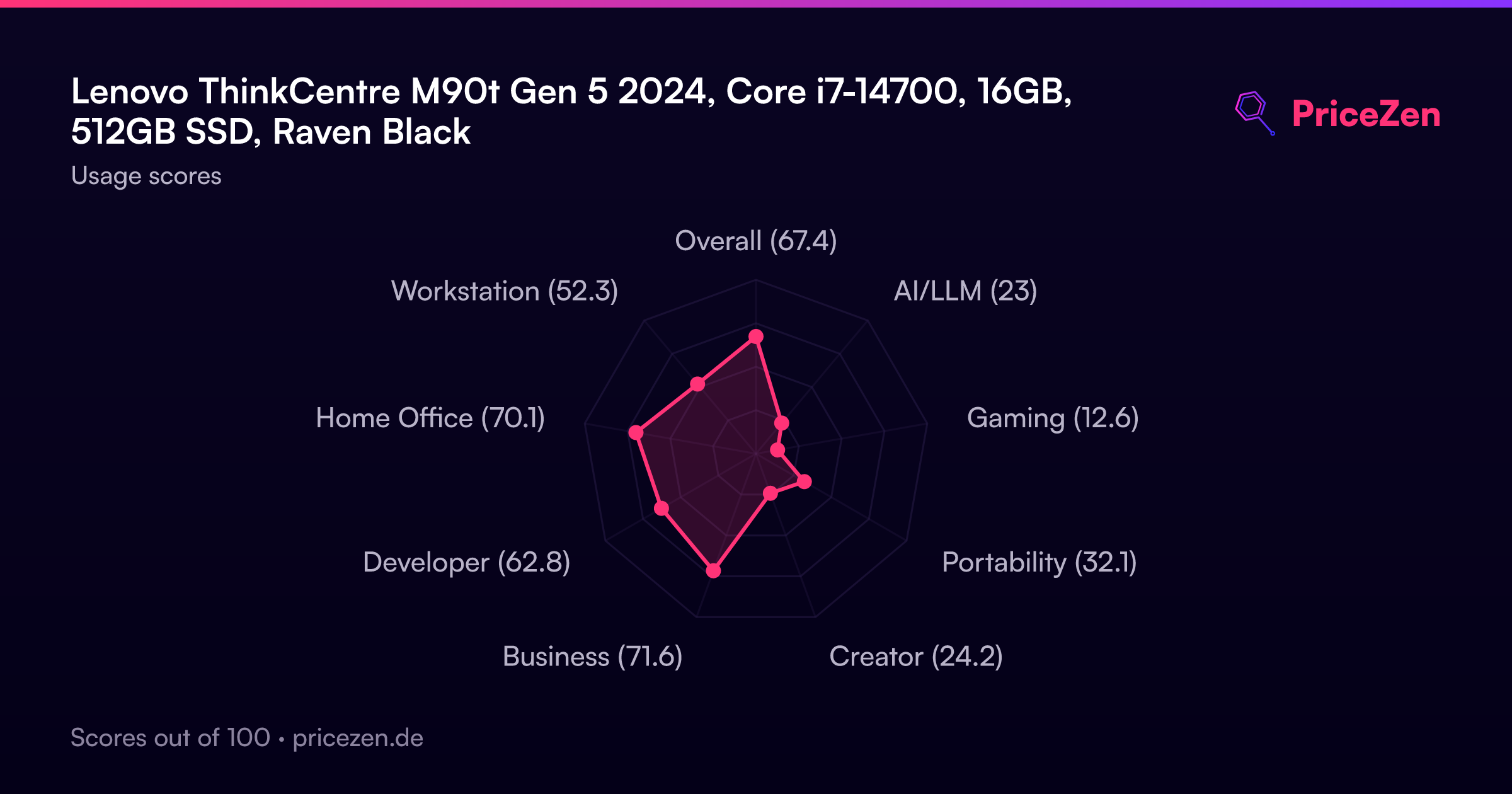
The Lenovo ThinkCentre M90t Gen 5 is a business workhorse that knows exactly what it is, and doesn't apologize for what it isn't. You're getting a 14th Gen Core i7-14700 with 20 cores, 16GB of DDR5, and a 512GB NVMe SSD in a big, upgrade-friendly mid-tower. The one thing to know? This is a serious productivity machine for office work, not a gaming rig. The integrated Intel UHD 770 graphics put gaming performance at a rough 12.7 out of 100, so don't expect to run anything beyond solitaire and spreadsheets.
Common Questions
Q: Can I play games on this?
No. The integrated Intel UHD 770 graphics score a 12.7 out of 100 for gaming in our database. This is an office machine, not a gaming rig. If you want to game, get something with a dedicated GPU.
Q: Can I upgrade the RAM and storage later?
Yes, and that's one of the best reasons to buy this. The mid-tower case has real expansion space, and the 16GB of DDR5 can be bumped up. The 512GB SSD is easy to swap or supplement with a second drive.
Q: Is this good for a home office?
Absolutely. It scores 75.3 out of 100 for home office use in our database. The i7-14700 handles video calls, large documents, and heavy multitasking without flinching. Just make sure you have desk space for the big case.
Who Should Skip This
If you're looking for a gaming PC or anything that needs real graphics horsepower, this isn't it. Go get an HP OMEN or ASUS ROG with a dedicated GPU instead. And if you want something compact for a small desk, the 8.28kg mid-tower footprint will drive you nuts. This is for people who want a big, quiet, upgradeable office workhorse, not a sleek all-in-one or a gaming battlestation.
Verdict
Buy this if you need a reliable, fast Windows desktop for serious office work and you value upgrade space over compactness. The i7-14700 is a genuine performer, and the big case means you can add storage and RAM down the road. Just know that the integrated graphics are a hard ceiling, and that 300W PSU means you won't be dropping in a serious GPU later without a power supply swap. For the right buyer, this is a no-brainer. For anyone hoping to game, look elsewhere.
Usage Scores
- Overall67.4
- AI/LLM22.9
- Gaming12.6
- Portability32.1
- Creator24.2
- Business71.6
- Developer62.7
- Home Office70.1
- Workstation52.3