Lenovo ThinkCentre M90t Gen 5 2024, Core i9 i9-14900, 32GB, 1TB SSD, Black

A fast processor for office multitasking verified Nov 24
76/100 overall score 5.0 average from 1 owner ratings
- CPU
- Intel Core i9 14900
- RAM
- 32 GB
- Storage
- 1 TB
- GPU
- Intel UHD Graphics 770
- Form factor
- mini-tower
- Psu
- 300 W
- OS
- Windows 11 Pro
Compare prices at 1 store
Cheapest first. New, refurbished and bundled offers are kept apart, so you compare like with like.
| Store | Sold by | Colour and condition | Price | vs lowest | Last checked | Link |
|---|---|---|---|---|---|---|
| New1 offerSingle unit | ||||||
| Out of stock when last checked | ||||||
| Amazon | Not known | Not listed | No price | Out of stock | Not known | Go to store |
 Source: PriceZen
A price counts as current when we checked it in the last 7 days. “Marketplace seller” means a third-party seller on that store, not the store itself.











Snapshot
The 30-Second Version
The Lenovo ThinkCentre M90t Gen 5 is a business desktop with a powerful 24-core i9-14900 and 32GB of DDR5, but integrated graphics hold it back for anything beyond office work. It's a great productivity machine at the right price, especially around USD 2,089. Gamers and creative pros should look elsewhere.
Pros & Cons
Pros
- i9-14900 delivers excellent CPU performance for productivity 87th
- 32GB DDR5 RAM handles heavy multitasking easily 86th
- Tons of ports including USB-C, HDMI 2.1, and 8x USB-A 76th
- Wi-Fi 6E and Bluetooth 5.3 built in 70th
- Large mid-tower chassis leaves room for upgrades
Cons
- Integrated UHD 770 graphics are weak for anything beyond basic display output
- 300W PSU limits future GPU upgrade options
- Price varies wildly between retailers, easy to overpay
- Heavy at 8.62kg, not something you'll move around often
- Gaming performance is essentially a non-starter
What owners think
The Word on the Street
- Buyers appreciate the large chassis and the room it provides for future upgrades and expansion.
- Owners report being happy with the overall performance and reliability for everyday productivity tasks.
- Some buyers note the size is bigger than expected, which works for those wanting expansion space but may be a drawback for tight workspaces.
How owner sentiment changed over time
ExclusiveBased on when customers actually wrote their reviews - so you can see whether early praise held up.
1 written review, Feb 2025: 1 happy
Across all 1 store ratings: 5.0★. The chart counts the 1 written review.
Each dot is one written review, in the month it was written. Happy = 4-5★, mixed = 3★, unhappy = 1-2★.
The proof
Performance
The i9-14900 is the star here. It's a 24-core chip with a 2.0GHz base clock, and in our database it lands in the 86th percentile for CPU performance among desktops. That puts it well above average, and for office workloads, data crunching, or heavy multitasking, this thing will chew through tasks without breaking a sweat. The 32GB of 4400 MHz DDR5 RAM sits at the 77th percentile, which is solid. You won't be memory-constrained unless you're doing something genuinely wild like running multiple VMs while editing 4K video.
The integrated Intel UHD 770 is where things get real. It's in the 37th percentile for GPU performance, which is mediocre at best. It'll drive multiple monitors, handle 4K video playback, and run basic productivity apps fine. But any 3D work, gaming, or GPU-accelerated rendering is going to feel sluggish. The 1TB NVMe PCIe 4.0 SSD is about average for this class at the 64th percentile. Fast enough for quick boots and app launches, but not a standout. Port selection is actually a highlight at the 88th percentile, with DisplayPort, HDMI 2.1, USB-C, eight USB-A ports, and Wi-Fi 6E. You won't be hunting for dongles.
Specifications
Full Specifications
Processor
| CPU | Intel Core i9 14900 |
| Cores | 24 |
| Frequency | 2.0 GHz |
| L3 Cache | 36 MB |
Graphics
| GPU | Intel UHD Graphics 770 |
| Type | Integrated |
| VRAM Type | Shared |
Memory & Storage
| RAM | 32 GB |
| RAM Generation | DDR5 |
| Storage | 1 TB |
| Storage Type | NVMe SSD |
Build
| Form Factor | mini-tower |
| PSU | 300 |
| Weight | 6.5 kg / 14.3 lbs |
Connectivity
| USB-C Ports | 1 |
| USB Ports | 8 |
| HDMI | 1x HDMI 2.1 |
| DisplayPort | 2x DisplayPort 1.4a, 1x DisplayPort 1.2 |
| Wi-Fi | Wi-Fi 6E |
| Bluetooth | Bluetooth 5.3 |
| Ethernet | Gigabit Ethernet |
System
| OS | Windows 11 Pro |
vs Competition
Compared to the HP OMEN GT22-3080 or the Dell Aurora Aurora Gaming, the ThinkCentre M90t Gen 5 is a completely different animal. Those machines are built around discrete GPUs and gaming performance, while this Lenovo is all about CPU-heavy office work. If you need to run games or do GPU-accelerated rendering, the OMEN or Aurora will run circles around the M90t. But for pure CPU tasks like compiling code, running spreadsheets, or handling large datasets, the i9-14900 in this Lenovo holds its own against anything in its price bracket.
The Apple Mac Studio M5 Max is another interesting comparison. It's more expensive and runs macOS, but it delivers far better GPU performance and a much smaller footprint. If you're not tied to Windows and need real graphics horsepower, the Mac Studio is worth a look. The ASUS ROG GM700 is yet another gaming-focused option that trades CPU efficiency for GPU muscle. The bottom line: the M90t Gen 5 wins for business productivity and port selection, but loses badly on graphics. Pick your poison based on what you actually do all day.
| Spec | Lenovo ThinkCentre M90t Gen 5 | Apple Mac Studio M5 Max | HP OMEN GT16-0364 | Dell Desktop ECT1250 | ASUS ROG GM700 | MSI Aegis ZS2 A9NVP-1407US |
|---|---|---|---|---|---|---|
| CPU | Intel Core i9 14900 | Apple M5 Max | AMD Ryzen 7 8700F | Intel Core Ultra 7 265 | AMD Ryzen 7 9800X3D | AMD Ryzen 9 9900X |
| RAM (GB) | 32 | 48 | 32 | 32 | 32 | 32 |
| Storage (GB) | 1024 | 1024 | 1024 | 2048 | 2048 | 2048 |
| GPU | Intel UHD Graphics 770 | Apple (40-Core) | NVIDIA GeForce RTX 5070 | Intel UHD Graphics | NVIDIA GeForce RTX 5070 Ti | NVIDIA GeForce RTX 5070 |
| Form Factor | mini-tower | mini | mid-tower | sff | mid-tower | mid-tower |
| Psu W | 300 | 480 | 850 | 180 | 850 | 750 |
| OS | Windows 11 Pro | macOS | Windows 11 Home | Windows 11 Home | Windows 11 Home | Windows 11 Home |
| Compare | Compare | Compare | Compare | Compare |
| Product | CPU | GPU | RAM | Ports | Storage | Reliability | Social Proof |
|---|---|---|---|---|---|---|---|
| Lenovo ThinkCentre M90t Gen 5 | 85.8 | 36.5 | 75.5 | 87.2 | 68.6 | 70.3 | 48.4 |
| Apple Mac Studio M5 Max Compare | 95.7 | 84.9 | 95 | 89.1 | 68.6 | 99.3 | 70.9 |
| HP OMEN GT16-0364 Compare | 69.3 | 90.6 | 87 | 97.9 | 53.2 | 70.3 | 98.1 |
| Dell Desktop ECT1250 Compare | 88 | 60 | 81.6 | 75 | 82.5 | 70.3 | 98.1 |
| ASUS ROG GM700 Compare | 80.3 | 94.6 | 81.6 | 96.1 | 90 | 37.7 | 99.2 |
| MSI Aegis ZS2 A9NVP-1407US Compare | 92.3 | 90.6 | 87 | 90.4 | 82.5 | 37.7 | 99.2 |
Price
Value & Pricing
Value is tricky here because the price spread is enormous. In the US, we're seeing this config listed from USD 2,089 up to USD 3,219 across three listings. That's a USD 1,130 gap for what appears to be the same machine. The best deal we found is at USD 2,089, and honestly, that's where this desktop starts to make sense. At the top end of that range, you're paying workstation money for a machine with integrated graphics and a 300W power supply, which feels rough. In Canada, the spread is even wider at CAD 3,034 to CAD 4,783. If you're buying this, do yourself a favor and check multiple retailers before pulling the trigger. At the low end, it's a solid productivity workhorse. At the high end, you're getting fleeced.
Read more
Overview
The Lenovo ThinkCentre M90t Gen 5 is a mid-tower business desktop that sits in a weird spot. It's got a 14th Gen Intel Core i9-14900, 32GB of DDR5, and a 1TB NVMe SSD, which sounds like a workstation config. But it pairs all that with integrated Intel UHD 770 graphics and a 300W power supply, so it's clearly not aimed at gamers or creative pros who need a discrete GPU. This is a productivity machine for offices and home offices where CPU grunt matters more than pixel pushing.
We see this config listed between USD 2,089 and USD 3,219 across US retailers, and CAD 3,034 to CAD 4,783 in Canada. That's a pretty wide spread, so shopping around actually matters here. The cheapest US listing we found comes in at USD 2,089, which is a lot more palatable than the top end of that range.
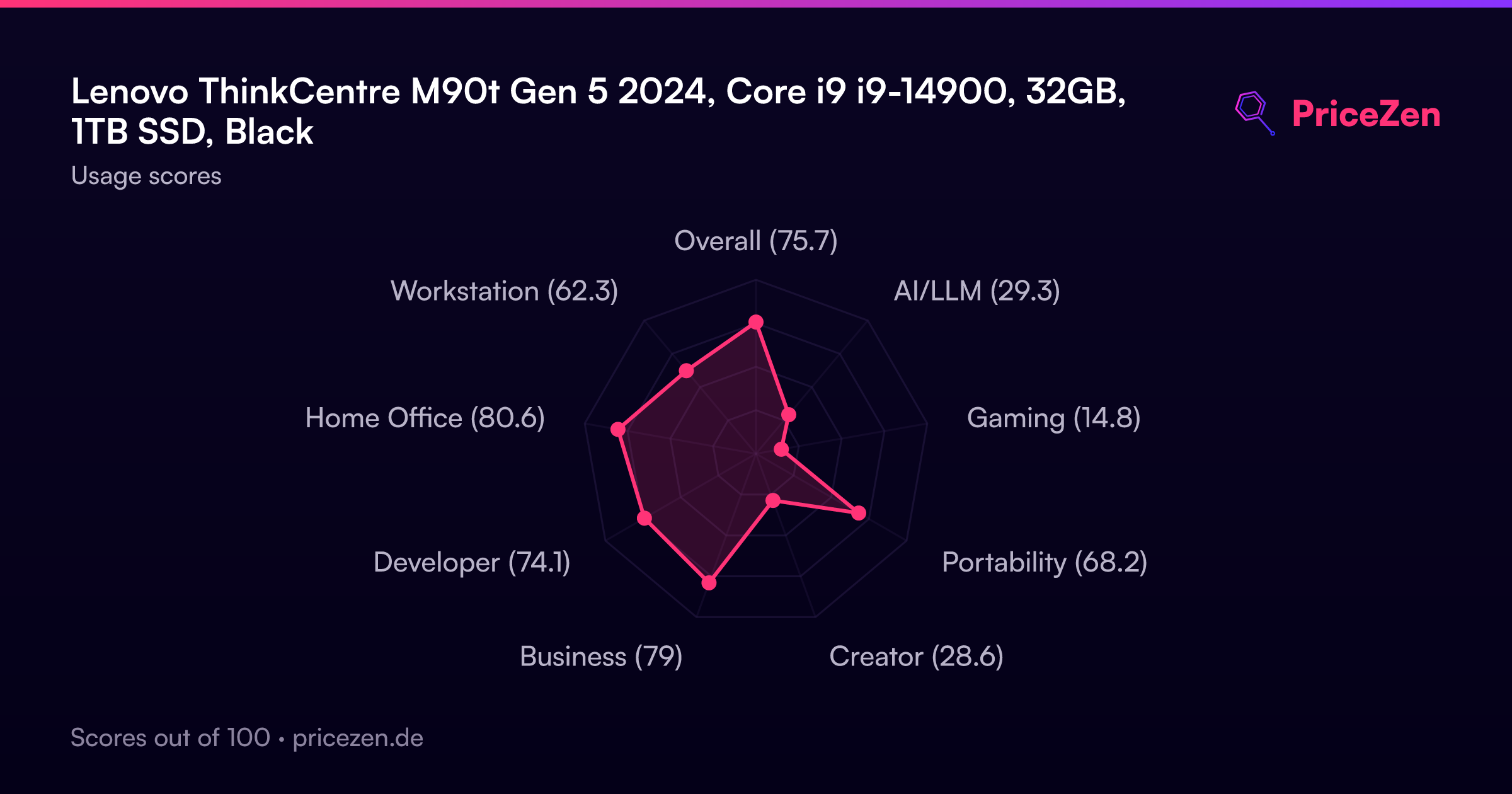
So is the ThinkCentre M90t Gen 5 good for business use? Based on our scoring, yes. It lands at 79.1 out of 100 for business and 83.1 for home office. The weak spot is gaming at 14.8, which should surprise exactly no one given the integrated graphics. If you're wondering whether this can handle spreadsheets, code compilation, or running a bunch of browser tabs while on video calls, the answer is a confident yes. If you're wondering whether it can run Cyberpunk, the answer is a polite but firm no.
Common Questions
Q: Is the Lenovo ThinkCentre M90t Gen 5 good for gaming?
No, the M90t Gen 5 is not good for gaming. It uses integrated Intel UHD 770 graphics, which score in the 37th percentile for GPU performance, so even older games will struggle at higher settings.
Q: How much RAM and storage does the ThinkCentre M90t Gen 5 have?
This configuration comes with 32GB of 4400 MHz DDR5 RAM and a 1TB M.2 NVMe PCIe 4.0 SSD, which is plenty for business and home office use.
Q: Can I upgrade the graphics card in the ThinkCentre M90t Gen 5?
Technically the mid-tower chassis has room for a GPU, but the 300W power supply severely limits your options. You'd likely need to upgrade the PSU first, which adds cost and complexity.
Q: Does the ThinkCentre M90t Gen 5 support Wi-Fi 6E?
Yes, it has built-in Wi-Fi 6E and Bluetooth 5.3, plus Gigabit Ethernet for wired connections. Port selection is a strong point, with HDMI 2.1, DisplayPort, USB-C, and eight USB-A ports.
Who Should Skip This
Skip the ThinkCentre M90t Gen 5 if you're a gamer, video editor, 3D artist, or anyone who needs real GPU performance. The integrated UHD 770 and 300W PSU make this a dead end for graphics upgrades without significant extra investment. If you need graphics muscle, look at the HP OMEN GT22-3080, Dell Aurora Aurora Gaming, or ASUS ROG GM700 instead. Also skip it if you're tight on desk space, since this thing weighs 8.62kg and has a large mid-tower footprint. And if you're on a strict budget, the price spread means you could easily overpay by hundreds if you don't shop around carefully.
Verdict
Should you buy the Lenovo ThinkCentre M90t Gen 5? If you're running a business, working from a home office, or need a reliable Windows 11 Pro machine for CPU-intensive productivity tasks, yes, this is a strong choice. The i9-14900 and 32GB of DDR5 will keep this thing relevant for years, and the port selection is genuinely excellent. Just make sure you're paying closer to USD 2,089 than USD 3,219.
But if you have any interest in gaming, 3D modeling, video editing with GPU acceleration, or anything that needs real graphics performance, skip this. The integrated UHD 770 and 300W PSU are hard limits. You'd be better off with a gaming desktop or a workstation with a discrete GPU. For the right buyer, this is a quiet, capable workhorse. For everyone else, it's a lot of CPU paired with not enough GPU.
Usage Scores
- Overall75.7
- AI/LLM29.3
- Gaming14.8
- Portability68.3
- Creator28.6
- Business79.1
- Developer74.2
- Home Office80.7
- Workstation62.3